How to Stop Fake Signups and Form Spam from Bots
Learn how bots fake signups, how to block them before they hit your forms, and how NoirTrack's Form Shield helps reduce spam.

NoirTrack team·Follow

Fake signups and form spam usually come from scripted bots, proxies, and simple automation hitting public forms at scale. The practical fix is layered defenses: block obvious bot traffic, protect the form itself, and review what gets caught so you do not stop real people. This does not replace moderation for manual abuse or fraud from real humans.
Fake signups waste time, pollute your CRM, and make conversion rates look healthier than they are. A layered setup works better because each layer catches a different part of the attack: traffic that looks wrong, requests that hit the form endpoint, and blocked submissions you need to review later.
NoirTrack's firewall and Form Shield are built for that job, so you can reduce spam without guessing what changed. After reading this post, you will know how to stop fake signups and form spam from bots, keep real people moving, and check what your filters blocked.
What causes fake signups and form spam?
Fake signups and form spam usually come from bots that can post straight to your form without behaving like a normal visitor. They do not need to read your page, click around, or wait between actions, so they can send a form request in seconds and move on to the next target. That is why the first signs often show up in your signup list, while the traffic pattern behind them stays hidden unless you check it.
The pattern is usually easy to spot once you look past the inbox. Bursts of submissions often share the same IP, the same subnet, or the same referrer pattern. Names repeat. Email addresses often come from disposable domains. Some submissions never reach a second page or a next step because the sender never had a real session to begin with. If you only review the CRM row, you see the fake lead. If you review the traffic, you see the source.
A plain example helps. If 40 signups arrive in 8 minutes from 3 IPs, all using temporary email domains and the same landing page, the traffic fits a script testing your form at scale.
Common bot patterns to spot
Fast repeated submits from the same IP or subnet usually mean one script or one botnet node is testing the form at scale. Disposable email domains are another clear sign, because the sender has no reason to keep access to that address after the form goes through. Submissions that never move past the first page often point to automation that posts directly to the endpoint instead of using the site like a person would.
Why basic form defenses fail
Simple hidden fields only work until a bot learns to skip them, and many bots already do. Captcha raises the cost for the attacker, but it can still block real people who use a password manager, a VPN, or an accessibility tool, and it does not stop every automated flow. Rate limits help when traffic comes from a small set of addresses, but they break down when the attacker spreads requests across proxies.
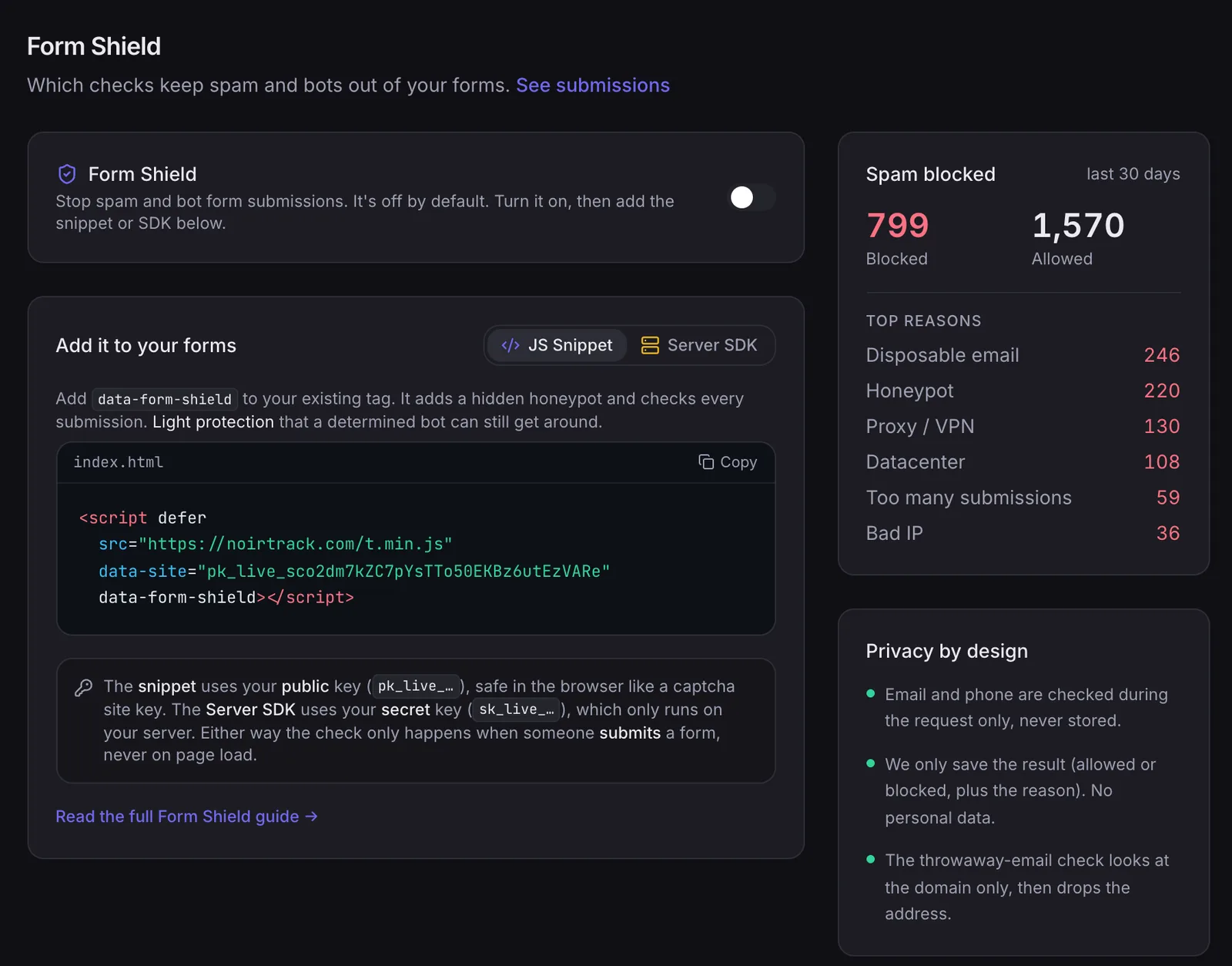
If you want to stop fake signups and form spam from bots without guessing, start with controls that inspect the submission itself and the request behind it. Form Shield checks a honeypot, disposable email patterns, and submission rate, and you can turn it on under Form Shield settings.
How to stop bot signups before they reach your numbers
Stop fake signups and form spam from bots by checking traffic more than once: at the edge, in the browser, and at the form itself. NoirTrack's firewall blocks bots, datacenter proxies, VPNs, scrapers, and form spam before they touch your numbers, while Form Shield checks the signup form for spam patterns and abusive submission patterns. The goal is to make automated abuse expensive enough that most of it never lands in your reports or your database. Use the firewall to catch bad visitors early, then add Form Shield where the form is submitted so you have a second gate on the actual request. See how the firewall works and how Form Shield protects forms for the setup details.
Choose the right protection level
Start in Monitor mode if you want to see what would be blocked before you turn anyone away. That gives you a clean way to check false positives, because NoirTrack logs the decision without stopping the request. Switch to Block mode only after the log shows the rule set is catching junk and leaving real visitors alone, then keep tuning the rules as new traffic patterns show up.
-
Begin in monitor mode
Turn protection on, but leave enforcement off while you watch the log. -
Review the caught traffic
Check whether the blocked requests are bots, proxies, VPNs, or real people on unusual networks. -
Move to block mode
Enforce the rules after the false-positive rate looks low enough for your site.
A simple example is enough to test the flow: if 200 suspicious signups arrive in a week and 184 would have been blocked, you can inspect the 16 edge cases before you enforce anything.
Protect the form itself
Add Form Shield on the page where the signup request is created, not somewhere downstream. That keeps the check close to submission, so bots cannot skip around it by posting directly to a later endpoint. In practice, you add the snippet or SDK on the form handler, turn on the checks you want, and watch the spam blocked total after launch.
-
Place Form Shield on the form path
Put the check where the request first enters your app. -
Turn on the checks you want
Use the honeypot, disposable-email check, and rate limit that fit your form. -
Watch the blocked totals
Review the count after launch so you can see whether abuse is dropping.
If you use the browser snippet, the form setup looks like this:
<script defer src="https://noirtrack.com/t.min.js" data-site="YOUR_SITE_KEY" data-form-shield></script>
Which anti-spam method should you use?
Pick the method that matches the kind of abuse you see. Firewall rules fit bot traffic before signup, Captcha slows down noisy abuse, honeypots catch simple scripts, and email verification catches fake inboxes after the submit. If you want to stop fake signups and form spam from bots without changing your whole app, start with Form Shield on the form and add firewall blocking when the traffic itself is the problem. A practical rollout looks like this: turn on Form Shield, watch which submissions it flags for a week, then add a stronger block for sources that keep hitting the form. One site might see 200 signup attempts, 30 flagged as disposable emails, and 12 more blocked by the rate limit. That gives you a clear order for what to fix first.
Comparison of common defenses
| Method | Best for | Weak spot |
|---|---|---|
| Firewall | Bot traffic before signup | Needs review and tuning |
| Captcha | Very noisy abuse | Hurts user experience and can be bypassed |
| Honeypot field | Simple bots | Easy to learn and skip |
| Email verification | Fake inboxes | Does not stop the submit itself |
Firewall rules stop requests before your app spends time on them, which matters when the same source keeps hammering a signup endpoint. Captcha works when abuse is loud and repetitive, but it adds friction for real people. A honeypot is cheap to add, yet modern bots often skip hidden fields. Email verification still helps when a lead form needs a real inbox, but it does not protect the form submit itself.
How do you review and tune blocked signups?
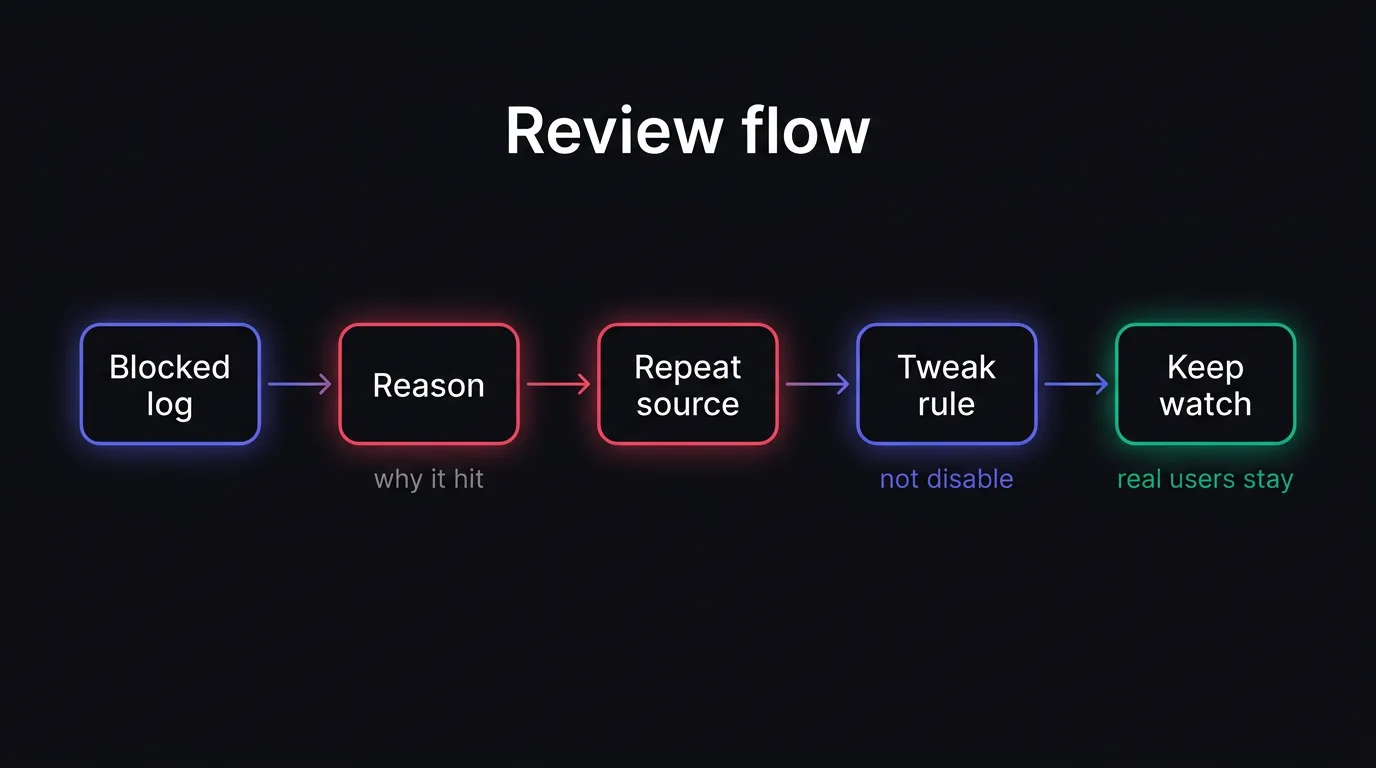
After you turn on protection, review the block log before you trust the setting on live traffic. The log shows totals, reasons, and each caught request, so you can spot a bad rule, a noisy source, or a real lead that needs an exception. That is the fastest way to stop fake signups and form spam from bots without shutting off the filter for everyone else. See the full review flow in /docs/reviewing-blocks.
What to check in the block log
-
Blocked request count by reason
Check whether most blocks come from bot, proxy, VPN, scraper, or spam rules. A single reason that dominates usually points to one rule doing most of the work. -
Repeat offenders from the same source
Look for the same IP, subnet, or form path showing up again and again. If 18 of 20 blocked submissions come from one source, that source is probably junk and you should tune around it instead of changing the whole setup. -
Any real visitor you need to let through
Review the one-offs that look legitimate, such as a customer on a corporate VPN or a partner testing the form. Open the record, read the reason, and decide whether the source needs an exception.
How to avoid blocking real people
-
Review the path and source of the blocked request
A blocked signup from a waitlist page does not need the same treatment as one from a contact form. The path tells you which form needs attention, and the source tells you whether the traffic pattern is broad or local. -
Relax the strictest rule only if legitimate traffic is affected
Keep the stricter setting in place when the log shows obvious junk. If a real customer is getting caught, adjust the narrowest rule that caused it instead of opening the door wider than you need. -
Check the spam total after each change
After every adjustment, watch the blocked count on the next batch of submissions. If spam drops and real leads keep coming through, the change worked. If blocked spam falls to zero but you start seeing bad signups again, tighten the rule back up.
Form Shield logs the checks it runs on each submission, which gives you a clean place to review blocked entries and tune the checks that matter for signups and waitlists. If you want the setup details, the Form Shield docs show the toggle and review screen under /docs/form-shield.
What is the fastest way to put this in place?
The fastest way to stop fake signups and form spam from bots is to protect the form first, then watch the firewall in monitor mode before you block anything. Turn on Form Shield for the signup endpoint, then add the firewall where traffic enters the site so you catch bad requests before they reach the form handler.
If you want the lowest-risk rollout, start with monitor mode. New sites begin there, so NoirTrack logs what it would block without turning anyone away. Review a few false positives, then switch to block mode when the pattern is clear.
A simple rollout order
- Turn on Form Shield for the signup endpoint.
- Set the firewall to monitor only.
- Check the log for disposable emails, proxy traffic, and repeat submissions.
- Switch to block mode when the log looks clean.
- Revisit the rules after each spike.
Questions, answered.
Fake signup spam from bots is automated or semi automated form submission that creates false leads, pollutes your CRM, and distorts signup metrics. These entries waste sales time because they look like real prospects until someone checks them. They also make conversion rates and channel reports less reliable, which can send you toward the wrong marketing decisions.
The first pass is usually light: enable a form shield, start the firewall in monitor mode, then review logs and tighten rules. Most sites can begin with a small set of controls and adjust after they see which requests are real and which are junk. The main work comes from checking a few days of traffic and tuning the rules.
A firewall blocks suspicious traffic before it reaches your forms, while captcha asks the user to prove they are human and can still frustrate real visitors. A firewall acts on request patterns, IP reputation, and other signals without asking the user to solve a puzzle. Captcha adds friction at the form itself, which can reduce submissions from people who are legitimate.
The biggest mistake is turning on aggressive blocking without checking logs, which can stop real users and hide why the rule was too strict. Monitoring first shows which requests share the same patterns and which ones come from normal visitors. Once you know that, you can tighten the rule with less risk to genuine signups.
Yes. Some abuse is manual or human assisted, so technical filters help but do not replace moderation, email verification, or downstream review. A real person can still submit junk, test stolen emails, or fill forms by hand in a way that looks legitimate at first. That is why form protection works best with verification and review after submission.
Try NoirTrack
See which traffic actually pays.
Analytics with revenue attribution and a built-in bot firewall. One script tag, live in two minutes.
Free 14-day trial, no credit card
Written by NoirTrack team
The privacy-first Google Analytics alternative with a built-in bot firewall and revenue attribution. See which traffic makes you money, no cookie banner.


