How to Prevent Form Spam and Fake Signups on Your Website
Learn how to cut form spam and fake signups with layered defenses, better form design, and NoirTrack Form Shield before bad signups skew your data.

NoirTrack team·Follow

The best way to stop form spam and fake signups is to stack defenses: hide the easiest bot targets, verify the request, and block repeat offenders before they hit your database. Form spam and fake signups are automated or low-quality submissions that fill your forms with junk data or fake identities. A simple three-layer setup catches most abuse without adding much friction for real users. If your form is public and high-traffic, or you rely on third-party embeds, you still need ongoing tuning and review.
Form spam is not just annoying. It wastes time, inflates signup counts, and can make acquisition channels look better than they are. Fake signups also break follow-up email metrics, pollute your CRM, and make it harder to know which leads are real. The fix is not one magic field or one captcha. It is a layered system that blocks obvious bots, slows automated abuse, and lets you inspect what is still getting through.
After reading this, you will know how to set up a form defense plan that cuts junk submissions and keeps your signup data useful.
Why are bots and fake signups getting through?
Bots and fake signups get through because your forms are public, easy to script against, and often accept a submission before anything else checks it. A bot can post directly to the endpoint, skip the browser, or replay the same request across dozens of pages in minutes. That is why you need to prevent form spam and fake signups before they start polluting your lead list or trial flow.
What kinds of abuse hit forms most often?
Spam bots usually test forms with random text, links, or payloads to find anything that accepts input. Signup bots go after account creation, where they can create throwaway profiles, check whether an email address gets through, or pull down gated content at scale. Human spam happens too. A contractor, competitor, or click-farm worker can fill out a form in a way that looks normal unless you compare source patterns across many submissions.
The same form can see all three. A contact form might get link spam in the message field, while a free-trial form gets hundreds of throwaway emails from the same request pattern, and a lead form gets people who never reply after the first touch. The abuse type changes, but the pattern is the clue.
How do you tell spam from real interest?
Look for repeated source, country, device, and timing patterns across many new signups. If 20 form fills land within a few minutes from the same region, use the same browser mix, and never return, that points to automation, not a burst of buyer interest. Compare the submission with later behavior too. Real leads usually open the email, click something, or come back to use the product.
A simple example makes this clearer. If a waitlist gets 50 signups and 32 never confirm their email, never open the follow-up, and never visit again, the issue is wider than one bad field. The form is catching traffic that looks real at the edge but does nothing after the submit.
You can use the same checks in the firewall log to spot whether the source is a few noisy submissions or a broader pattern across your site. That lets you separate one-off junk from a form that is attracting automated abuse.
What is the best way to stop form spam without hurting conversions?
To prevent form spam and fake signups without adding friction to real users, start with checks that normal visitors never notice, then add stricter controls only when a request looks risky. That means you use cheap signals first, keep the form short, and let server-side rules catch what slips through. A hidden field, a timing check, and a rate limit can block most low-effort bots before you ask a person to prove anything. Form Shield runs that kind of check on each submission and can be added to browser forms or verified in your backend with server-side checks.
Which defenses should you combine first?
- Start with a honeypot or timing check. A hidden field catches bots that submit every input they see. A timing check catches scripts that post in under a second.
- Add rate limits next. If one IP or source can send 200 submits in 5 minutes, it can fill your inbox fast even when each submit looks valid.
- Verify identity only when the flow needs it. Use email or phone confirmation for account creation, bookings, or lead handoff. Skip it for low-stakes newsletter signup.
A simple setup might reject a source after 10 submissions in 1 minute, while still letting a real user submit one form and wait for a confirmation email. That keeps the normal path short and pushes work onto the abuse pattern you actually see.
How do common defenses compare?
| Defense | Friction for real users | Setup effort | Stops automation well? |
|---|---|---|---|
| Honeypot field | None | Low | Good for simple bots |
| Timing check | None | Low | Good for fast scripts |
| Rate limit | Low | Medium | Good for floods and repeats |
| Email or phone verification | Medium | Medium to high | Good when identity matters |
| Server-side blocking | None on the form, higher for attackers | Medium | Strong, because the request is stopped before your app acts on it |
The table shows why a single check is rarely enough. A honeypot cuts basic spam, but it will not stop a bot that skips hidden fields. A challenge may pass automation that copies browser behavior. Server-side enforcement closes that gap because it blocks bad requests before they reach your app, and you can review each decision later in the firewall log.
How does NoirTrack Form Shield help stop bot signups?
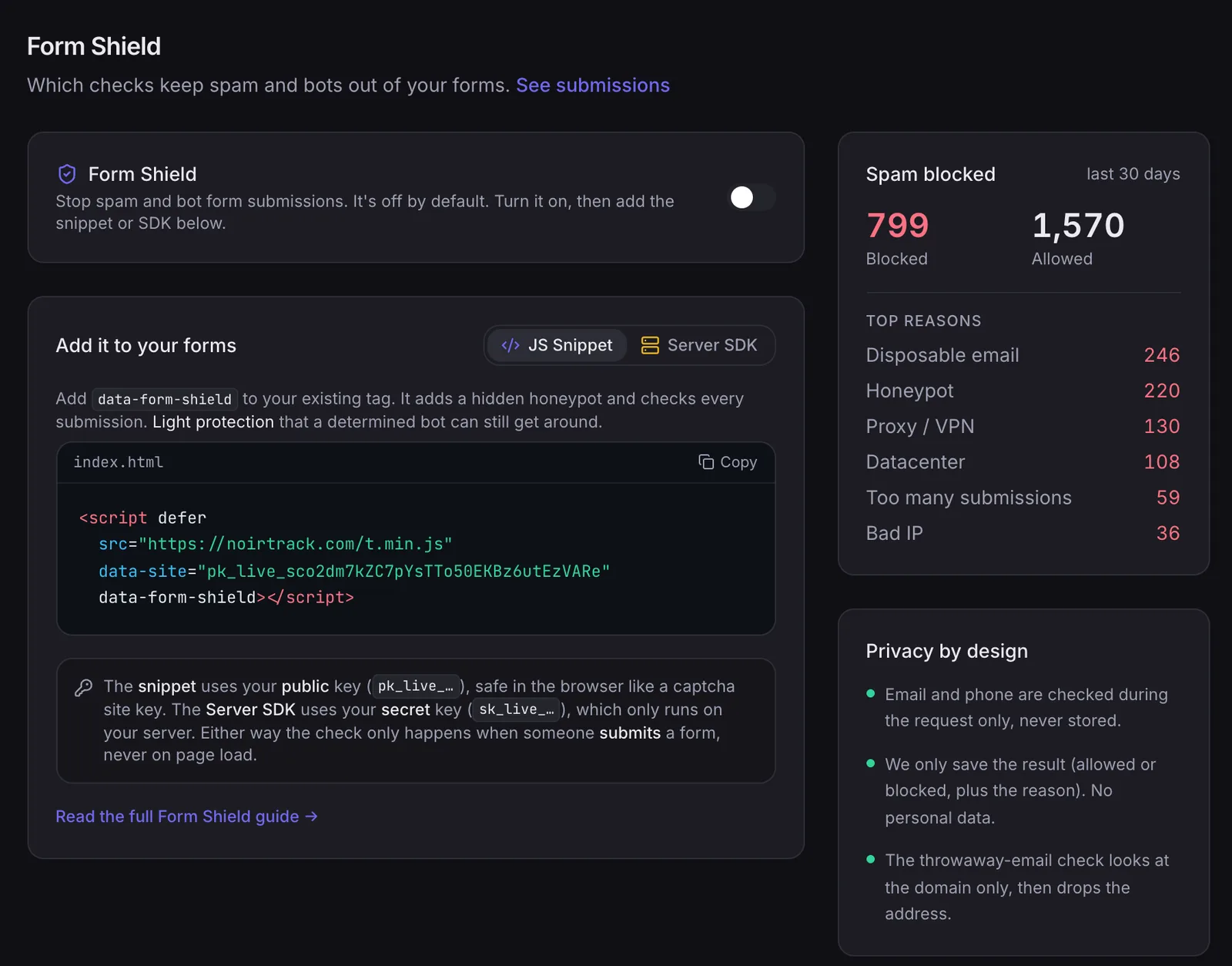
NoirTrack Form Shield keeps spam and bot signups out of your forms, contact pages, and waitlists before fake entries reach your sales and product data. It checks each submission for a hidden honeypot field, disposable email addresses, and request rate, then allows or flags the result. The settings page shows the protection switch, the code snippet, and the blocked totals in one place, so you can turn it on, install it, and watch whether the junk drops. If you want a plain setup that helps prevent form spam and fake signups, this is the place to start.
What do you turn on first?
- Enable protection in settings. Open Site → Settings → Form Shield and switch protection on. Form Shield ships off by default, so nothing changes until you do this.
- Pick the checks you want. Turn on the honeypot, disposable-email check, and rate limit. Those three checks catch common abuse without making real people solve puzzles.
- Add the snippet or the SDK path. For a normal browser form, add the snippet to the page where the form lives. For a server flow, verify the submission in your backend before you act on it.
- Watch the blocked totals. Use the blocked count in the settings page to confirm it is catching junk. If you submit 200 demo entries and 27 get blocked, you know the filter is doing work.
A simple browser install looks like this:
<script defer src="https://noirtrack.com/t.min.js" data-site="YOUR_SITE_KEY" data-form-shield></script>
That single attribute is enough for standard HTML forms. You do not need backend code for that path.
When should you use server blocking too?
Use server blocking when the submission should stop before your app spends time on it. That matters for forms that create accounts, write to a CRM, send email, or hit any endpoint with a cost.
Server-side checks also help when the form posts to an API or when you want the decision made in the backend. NoirTrack's server-side blocking path rejects bad requests before your app runs, while still recording the request for analysis.
A useful split is simple: use Form Shield on the form itself, then add server blocking for the endpoint behind it when fake submissions would trigger automation or burn quota. If a signup creates a trial account and starts a welcome sequence, block it at the server so the junk never reaches those steps.
How do you review false positives and tune the rules?
Reviewing false positives means checking what the firewall blocked, why it blocked it, and whether the same pattern still looks like abuse. That is how you keep the rules tight enough to stop junk while leaving real signups alone. If you are trying to prevent form spam and fake signups, this review step matters as much as the block itself.
Open the log in Site → Firewall and read it as evidence, not as a scorecard. The log shows totals, reasons, and each blocked request, so you can see whether most of the traffic came from one IP, one path, or one kind of request. The reviewing and tuning log is the right place to confirm that the firewall caught the pattern you expected.
-
Check the totals first
Look for a spike in blocks after you change a rule. If 180 of 200 blocked requests hit the same signup path, you are probably looking at one campaign or one bot, not random noise. -
Read the reason on a few rows
Make sure the reason matches the traffic. A disposable email hit on a signup form is different from a burst of requests that trip the rate limit. -
Spot the source pattern
If one source keeps coming back, note the IP, ASN, or path. That tells you whether the issue belongs in Form Shield, the firewall, or server-side blocking. -
Change one rule at a time
If real users are getting blocked, relax the most aggressive check first. If the same abuse returns after you loosen it, move the block closer to the source with server-side blocking.
A simple example helps. If the log shows 12 blocked submissions from /waitlist in 3 minutes, all with disposable email addresses, keep the email check on and raise the rate limit only if a real campaign sent that burst.
What should you check in the firewall log?
Check totals, reasons, and individual requests. Those three views tell you whether the block was broad, which rule fired, and whether a single source is behind most of it. A quick scan often shows whether you have one noisy bot or a wider rule that needs attention.
How do you decide what to loosen or tighten?
If real users are blocked, loosen the most aggressive rule first and watch the next set of requests. If the same abuse keeps returning, tighten the rule that caught it least early, then test again. Use the log before each change, because a rule that looked too strict yesterday may fit a new burst today.
What is the fastest way to protect your forms this week?
Pick the form that gets the most abuse, usually your main signup, lead, or checkout form. Turn on Form Shield for that form, then test one real submission path and check the blocked totals in the log. If the same pattern keeps showing up, move the check closer to the server with server-side blocking so your app rejects bad requests earlier.
What should you do in order?
- Enable protection. Turn on Form Shield for the form with the most spam.
- Verify the install. Confirm the snippet or SDK runs where the form is rendered.
- Submit one test. Watch for a clean pass from a real browser and a log entry for blocked junk.
- Tighten from examples. Review repeated requests and adjust only after you have real samples.
Questions, answered.
Form spam is automated or low quality submissions sent to your forms, while fake signups are accounts or leads created without real intent to use your product. Spam usually fills inboxes, distorts conversion numbers, and wastes review time. Fake signups can also pollute your database, trigger onboarding emails, and make it harder to see which traffic brings real users.
You can start with one protected form and a copied snippet, then add server side blocking or rule tuning only if abuse continues. That first step covers the form you care about most and gives you a fast check on whether the problem drops. If attackers shift tactics, you can tighten the rules instead of rebuilding the whole setup.
Captcha adds friction for the user, while server side blocking stops requests before they reach your app, and server side blocking is better when you want less visible interruption. Captcha asks real visitors to prove they are human, which can slow signups and hurt completion on mobile or with accessibility tools. Server side blocking removes bad requests earlier, so your app sees less junk traffic.
The usual mistake is turning on one heavy defense and never reviewing false positives, which can block real signups or leave other endpoints exposed. A single rule can catch obvious spam and still miss abuse on another form, webhook, or signup path. Review the blocked traffic, check which requests look real, and adjust the rules when the pattern changes.
NoirTrack Form Shield blocks spam and bot signups, and the firewall log shows what was blocked so you can tune the rules with evidence. That lets you see which requests got stopped and decide whether a rule is too broad or too narrow. You can protect the form, review the log, and adjust based on actual blocked traffic instead of guesswork.
Try NoirTrack
See which traffic actually pays.
Analytics with revenue attribution and a built-in bot firewall. One script tag, live in two minutes.
Free 14-day trial, no credit card
Written by NoirTrack team
The privacy-first Google Analytics alternative with a built-in bot firewall and revenue attribution. See which traffic makes you money, no cookie banner.


