NoirTrack vs DataFast (2026): revenue attribution compared
Compare NoirTrack and DataFast on revenue attribution, bot blocking, tracking modes, pricing, and migration so you can pick the right analytics stack.

NoirTrack team·Follow

NoirTrack vs DataFast revenue attribution compares two tools that connect traffic to sales and show which visits led to paid customers. NoirTrack is the better pick if you want revenue attribution plus built-in bot blocking, firewall controls, and privacy modes in one product. DataFast is a stronger fit if you want revenue-focused analytics with lighter ops and features like mobile, CLI, and MCP access. The trade-off is simple: NoirTrack adds protection and tracking controls, while DataFast leans more toward product analytics workflows.
If you are choosing between NoirTrack and DataFast, the real question is whether you want revenue attribution alone or revenue attribution plus bot protection and privacy controls. Both tools help you connect traffic to sales, but they differ in what surrounds that core job: NoirTrack adds a firewall, cookieless mode, and payment-provider attribution across several plans, while DataFast leans into product analytics, journeys, and developer access. This post compares the two on revenue tracking, setup effort, pricing, and the situations where each one is the better fit, so you can choose the tool that matches your stack and read the trade-offs without guesswork.
Which one should you pick for revenue attribution?
Pick NoirTrack when you want revenue attribution plus bot blocking and privacy controls in the same stack. Pick DataFast when you want revenue attribution inside a broader product analytics tool. NoirTrack includes a firewall that blocks bots, scrapers, datacenter proxies, VPNs, and AI scrapers, while DataFast does not list a bot-blocking firewall. That choice is about more than sales tracking. It is about whether you also need clean traffic, form protection, and a cookieless option.
The short answer
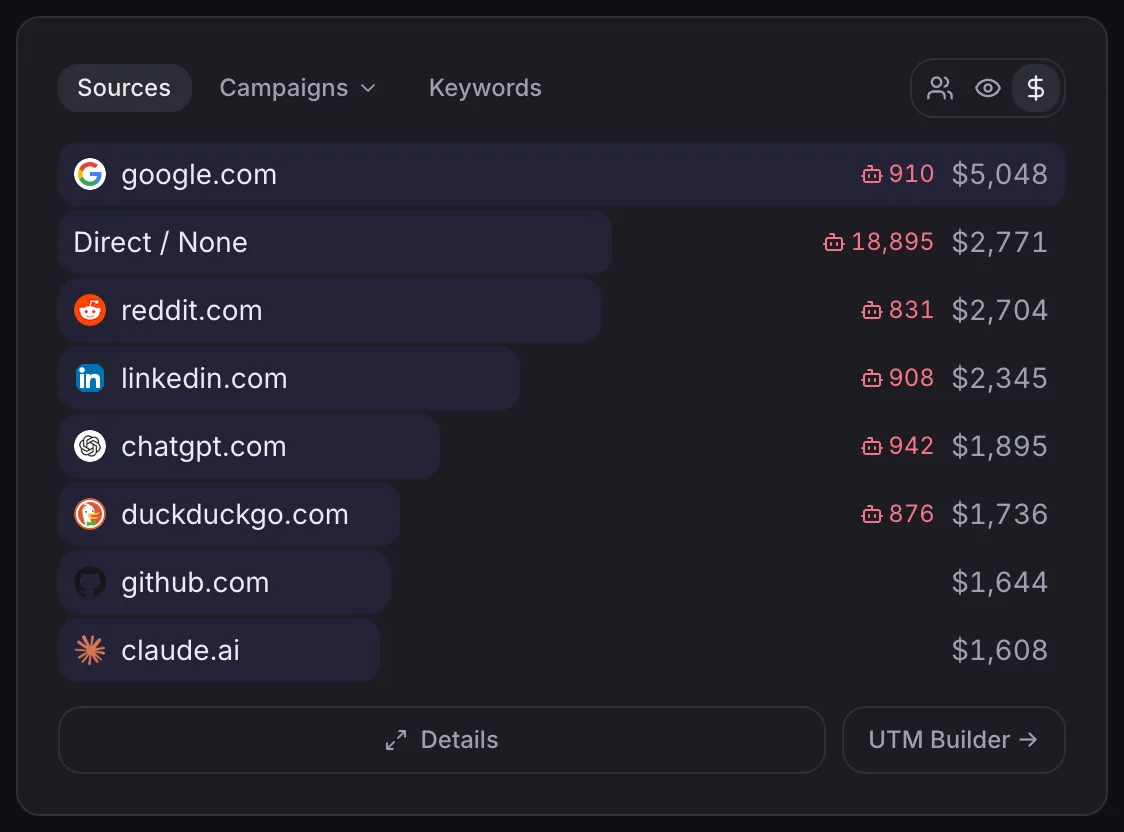
NoirTrack vs DataFast revenue attribution comes down to traffic quality versus product analysis. NoirTrack is the better fit when you care about which traffic pays and want bad traffic blocked before it reaches the numbers. It also links sales back to the visit, source, and campaign, and it does that on every plan through direct payment provider connections like Stripe, Paddle, Polar, Lemon Squeezy, Dodo Payments, and Creem. See the revenue flow in /docs/revenue-attribution and the blocking rules in /docs/firewall.
DataFast is the better fit when your team wants revenue-aware analytics with goals, funnels, journeys, and developer access like API, CLI, and MCP. It also lists real-time visitors and a purchase likelihood prediction, which helps product teams read intent. If your main pain is noisy traffic or spam, NoirTrack is the safer fit. If your main pain is product analysis, DataFast may be the lighter choice.
A simple example shows the split. A solo SaaS founder selling through Stripe can connect the processor once, then rank channels by revenue while blocking proxy and scraper traffic before it skews reports. A product team running a subscription app can use DataFast to study funnels, journeys, and developer workflows without needing the firewall layer.
Who each tool fits best
- Choose NoirTrack if you are a founder, indie maker, marketer, or developer who wants traffic quality, payment attribution, and privacy modes in one dashboard.
- Choose DataFast if you want real-time visitors, cross-domain tracking, mobile or builder workflows, and revenue-aware product analytics.
- Choose NoirTrack if you already know you need Stripe, Paddle, Polar, Lemon Squeezy, Dodo Payments, or Creem attribution and want that path made explicit on every plan.
- Choose DataFast if your workflow depends on API, CLI, MCP, or a mobile app for checking analytics on the move.
NoirTrack vs DataFast revenue attribution compared
Checked on 2026-10-06, both tools start at $9/month, but they are built for different stacks. NoirTrack ties sales back to the visit, source, and campaign across Stripe, Paddle, Polar, Lemon Squeezy, Dodo Payments, and Creem, and it includes bot blocking and cookieless tracking on every plan. DataFast focuses on paying customers and lists Stripe, LemonSqueezy, Polar, and Shopify, plus Shopify and mobile access in its product pages. If you need revenue data without extra setup around bad traffic, NoirTrack vs DataFast revenue attribution tilts toward NoirTrack. If you want product analytics with mobile and Shopify workflows, DataFast fits better. See how NoirTrack matches sales back to visits and how the firewall blocks bad traffic.
Feature and pricing table
| Item | NoirTrack | DataFast |
|---|---|---|
| Monthly starter price | $9 | $9 |
| Free trial | 14-day trial on Pro, no free plan | 14-day free trial, no card required |
| Revenue attribution | On every plan | Listed for paying customers |
| Bot blocking | Firewall blocks bots, scrapers, VPNs, datacenter proxies, and AI scrapers | Not listed |
| Privacy mode | Cookie mode and cookieless mode | Default and cookieless tracking options |
| Import or migration path | Import from DataFast history via API key | Not listed |
| Other listed items | Firewall and revenue attribution on every plan, Form Shield on Pro and Business | Shopify, mobile app, API, CLI, MCP, and X links attribution |
A simple checkout tag like visitor_id=abc123 is enough for NoirTrack to match a sale back to the visit when you pass the noir_vid value through your payment flow. DataFast does not list that import path or bot-blocking firewall on its pricing page, so the setup burden stays on your side.
Where NoirTrack is stronger for paying traffic
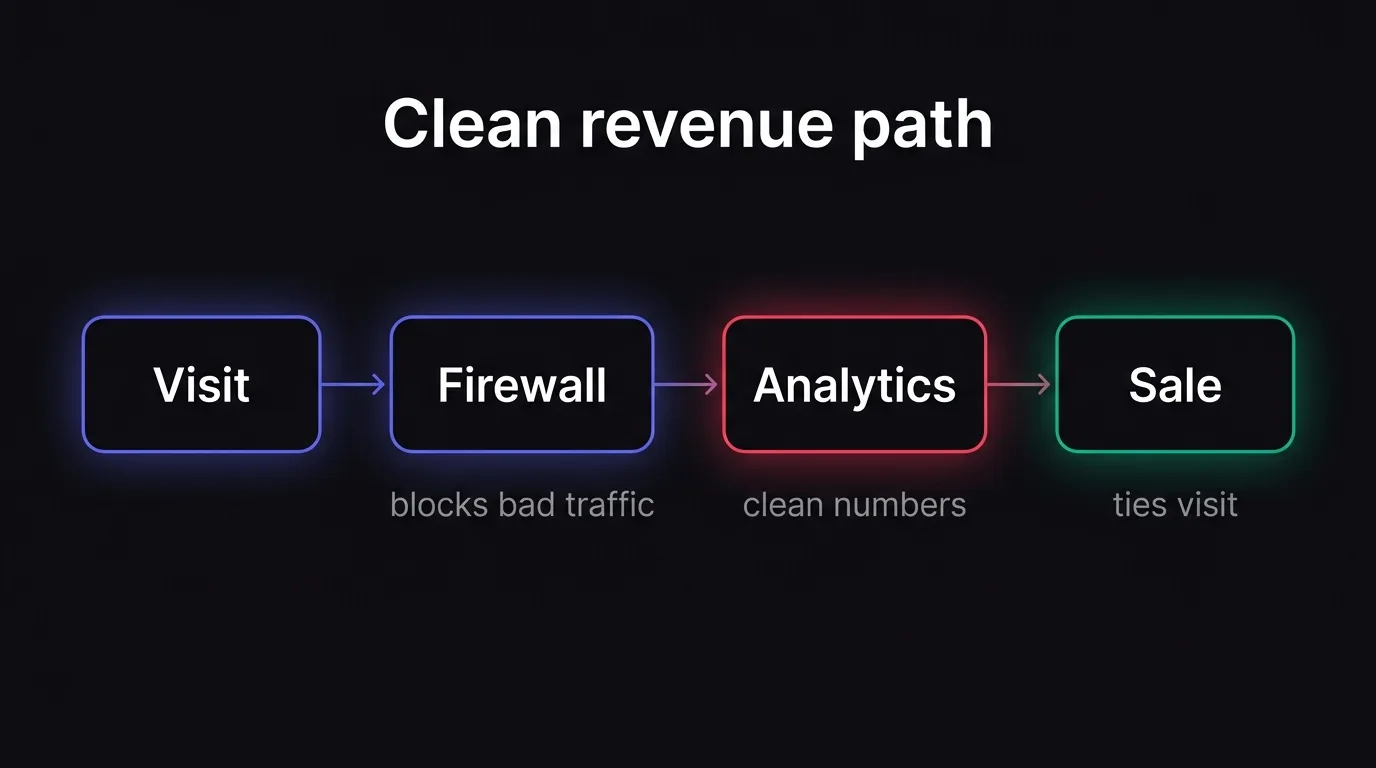
NoirTrack fits better when you want revenue numbers you can trust before you open the dashboard. Its firewall blocks bad traffic, its analytics modes give you a cookie or cookieless setup, and its revenue attribution links each sale back to the visit, source, and campaign that brought it in. The result is a revenue view that is less exposed to bots and easier to compare across channels. See how revenue tracking works, how the firewall works, and GDPR and cookieless tracking.
Revenue attribution across payment providers
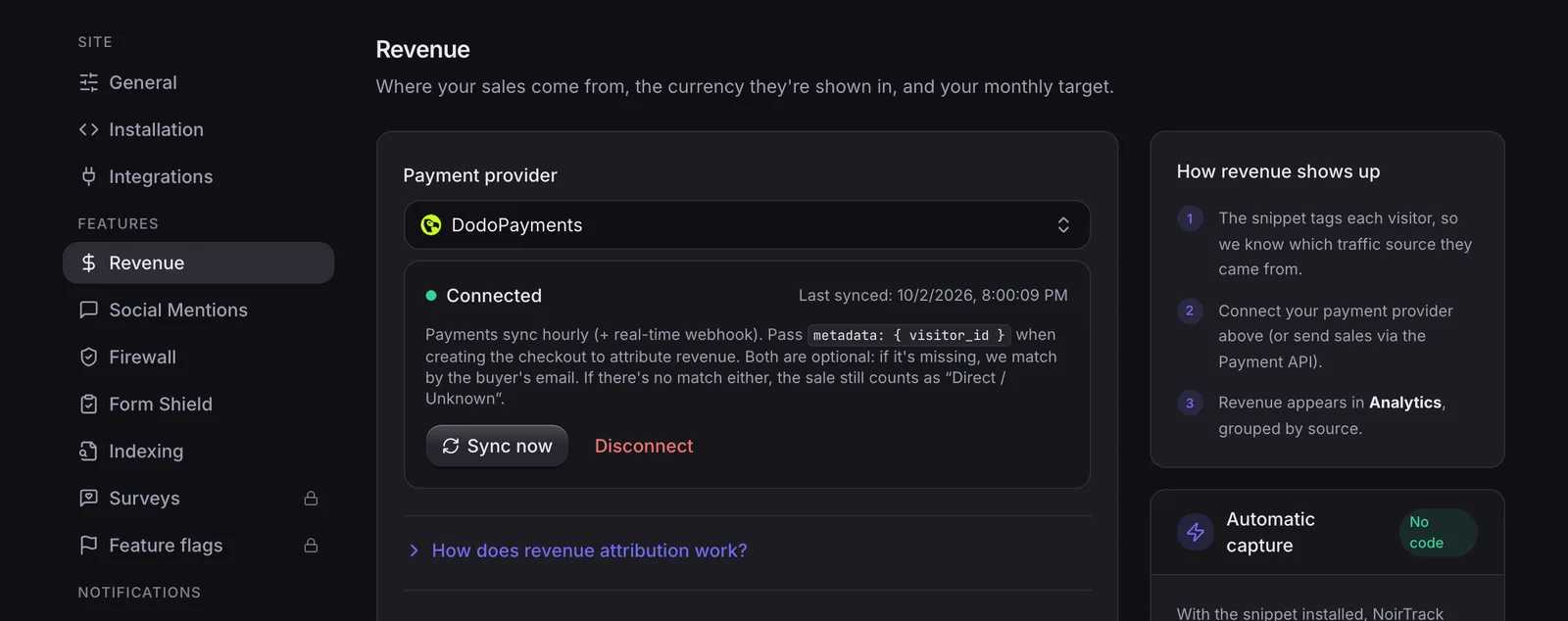
NoirTrack attributes sales from Stripe, Paddle, Polar, Lemon Squeezy, Dodo Payments, and Creem on every plan. It connects one provider per site, then matches each sale back to the visitor who made it, so the dashboard can rank sources by revenue instead of only by visits. That matters if you run paid search, affiliates, and partner promos at the same time and need one place to see which channel pays.
A simple example: if a Stripe sale comes in after a visitor clicked your "spring-campaign" ad, NoirTrack can put that sale on the source and campaign that brought the visitor, not just on the last pageview. That gives you a clearer read on which links and ads deserve more spend.
Bot blocking and privacy controls
NoirTrack's firewall blocks bots, scrapers, datacenter proxies, VPNs, and AI scrapers. New sites start in Monitor mode, so you can review traffic first, then switch to Block mode once the rules look right. That helps keep junk traffic out of both visit counts and revenue reports.
NoirTrack also gives you two tracking modes. Cookie mode uses a first-party noir_vid cookie, and cookieless mode uses a daily-rotating hash with data-cookieless and no consent banner needed for analytics. Together, those options let you choose between exact returning-visitor tracking and a lighter privacy setup.
A clean setup usually looks like this:
- Connect the provider. Open Site → Settings → Revenue and link the processor you charge through.
- Turn on protection. Use the firewall in Monitor mode first, then move to Block mode after you check the traffic.
- Pick the tracking mode. Use cookie mode for exact return counts or cookieless mode for a banner-free analytics setup.
That flow keeps revenue tied to the visit that caused it while reducing the chance that bots distort the numbers.
Where DataFast is stronger for product teams
DataFast is the better fit when you want product analytics surface area around revenue, not just source-to-sale tracking, because it includes goals, funnels, visitor journeys, real-time visitors, and a purchase likelihood prediction. It also gives technical teams more ways to work with the data through an API, CLI, and MCP access, plus mobile apps, a React Native SDK, Google Search Console, and social media mentions. That makes it a broader workspace for teams that ship products and watch multiple channels at once, while NoirTrack still focuses more tightly on seeing which traffic pays with direct payment-provider attribution, as described in /docs/revenue-attribution. DataFast's own site does not list a firewall, form spam protection, or uptime monitoring.
Product analytics depth
DataFast is strong when you want to follow the path from visit to purchase intent, then use funnels and visitor journeys to see where people drop off. Its Google Search Console, social media mentions, and X link attribution features help marketers connect search, social, and paid clicks in one place. A team running a launch could, for example, watch a funnel from landing page to checkout and compare it with likely buyers in real time, which is more of a product-analytics workflow than a simple revenue report.
If you want one tool that behaves more like a product analytics workspace, DataFast has the broader surface area.
Developer workflow advantages
The API, CLI, and MCP support make DataFast easier to wire into technical workflows, especially when analysts and engineers want to script exports or connect other tools. The mobile app and React Native SDK also make it more attractive for teams building mobile products, since they can keep an eye on traffic and revenue signals without staying in the browser.
That matters in mixed product and growth teams. NoirTrack can still fit many codebases, but DataFast is the more obviously workflow-heavy product.
How to choose and switch without losing history
A simple decision checklist
Pick NoirTrack vs DataFast revenue attribution based on the job you need done. Choose NoirTrack if you want revenue attribution plus firewall protection, cookieless tracking, and form spam controls. Choose DataFast if you want visitor journeys, real-time users, purchase likelihood prediction, and wider developer access. If you are already on DataFast, import your history from DataFast first so old reporting stays intact.
Your next step
If attribution is the priority, start with revenue attribution setup and connect your payment provider. If you also want traffic protection, add the firewall and start in Monitor mode or Block mode, depending on how strict you want it. If you are switching, open Site → Settings → Import and use the DataFast import page before you change anything else.
Questions, answered.
NoirTrack combines revenue attribution with bot blocking, privacy modes, and form protection. It tracks sales from Stripe, Paddle, Polar, Lemon Squeezy, Dodo Payments, and Creem, then blocks bots, scrapers, datacenter proxies, VPNs, and AI scrapers before they reach your numbers. DataFast focuses more on product analytics, journeys, and developer workflows. It lists revenue attribution, funnels, visitor journeys, an API, a CLI, an MCP interface, and mobile apps, but it does not list a bot blocking firewall or form spam protection.
NoirTrack and DataFast both start at $9 per month on the checked pricing pages. NoirTrack's Starter plan includes 500,000 events, 10 sites, 3 team members, and 2 years of data, while DataFast's Starter tier is priced at $9 for 10k events with 1 website and 1 team member. NoirTrack also offers a 14 day free trial on Pro. DataFast offers a 14 day free trial with no card required.
Switching from DataFast to NoirTrack is straightforward if you use NoirTrack's import datafast path with an API key. That lets you bring history over instead of starting from zero. That matters for revenue reports because old data helps you compare traffic sources, sales, and bot filtering before and after the move. If you want to keep prior attribution history in one place, import first and then cut over tracking.
NoirTrack tracks revenue without cookies in its cookieless mode. That mode uses a daily rotating hash and says no consent banner is needed for analytics. NoirTrack also has a default cookie mode with a first party noir vid cookie for exact returning visitors, plus a built in consent banner for that mode. If your site needs cookie free analytics for privacy or consent reasons, the cookieless option is the cleaner fit.
Buyers often compare sales tracking without checking whether junk traffic is being blocked or filtered. If bots and proxies can reach your analytics, the revenue picture can be distorted because visits, conversions, and source paths no longer reflect real people. That is why bot handling matters next to payment integrations. NoirTrack blocks bots before they reach the numbers, while DataFast and several other tools list revenue tracking but do not list a bot blocking firewall.
Try NoirTrack
See which traffic actually pays.
Analytics with revenue attribution and a built-in bot firewall. One script tag, live in two minutes.
Free 14-day trial, no credit card
Written by NoirTrack team
The privacy-first Google Analytics alternative with a built-in bot firewall and revenue attribution. See which traffic makes you money, no cookie banner.


