NoirTrack vs Fathom Analytics in 2026: key differences
Compare NoirTrack and Fathom on pricing, bot blocking, revenue attribution, privacy, and setup so you can pick the better fit fast.

NoirTrack team·Follow

NoirTrack vs Fathom Analytics compares two privacy-first website analytics tools. NoirTrack is the better pick if you want revenue attribution plus a firewall that blocks bots before they hit your numbers. Fathom is the simpler choice for privacy-first website analytics when you mainly need pageviews, UTM tracking, and clean reports. If you do not need blocking, form protection, or payment-provider attribution, Fathom can be enough.
If you are choosing between NoirTrack and Fathom, the real question is whether you want plain privacy analytics or privacy analytics plus revenue and bot protection. Both tools are built for lean teams, but they solve different problems once you care about sales, spam, and bad traffic. This comparison focuses on pricing, tracking model, bot handling, revenue attribution, and the setup path that matches a founder-run site. After reading, you will know which tool fits your site and what trade-offs you make with each one.
Which is better: NoirTrack or Fathom Analytics?
NoirTrack fits teams that want revenue attribution and bot blocking. Fathom fits teams that want simple analytics with no cookie banner and less moving parts. Fathom filters bots from reports, while NoirTrack can block them before they reach the numbers. NoirTrack also adds payment-provider revenue attribution on every plan, which matters for SaaS, creators, and storefronts that want to tie traffic to actual sales.
Pick NoirTrack when you need revenue and blocking
NoirTrack ties each sale to the visit that brought it for Stripe, Paddle, Polar, Lemon Squeezy, Dodo Payments, and Creem. That makes channel reports useful when you care about money, not just visits. See how revenue attribution works for the matching flow.
Its firewall blocks bots, scrapers, datacenter proxies, VPNs, and AI scrapers, with Monitor mode before Block mode. That matters when bad traffic drives up pageviews, pollutes conversion rates, or wastes form submissions. See how the firewall works.
NoirTrack also gives you cookie mode and cookieless mode. Cookie mode keeps exact returning-visitor counts, while cookieless mode stores nothing on the device. A privacy team can use either setup without changing tools.
A simple setup can look like this:
<script defer src="https://noirtrack.com/t.min.js" data-site="YOUR_SITE_KEY" data-cookieless></script>
Pick Fathom when you want a lighter website tool
Fathom includes event and revenue tracking, UTM campaigns, saved views, shared dashboards, automatic bot filtering, an analytics API, email reports, and exports. It also offers EU data isolation and no cookie banners required.
That keeps it lean for sites that want basic measurement without a firewall or a wider product stack. Fathom filters bad traffic out of reports, but the pricing page does not list a firewall, form spam protection, uptime monitoring, or direct payment-provider integrations.
Here is the practical split. If you want to see which Stripe or Paddle sale came from a post, ad, or referral, NoirTrack gives you that link on every plan. If you want website analytics with fewer parts and automatic bot filtering in reports, Fathom is the simpler pick.
NoirTrack vs Fathom Analytics comparison table
NoirTrack covers more of the stack because it ties sales to visits, blocks bad traffic before it reaches your numbers, and adds uptime and form protection on top of analytics. Fathom keeps the setup lighter and starts cheaper at the pageview tier, so it fits teams that want simple website stats without extra site controls. The table below uses the checked pricing pages and listed features only.
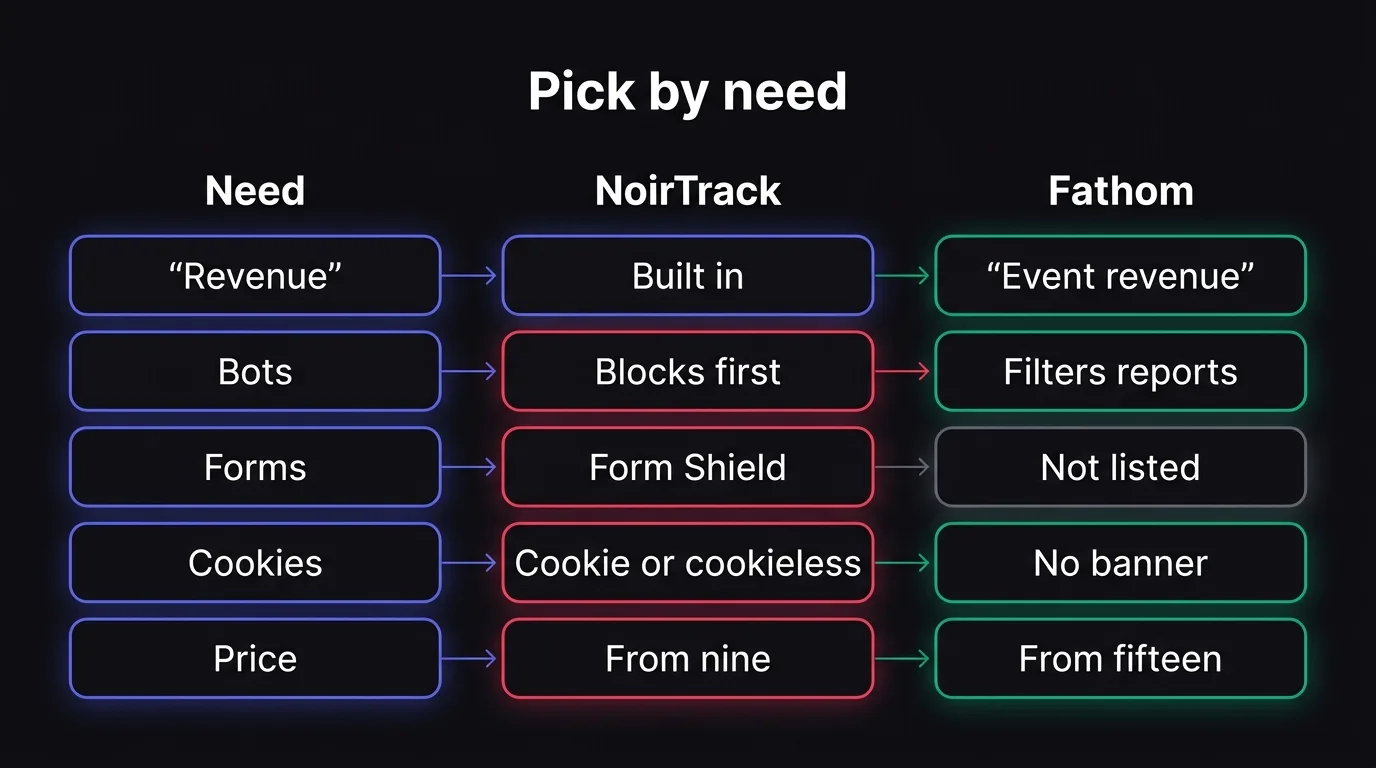
Feature-by-feature comparison
| Feature | NoirTrack | Fathom Analytics | Difference note |
|---|---|---|---|
| Starting price | $9/month on Starter | $15/month for 100,000 pageviews | Fathom's entry price is lower on the pageview tier comparison |
| Free trial | 14-day trial on Pro | 7-day trial, card required | NoirTrack gives a longer trial |
| Revenue attribution | Yes, on every plan | Yes | Both track revenue |
| Bot handling | Firewall blocks bots, scrapers, proxies, VPNs, AI scrapers | Automatic bot filtering in reports | NoirTrack blocks; Fathom filters in reporting |
| Cookies | Cookie mode or cookieless mode | No cookie banners required | NoirTrack gives both modes |
| Funnels | Yes | Not listed | NoirTrack lists funnels; Fathom does not |
| Form spam | Form Shield on Pro and Business | Not listed | NoirTrack covers forms |
| Uptime | Heartbeat uptime and SSL monitoring on every plan | Not listed | NoirTrack includes uptime checks |
| Data isolation | Not listed | EU data isolation offered | Fathom lists EU data isolation |
One concrete example: if you need a form spam check plus revenue tracking, NoirTrack can cover both on the same site setup, while Fathom's pricing page only lists analytics, reports, exports, and bot filtering.
How much do NoirTrack and Fathom cost in 2026?
Checked on 2026-10-06, the two entry plans look close on price but not on what they count. NoirTrack prices by events and includes revenue attribution on every plan, so the plan limit covers the actions you track, not just traffic volume. Fathom prices by pageviews, starts with a lower traffic cap, and adds its 50-site allowance to every plan. If your site sends 120,000 tracked actions and 40,000 pageviews, those are two different billing models with two different totals, so the cheaper headline price can point to the wrong plan. See how revenue tracking works if you want the matching side of NoirTrack pricing.
NoirTrack pricing snapshot
NoirTrack's Starter plan is $9 a month for 500,000 events, 10 sites, 3 team members, and 2 years of data. Pro is $19 a month for 2,000,000 events, 25 sites, 10 team members, and 3 years of data, and it includes a 14-day free trial. Business is $49 a month for 5,000,000 events, 50 sites, 25 team members, and 5 years of data.
The practical difference is that every plan includes revenue attribution, so you can connect payment providers and tie sales back to the visit that brought them in. That matters if you care about which channel paid for itself, not just which page got clicks.
Fathom pricing snapshot
Fathom starts at $15 a month for 100,000 pageviews and includes 50 sites on every plan. Higher tiers rise with pageviews, and extra site packs cost more if you need them. Yearly billing gives 2 months free, and the trial lasts 7 days with a card required.
That pricing makes sense if you want a website analytics tool that stays simple and you do not need to think in events. Fathom also lists event and revenue tracking on all plans, but its billing unit is still pageviews, so a traffic-heavy site can move up tiers faster than an event-based plan would.
If you are comparing the two on cost alone, the first question is which meter fits your site. Events work better when you track signups, checkouts, downloads, and other actions. Pageviews work better when you only want to price page traffic. NoirTrack and Fathom both start with a low monthly entry point, but they charge for different things.
Where each tool is stronger
NoirTrack is the better fit when you care about traffic quality and revenue in the same place. Fathom is the better fit when you want a lighter analytics stack with clean reporting, shared dashboards, and email reports, without adding payment-provider setup or blocking rules. The split is simple: NoirTrack handles the operational side of bad traffic and paid traffic, while Fathom stays focused on reporting.
In NoirTrack, the dashboard shows visitors, revenue, and the live globe together, so you can see traffic and money on one screen. The revenue screen links sales back to the visit, source, and campaign that brought them in, and the firewall screen controls whether bots get counted at all. If you want the setup to match that picture, start with how revenue attribution works and how the firewall works.
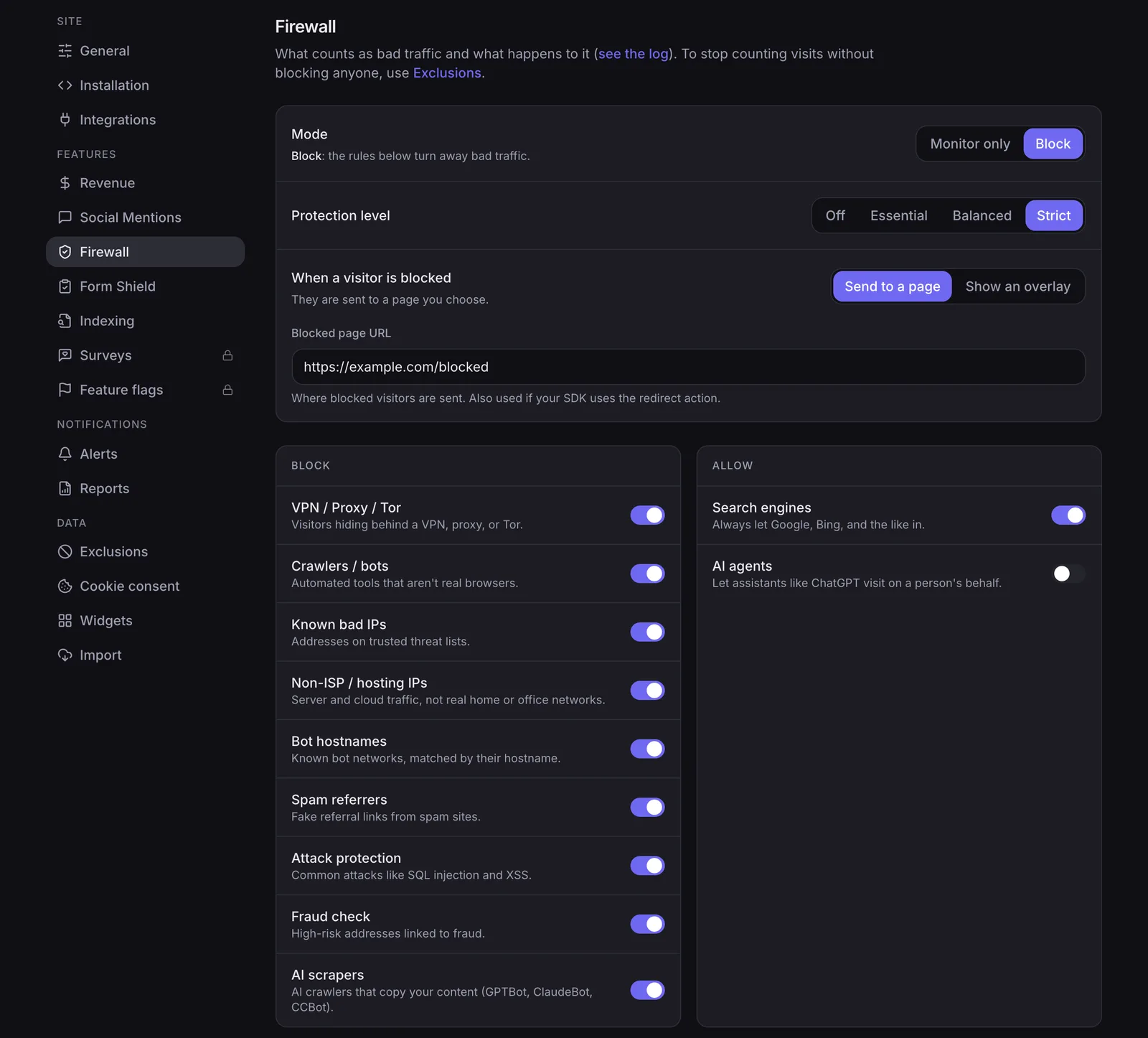
NoirTrack is stronger for traffic quality and money
NoirTrack blocks bots, scrapers, datacenter proxies, VPNs, and AI scrapers before they reach your numbers, so visitors and pageviews exclude that traffic. It also ties each sale to the visit that brought it for Stripe, Paddle, Polar, Lemon Squeezy, Dodo Payments, and Creem, which lets you rank sources by revenue instead of by clicks alone.
Form Shield adds another layer on Pro and Business. It uses a honeypot, disposable-email detection, and submission rate limits for signup and contact forms, so spam does not pollute lead data.
A simple example makes the trade-off clear. If 1,000 visits include 180 bot hits and 12 sales, NoirTrack can remove the 180 bots from reporting and show which source drove those 12 sales. That gives you a cleaner read on which campaign paid.
Fathom is stronger for a simpler analytics stack
Fathom is a cleaner choice when you want no cookie banners, UTM campaign tracking, shared dashboards, and email reports without setting up revenue infrastructure. It also offers EU data isolation, which matters if you want your analytics data kept in the EU.
Fathom is enough when you only need website analytics and you do not need to block bad traffic or connect payment data back to visits. In that case, the setup stays lighter, and the reporting surface stays narrower.
| Need | NoirTrack | Fathom |
|---|---|---|
| Block bots before they count | Yes | No, it filters bots in reports |
| Tie sales to sources | Yes | Yes, but without payment-provider depth in the docs here |
| Protect forms from spam | Yes, on Pro and Business | Not listed |
| Keep the stack light | Less light | Yes |
How to choose between NoirTrack and Fathom
Pick the tool that matches the job you need done. If you need to see which traffic brings revenue, block bad traffic before it lands in your numbers, and protect forms, NoirTrack is the better fit. If you only want privacy-friendly website analytics with pageviews and a lighter reporting layer, Fathom is the simpler choice. Start by checking your current problems first: do you need to know which channel pays, or do you just need a clean read on visits?
Use this decision rule
-
Pick NoirTrack for money and traffic quality. NoirTrack ties sales back to the visit, source, and campaign that brought them in, and it includes a firewall that blocks bots, scrapers, proxies, VPNs, and AI scrapers before they reach your numbers. It also adds uptime and SSL monitoring on every plan.
-
Pick Fathom for basic website analytics. Fathom covers pageviews, event and revenue tracking, UTM campaign tracking, shared dashboards, email reports, and automatic bot filtering. That works well when you want a clean analytics layer without a firewall or form protection.
-
Check your real question before you switch tools. If your team asks, "Which source paid last month?" or "Why did form spam jump after launch?", NoirTrack answers that directly. If your team only asks, "How many visits did the site get?", Fathom can be enough.
A short scenario makes the choice obvious. If you run a SaaS checkout and want to see which campaign brought a paid signup, connect revenue in NoirTrack and read it in the dashboard. If you run a content site and only want pageviews plus campaign tags, Fathom is a fit.
Start with the right install path
-
Use the install that matches your stack. For any website, start with the script tag. For apps and server-side code, use the SDK or framework guide that matches your codebase. The Quickstart shows the basic install, and How revenue tracking works shows how to connect sales.
-
Use AI setup if you want a fast handoff. NoirTrack's AI setup page gives you a copy-paste prompt for your coding agent, so you can wire up the snippet without reading through every step.
-
Verify the result in the dashboard. Open your dashboard after install and check that visits, sources, and sales line up. A good first test is one visit and one test order that both appear under the same source.
How to switch from Fathom to NoirTrack
Start by adding NoirTrack next to Fathom so both tools collect the same visits for a few days. Use the quick start install and keep Fathom running until the numbers match on your main pages.
Switch in four steps
- Install NoirTrack. Add the script or SDK, then open a new tab and confirm the first visitor shows up in the dashboard.
- Connect revenue. Set up your payment provider in revenue attribution so source and sale line up.
- Watch bot traffic. Keep the firewall in Monitor mode first, then turn on Block mode only after you see the same patterns in your reports and want bad traffic stopped.
- Trim and cut over. Keep only the reports you need, then remove Fathom once the visits and revenue lines match your check period.
Questions, answered.
NoirTrack adds revenue attribution, bot blocking, and form protection. Fathom Analytics focuses on privacy first web analytics, UTM campaign tracking, shared dashboards, saved views, email reports, and exports. NoirTrack also ties sales from Stripe, Paddle, Polar, Lemon Squeezy, Dodo Payments, and Creem back to the visit that brought them. Fathom includes event and revenue tracking, but its pricing and product page do not list direct payment provider integrations.
NoirTrack starts at $9 per month on the Starter plan, and Fathom starts at $15 per month for 100,000 pageviews. NoirTrack prices by events, while Fathom prices by pageviews. At the checked tiers, NoirTrack is cheaper on entry price, but the better deal depends on traffic shape. If you track many events on fewer pages, the two pricing models do not line up the same way.
Yes, you can switch from Fathom to NoirTrack, but you need to install NoirTrack, connect your payment providers, and verify that your events and revenue match before you retire the old tracker. That keeps your historical tracking in place until the new setup is confirmed. Fathom also includes event and revenue tracking, so the main risk is not feature loss. The risk is an incomplete migration if you stop the old tag before you confirm the numbers.
Fathom says no cookie banners are required. NoirTrack offers cookie mode with a built in consent banner, and it also offers a cookieless mode that does not need one for analytics. NoirTrack's cookie mode uses one first party noir vid cookie for exact returning visitors. Its cookieless mode uses data cookieless and a daily rotating hash, which keeps analytics without a consent banner.
NoirTrack is stronger if you want sales from Stripe, Paddle, Polar, Lemon Squeezy, Dodo Payments, or Creem tied to the visit that brought them. Fathom includes revenue tracking, but its pricing and feature list do not mention direct payment provider integrations. If you need payment source attribution without extra setup, NoirTrack fits that job better.
Try NoirTrack
See which traffic actually pays.
Analytics with revenue attribution and a built-in bot firewall. One script tag, live in two minutes.
Free 14-day trial, no credit card
Written by NoirTrack team
The privacy-first Google Analytics alternative with a built-in bot firewall and revenue attribution. See which traffic makes you money, no cookie banner.


