NoirTrack vs Google Analytics 4 in 2026: small business fit
Compare NoirTrack and Google Analytics 4 on price, privacy, bot blocking, and revenue tracking to choose the better fit for small businesses and SaaS.

NoirTrack team·Follow

NoirTrack is the better pick if you want privacy-first analytics with built-in revenue attribution, bot blocking, and uptime monitoring without custom setup. GA4 is cheaper to start because the standard version is free and fits teams already deep in Google Ads and BigQuery. If you need enterprise-grade Google reporting, or a free tool and can handle setup complexity, GA4 can still be the better choice.
NoirTrack vs Google Analytics 4 compares two web analytics tools for small businesses and SaaS teams. These teams usually compare them for one reason: they want to know which traffic actually pays.
The real choice is whether you want privacy-first analytics with bot blocking and revenue attribution built in, or Google's broader ecosystem with a steeper setup and learning curve. This guide compares cost, privacy, revenue tracking, and what each tool does best so you can pick without guessing.
By the end, you will know which tool fits your site, budget, and reporting needs.
Which should small businesses and SaaS choose?
NoirTrack suits teams that care about paid traffic, privacy, and less maintenance. GA4 suits teams that want a free standard analytics tool and rely on Google Ads or BigQuery. NoirTrack includes revenue attribution, bot protection, uptime monitoring, and an AI analytics assistant on every plan, while GA4 is free for standard properties and does not list those features as built in. The rest of this article focuses on the practical differences that matter when a founder or marketer has to make a call.
Who is each tool better for?
NoirTrack is better for small businesses and SaaS teams that want to see which channels drive revenue, filter out bot traffic, and avoid custom glue code for payments and spam protection. It also fits sites that want a cookieless setup with less consent-banner work. Add data-cookieless and the script stores nothing on the device.
GA4 is better for teams that want a free starting point and already use Google Ads, audiences, explorations, or BigQuery export. It fits teams that have time to learn a deeper reporting stack and want Google-native analysis.
A simple example shows the difference. A SaaS founder sends 1,000 visits from three channels and 20 trials turn into 4 paid plans. NoirTrack can tie those sales back to the visit and source that brought them in. GA4 can count the trials, but payment attribution and bot filtering need extra setup.
What problem is this comparison solving?
The comparison is about whether the analytics stack helps you make money or only helps you count visits. For SaaS, that means tying traffic to trials, signups, and paid plans, then filtering out bot noise that can distort conversion rates.
For local businesses, the question is simpler. The better fit is the tool that gives you trustworthy numbers without weeks of tuning. If you need a lighter privacy setup, NoirTrack is the cleaner fit. If you need Google-native reporting depth, GA4 is the natural choice.
| Tool | Best fit | Starting price | Built-in fit for paid traffic and noise control |
|---|---|---|---|
| NoirTrack | Small businesses and SaaS teams that want revenue-linked analytics and bot protection | $9/month | Yes |
| GA4 | Teams already inside Google Ads and BigQuery | Free | Not listed |
For a deeper look at how revenue is tied back to visits, see how revenue tracking works. For privacy and cookieless setup, see cookieless analytics without a cookie banner.
How do NoirTrack and GA4 compare on features and price?
NoirTrack and Google Analytics 4 cover different jobs. NoirTrack adds revenue attribution, bot blocking, form spam protection, uptime checks, and privacy modes in one product, while GA4 gives you a free standard property with strong Google Ads and BigQuery links. NoirTrack pricing is monthly as checked on 2026-10-06. GA4 standard properties are free, and GA4 360 is the paid enterprise tier.
Comparison table
| Decision factor | NoirTrack | GA4 |
|---|---|---|
| Starting price | Starter $9/month | Free standard properties |
| Free tier or trial | No free plan, 14-day free trial on Pro | Free standard properties |
| Revenue attribution | Built in for Stripe, Paddle, Polar, Lemon Squeezy, Dodo Payments, and Creem | Not built in for Stripe-style payment providers without custom setup |
| Bot blocking | Built in firewall with Monitor and Block modes | Not built in |
| Form spam protection | Form Shield on Pro and Business | Not built in |
| Uptime monitoring | Heartbeat uptime and SSL monitoring on every plan | Not built in |
| Privacy mode | Cookie mode and cookieless mode | Cookie-based measurement; consent is usually needed in the EU |
| Notable ecosystem strengths | Google Search Console integration, AI analytics assistant, surveys, session replay, feature flags | Google Ads, BigQuery export, explorations, audiences |
A simple example shows the difference. If you add data-cookieless to NoirTrack, it stores nothing on the device for analytics. If you keep GA4 on standard cookies, you usually need a consent banner before measurement starts.
If you want the source of truth on paid traffic, read /docs/revenue-attribution. If you want the privacy setup, read /docs/gdpr-and-cookieless.
What do you actually pay, and what is included?
NoirTrack starts at $9 per month on the Starter plan, with Pro at $19 and Business at $49. Every paid NoirTrack plan includes revenue attribution and bot protection, so the monthly entry point already covers the parts small teams usually add later. GA4 standard properties are free, but Google keeps the paid path in Google Analytics 360, and standard property retention is limited to 2 or 14 months for user-level and event data, with large and XL properties limited to 2 months. For a small business, the real comparison is paid all-in-one analytics versus free tracking that can need more setup and a paid enterprise tier for longer retention and larger use.
NoirTrack pricing at a glance
Starter costs $9 per month and includes 500,000 events, 10 sites, 3 team members, and 2 years of data. Pro costs $19 per month and includes 2,000,000 events, 25 sites, 10 team members, 3 years of data, plus a 14-day free trial. Business costs $49 per month and includes 5,000,000 events, 50 sites, 25 team members, and 5 years of data.
A simple example helps: if you run one marketing site and one SaaS app, Starter covers both sites and still leaves room for 8 more. You do not need to guess whether the plan includes the money data, because revenue tracking is part of every plan.
GA4 pricing at a glance
Standard properties are free. GA4 360 is the paid enterprise version, and Google lists it as the path for teams that need the enterprise feature set and longer retention. For standard properties, Google says user-level and event data retention is 2 or 14 months, and large or XL properties are limited to 2 months on the standard tier. See Google's pricing and retention notes here.
The free label helps if you only need basic traffic reporting. It matters less if you want cleaner data, longer history, or built-in revenue attribution without custom work. For teams that care about bot filtering and payment-linked reporting on day one, bot protection changes the price math because it removes noise before it reaches the report.
Where does each tool win in practice?
NoirTrack wins when a small team needs to tie visits to revenue and keep bot traffic out of the numbers. GA4 wins when the team already works inside Google Ads, BigQuery, explorations, and audiences, and wants a free standard property with deep Google reporting links. For a small business, the choice comes down to whether the day-to-day question is "which traffic makes money" or "how do we feed Google's reporting and ad workflows."
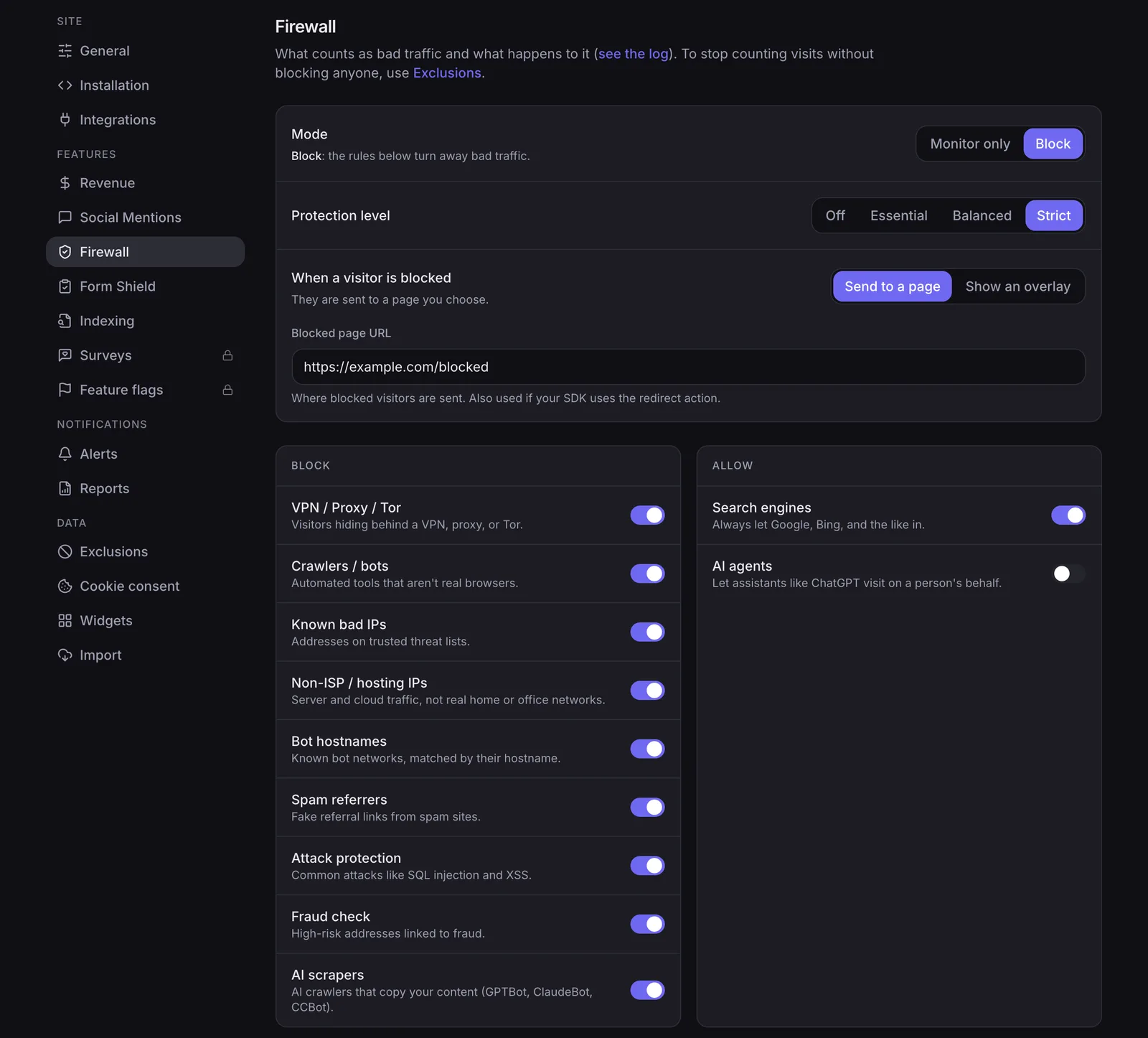
Why NoirTrack wins for revenue and noise control
NoirTrack links each sale back to the visit, source, and campaign that brought it in, so a founder can rank channels by money instead of pageviews. The setup is simple: connect Stripe, Paddle, Polar, Lemon Squeezy, Dodo Payments, or Creem, then let the tracker match sales to visitors.
Its firewall blocks bots, scrapers, datacenter proxies, VPNs, and AI scrapers before they reach the dashboard. That matters because blocked traffic never becomes part of the visitor and pageview counts, so a team can look at the same report twice and still see the same real audience.
Form Shield on Pro and Business adds honeypot fields, disposable-email detection, and submission rate limits for signup and contact forms. A small SaaS can use it on the same site that tracks revenue, so traffic quality and form quality get handled in one place.
A simple example is a Stripe checkout on a product page. NoirTrack can connect that sale to the source that sent the buyer, then show the channel as revenue, not just a session.
Read the revenue setup in How revenue tracking works and the traffic filters in How the firewall works.
Why GA4 still wins for Google-heavy teams
GA4's strongest point is ecosystem depth. Google Ads integration, BigQuery export, explorations, and audiences make it a better fit for teams that already build reports and campaigns around Google tools.
It is also the easier pick for a team that wants a free standard property and already accepts Google's reporting model. The trade-off is that NoirTrack vs Google Analytics 4 is really a choice between built-in revenue attribution and bot control on one side, and Google workflow depth on the other.
GA4 does not include NoirTrack-style revenue attribution from payment providers, a bot-blocking firewall, or form spam protection without extra setup or separate tools.
How should a small business or SaaS team choose?
Pick the tool that fits your current constraint first: budget, privacy, revenue tracking, bot traffic, or Google dependence. For many teams, the choice between NoirTrack vs Google Analytics 4 comes down to whether they want paid-traffic visibility and cleaner data, or a free analytics base that plugs deeply into Google tools.
- Check budget first. GA4 is free for standard properties, while NoirTrack starts at $9 per month and includes a 14-day Pro trial.
- Check privacy next. NoirTrack supports cookieless tracking with
data-cookieless, so analytics can run without a consent banner in many cases. GA4 uses cookies, so EU sites usually need a banner. - Check revenue tracking. If you want sales tied back to the visit that brought them, NoirTrack does that on every plan with Stripe, Paddle, Polar, Lemon Squeezy, Dodo Payments, and Creem.
- Check bot traffic. If bots, scrapers, VPNs, or datacenter proxies pollute your numbers, NoirTrack has a firewall that blocks them before they reach the data.
- Check Google dependency. If your stack depends on Google Ads, BigQuery export, audiences, or explorations, GA4 fits that workflow better.
A simple scenario makes the trade-off clear: a $29 per month SaaS with paid search and churn-sensitive funnel reporting can justify NoirTrack if one extra customer closes the gap, while a content site that only needs basic traffic reporting may stay on GA4 and spend nothing.
A simple decision checklist
Pick NoirTrack if you need revenue attribution, built-in bot blocking, or privacy-first cookieless tracking without a consent banner for analytics. Pick GA4 if you need a free starting point, heavy Google Ads usage, or BigQuery export as part of your analytics stack. Pick NoirTrack Pro or Business if you also want surveys, social mentions, session replay, or feature flags on the higher plans. If none of those apply, use the cheaper option that covers today's job and revisit the choice when your reporting needs change.
What should you do next if you want to switch?
Install NoirTrack on one site first, then run it beside your current GA4 setup for a short overlap and compare the numbers you care about.
Start in the right order
Use the quickstart for your stack, or the script tag path if you just want the fastest start. Then connect revenue attribution so sales map back to traffic sources, using the setup in /docs/revenue-attribution. After that, pick cookie mode with the built-in banner or turn on cookieless mode in /docs/gdpr-and-cookieless.
How to compare the two on your own site
Keep both tools running for a few days, then compare source quality, sales attribution, and bot traffic. If you have old GA4 data you want in the same dashboard, import it before you judge the result. If fake signups are the main problem, add the firewall and Form Shield first. You can start with the dashboard and add protection later.
Questions, answered.
NoirTrack is privacy first analytics with built in revenue attribution, bot blocking, uptime monitoring, and a cookieless mode, while Google Analytics 4 is a free Google analytics platform built around Google Ads and BigQuery integration. NoirTrack fits small teams that want traffic tied to sales without extra setup. GA4 fits teams that already rely on Google's ad stack and want deeper export and audience tools.
NoirTrack starts at $9 per month on Starter, with Pro at $19 and Business at $49. GA4 standard properties are free, and Google Analytics 360 is the paid enterprise version. NoirTrack also includes a 14 day free trial on Pro, while GA4 is the lower cost choice if you only need general web analytics and can work within Google's setup.
Yes, NoirTrack has an import path from Google Analytics so you can bring historical data across instead of starting with an empty dashboard. That helps if you want to keep a record of past traffic while moving to revenue attribution and bot protection. The import path does not change what GA4 itself stores, so plan the move before you stop checking the old property.
GA4 uses cookies, so EU sites generally need a consent banner, and visitors who decline are not measured unless consent mode modelling fills the gap. NoirTrack offers cookie mode with a built in banner and a cookieless mode that does not need a consent banner for analytics. That makes NoirTrack a cleaner fit for sites that want tracking without consent friction.
Teams often compare pageview counts only and ignore whether the tool can tie traffic to revenue, block bots, and keep form spam out of the data. That leads to picking a tool that looks cheap or familiar but misses sales attribution and traffic quality checks. For small businesses, those missing pieces matter more than raw pageview totals.
Try NoirTrack
See which traffic actually pays.
Analytics with revenue attribution and a built-in bot firewall. One script tag, live in two minutes.
Free 14-day trial, no credit card
Written by NoirTrack team
The privacy-first Google Analytics alternative with a built-in bot firewall and revenue attribution. See which traffic makes you money, no cookie banner.


