NoirTrack vs Pirsch (2026): which tool fits?
Compare NoirTrack and Pirsch on pricing, privacy, revenue attribution, bot blocking, and fit for founders choosing a website analytics tool.

NoirTrack team·Follow

Pick NoirTrack if you want website analytics with built-in revenue attribution, a bot-blocking firewall, and cookieless tracking on one hosted tool. Pick Pirsch if you want a German-hosted analytics product with unlimited data retention, a longer free trial, and lower entry pricing. This comparison matters most for teams that care about paying traffic and bot prevention; if you need self-hosting, Pirsch Enterprise is the closer fit.
NoirTrack vs Pirsch is a choice between two privacy-friendly website analytics tools with different priorities. NoirTrack puts revenue attribution and bot blocking at the center, while Pirsch leans toward classic analytics with goals, funnels, and an on-premise Enterprise option. Both help you measure traffic without the usual ad-tech baggage, but they fit different sites, budgets, and setup styles.
If you run a founder-led site, a marketing site, or a developer project, this post will help you pick the tool that matches your traffic mix, payment stack, and hosting needs.
NoirTrack vs Pirsch: which one should you pick?
NoirTrack is the better pick when you need paying-traffic attribution and bot blocking, while Pirsch fits better when you want a lower-cost starter plan and an Enterprise path with on-premise installation and raw data access. Both are hosted products, so the real choice is revenue focus, protection features, and how much deployment control you need. NoirTrack is aimed at sites that care about which visits turn into sales. Pirsch is aimed at teams that want a lighter analytics setup with room to move into an internal deployment later.
Who should choose NoirTrack?
Choose NoirTrack if you sell through Stripe, Paddle, Polar, Lemon Squeezy, Dodo Payments, or Creem and want each sale tied back to the visit that brought it. That makes it useful for SaaS, newsletters, digital products, and content sites that need to see which source actually pays. The firewall is the other big reason to pick it. It blocks bots, scrapers, datacenter proxies, VPNs, and AI scrapers, and it starts in Monitor mode before you switch to Block mode. NoirTrack ties each sale back to the visit that brought it. See how revenue tracking works and how the firewall works.
A simple example: if a campaign brings 200 visits and 8 purchases, NoirTrack can tie those purchases back to the source instead of leaving them as plain revenue totals. That matters when you are deciding whether to spend more on that channel.
Who should choose Pirsch?
Choose Pirsch if price matters most at the start and you want a 30-day free trial with no credit card. Its Standard plan is $6/month at the 10,000 page view tier, includes 50 websites and unlimited members, and keeps things simple for small teams. If you need more control later, Enterprise adds on-premise installation and raw data access, which is useful for organizations that want their own deployment and deeper data work. Pirsch also suits teams that want unlimited data retention and a more classic web analytics stack without paying for revenue or firewall features they will not use.
NoirTrack vs Pirsch: features and starting price
NoirTrack starts at $9 per month, and Pirsch starts at $6 per month, so the main difference is what you get with that starting price: NoirTrack adds revenue tracking and bot blocking from day one, while Pirsch stays closer to classic analytics and adds more enterprise options at higher tiers. For cookieless tracking, NoirTrack uses data-cookieless and a daily-rotating hash, and no consent banner is needed for analytics. See how revenue tracking works and how the firewall works.
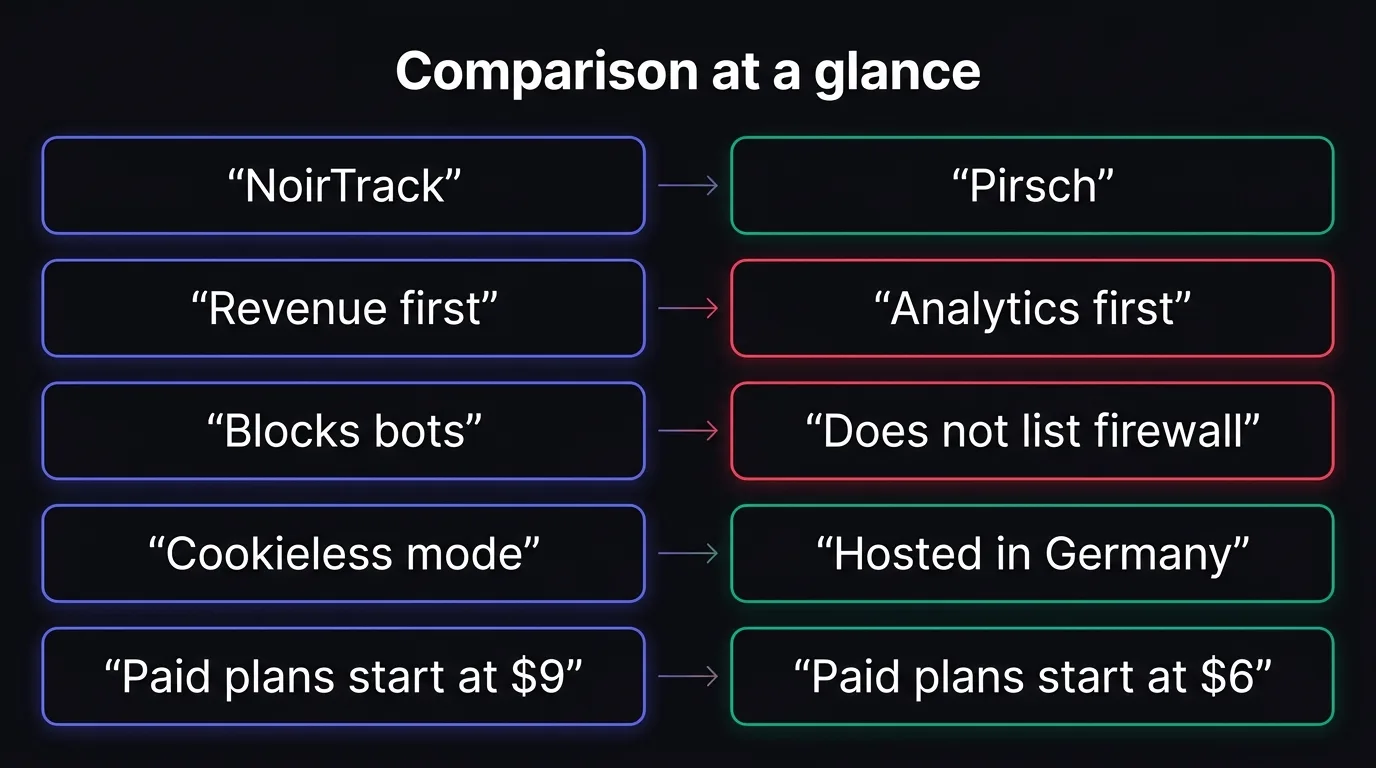
Comparison table to include
| feature | NoirTrack | Pirsch |
|---|---|---|
| starting price | $9/month, Starter | $6/month, Standard |
| free trial | 14-day trial on Pro | 30-day free trial, no credit card |
| revenue attribution | Yes, with Stripe, Paddle, Polar, Lemon Squeezy, Dodo Payments, and Creem | Not listed |
| bot blocking | Yes, firewall with Monitor and Block modes | Not listed |
| cookieless mode | Yes | Yes |
| data retention | 2 years on Starter, 3 years on Pro, 5 years on Business | Unlimited |
| self-hosting | No | Enterprise on-premise installation |
| notable extras | AI analyst, Google Search Console, surveys, session replay, feature flags | Funnels, A/B testing, segmentation, custom domains, white labeling, SAML SSO |
NoirTrack is the better fit if you care about which traffic pays and you want to keep bots out before they pollute the numbers. Pirsch is the better fit if you want a lower entry price, unlimited retention, and a path to enterprise features like on-premise installation without paying for sales-focused tools you may not need.
NoirTrack pricing vs Pirsch pricing in 2026
NoirTrack vs Pirsch comes down to how you price the first paid tier and what you get inside that tier. NoirTrack starts at $9 per month on Starter, with a 14-day free trial on Pro. Pirsch starts at $6 per month on Standard with a 30-day free trial and no card required. If you want to compare the real entry point, check the event or page view cap, the site limit, and the included features, because those change the total value fast.
What NoirTrack includes at each tier
Starter costs $9 per month and includes 500,000 events, 10 sites, 3 team members, and 2 years of data. Pro costs $19 per month and raises that to 2,000,000 events, 25 sites, 10 team members, and 3 years of data. Business costs $49 per month and includes 5,000,000 events, 50 sites, 25 team members, and 5 years of data.
NoirTrack also bundles revenue attribution on every plan, so you can see which source or campaign brought a paid sale. Its firewall blocks bots, scrapers, datacenter proxies, VPNs, and AI scrapers, and the docs say blocked traffic does not count against your event quota. If you run a paid funnel, that matters. A site that gets 400,000 monthly events and 2,000 monthly sales can keep those sales tied to the visit that brought them instead of guessing from page views alone. See the setup in /docs/revenue-attribution and /docs/firewall.
What Pirsch includes at each tier
Pirsch Standard costs $6 per month at the 10,000 page view tier and includes 50 websites, unlimited members, events, conversion goals, session analysis, a URL shortener, REST API, SDKs, and Google Analytics import. Plus costs $12 per month and adds funnels, A/B testing, segmentation, teams, custom domains and themes, and white labeling. Enterprise is custom and adds on-premise installation, SAML SSO, and raw data access.
Pirsch gives you a lower starting price and a longer trial, which helps if you want to test the product before you commit. NoirTrack costs more at the entry tier, but the first paid plan starts with 500,000 events, revenue attribution, and bot blocking in the same package. That makes the price gap smaller once you factor in what each plan includes.
Where NoirTrack is stronger, and where Pirsch is stronger
NoirTrack is the better fit for sites that care about paid traffic quality and clean numbers, because it ties each sale back to the visit that brought it and it can block bad traffic before it reaches your reports. Pirsch is the better fit when you want a lower-priced entry point, unlimited data retention, or an Enterprise path with on-premise installation for hosting policy or procurement.
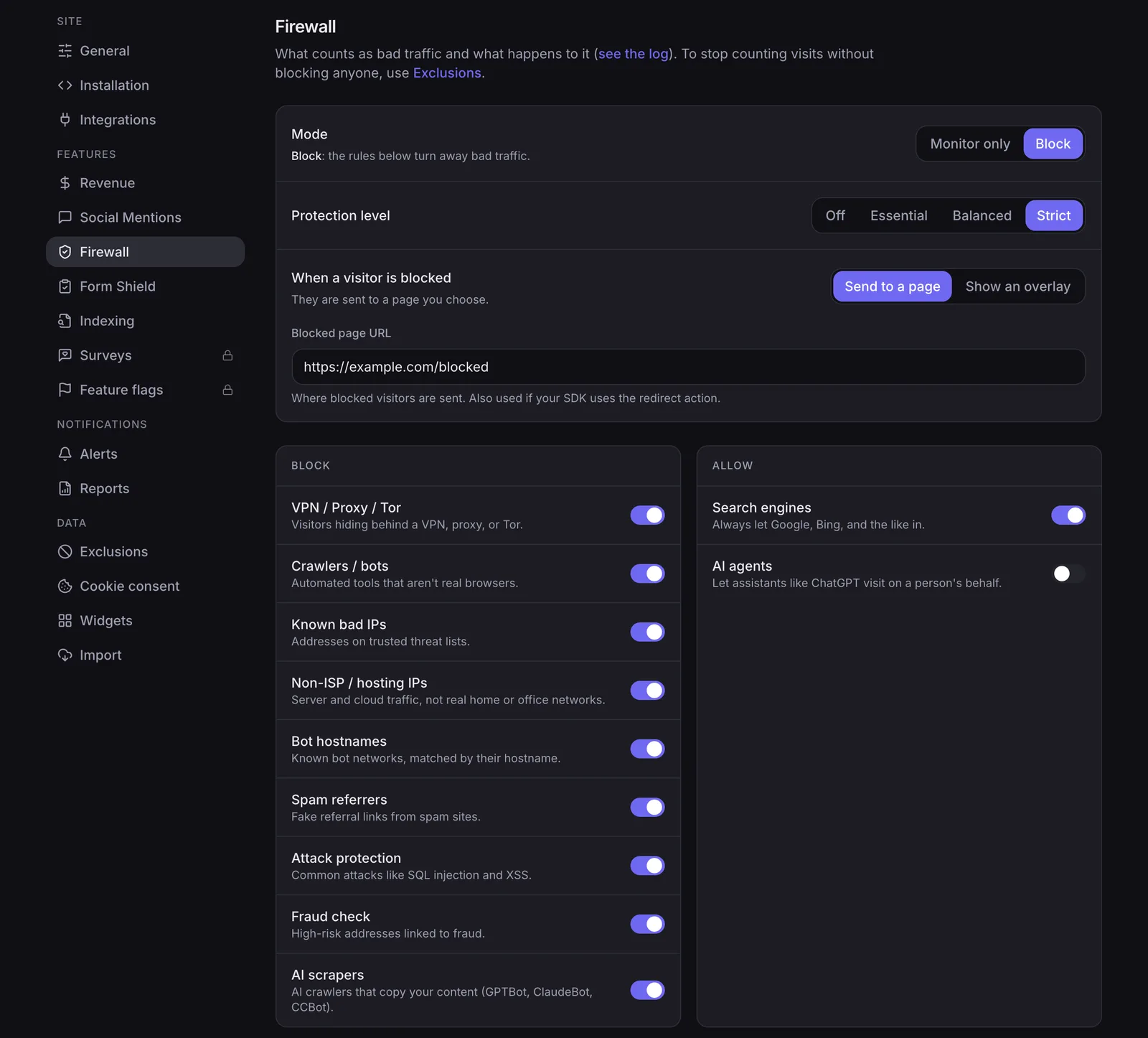
Why NoirTrack is better for monetized sites
NoirTrack connects revenue to traffic sources on every plan, and it supports Stripe, Paddle, Polar, Lemon Squeezy, Dodo Payments, and Creem. That means you can see which source, campaign, or page led to a sale instead of guessing from pageviews. The revenue docs show the matching flow in detail, from checkout to source attribution: /docs/revenue-attribution.
Its firewall matters when your site attracts scraper traffic, ad bots, or proxy traffic. NoirTrack blocks bots, scrapers, datacenter proxies, VPNs, and AI scrapers before they pollute visitors and pageviews, so the numbers start cleaner instead of being fixed after the fact. If you serve paid content, lead-gen pages, or checkout flows, that difference shows up fast.
Cookieless mode is the other reason monetized sites pick it. Add data-cookieless and NoirTrack uses a daily-rotating hash with no device storage, which helps teams that want privacy-first analytics without a consent banner for analytics. A basic setup looks like this:
<script defer src="https://noirtrack.com/t.min.js" data-site="YOUR_SITE_KEY" data-cookieless></script>
Why Pirsch is better for some teams
Pirsch starts cheaper, which helps small teams test analytics without a big budget decision. Its Standard plan includes unlimited members, so a few people can check the same data without managing seats first.
Pirsch also gives you a 30-day free trial with no credit card, which is longer than NoirTrack's 14-day Pro trial. That gives you more time to compare reports, imports, and workflows before you commit.
For teams that need hosting control, Pirsch's Enterprise plan includes on-premise installation. That is the stronger choice when internal policy, data residency, or procurement requires software to run inside your own environment.
Pirsch also lists unlimited data retention on its pricing page, which matters if you want old traffic history to stay available without a retention clock. For a small site that mainly wants pageviews, goals, and a cheaper starting plan, that can be the cleaner match.
How to choose between NoirTrack and Pirsch
Pick NoirTrack if you need revenue attribution tied to Stripe, Paddle, Polar, Lemon Squeezy, Dodo Payments, or Creem, plus bot blocking before bad traffic hits your numbers. Pick Pirsch if you want the $6 Standard plan, a 30-day trial, unlimited members on that plan, or an on-premise path at Enterprise.
Choose NoirTrack if...
You sell through a supported processor and want source, campaign, and page revenue in one place. See how revenue tracking works and how the firewall works.
Choose Pirsch if...
You need the lower entry price, a longer trial, funnels, A/B testing, segmentation, or on-premise installation.
Next step to take today
If privacy mode matters, test cookieless tracking before anything else.
Selection checklist: revenue attribution, bot blocking, privacy mode, trial length, self-host-style deployment.
Questions, answered.
NoirTrack centers on revenue attribution and bot blocking, while Pirsch centers on analytics features like goals, funnels, and an on premise Enterprise option. NoirTrack includes attribution for Stripe, Paddle, Polar, Lemon Squeezy, Dodo Payments, and Creem on every plan, plus a firewall that blocks bots, scrapers, datacenter proxies, VPNs, and AI scrapers. Pirsch focuses more on analytics depth, with funnels and A/B testing on Plus and raw data plus on premise installation on Enterprise.
NoirTrack starts at $9 per month and Pirsch starts at $6 per month at its 10,000 page view tier. NoirTrack's Starter plan includes 500,000 events, 10 sites, 3 team members, and 2 years of data, while Pirsch's Standard plan includes 50 websites, unlimited members, events and conversion goals, session analysis, a URL shortener, REST API, and SDKs. Both vendors also offer higher tiers with more capacity and features.
You can install NoirTrack on the same site and begin collecting new data, but the plan details here do not describe a direct import from Pirsch. That means you should expect historical data to stay in Pirsch unless you check for a separate migration path. NoirTrack supports both cookie mode and cookieless mode, so the tracking setup itself can be added without redesigning the site.
NoirTrack can run with cookies or without them. Cookie mode uses one first party noir vid cookie for exact returning visitors and includes a built in consent banner, while cookieless mode uses data cookieless with a daily rotating hash and does not need a consent banner for analytics. That gives you a choice between more exact visitor matching and a setup that avoids cookie consent for analytics.
NoirTrack is the stronger revenue tracking choice because every plan includes attribution for Stripe, Paddle, Polar, Lemon Squeezy, Dodo Payments, and Creem, with each sale tied back to the visit that brought it. Pirsch's pricing page does not list payment provider revenue attribution. If your main goal is to see which traffic paid, NoirTrack fits better; if you want funnels, A/B testing, or on premise hosting, Pirsch is the more relevant pick.
Try NoirTrack
See which traffic actually pays.
Analytics with revenue attribution and a built-in bot firewall. One script tag, live in two minutes.
Free 14-day trial, no credit card
Written by NoirTrack team
The privacy-first Google Analytics alternative with a built-in bot firewall and revenue attribution. See which traffic makes you money, no cookie banner.


