NoirTrack vs PostHog for Website Analytics in 2026
Compare NoirTrack and PostHog on pricing, privacy, bot blocking, revenue attribution, and setup so you can pick the right analytics stack.

NoirTrack team·Follow

Pick NoirTrack if you want website analytics that ties revenue to traffic and blocks bots before they distort the numbers. Pick PostHog if you want a broader product analytics suite with open-source options and can handle bot and AI traffic at query time instead of blocking it. If you want product analytics and experiments in one app, PostHog fits better.
NoirTrack vs PostHog for website analytics is a choice between clean web analytics and a wider product analytics suite. NoirTrack is built to show which traffic pays and stop bot noise at the door. PostHog is built for events, sessions, experiments, surveys, and replay in one place. Founders and marketers usually want fast setup, revenue attribution, and traffic they can trust. Product teams often want more event work and testing tools in the same app.
This comparison uses checked pricing and feature facts only, so you can judge each tool without guessing. After reading, you will know which one fits your site, your budget, and the kind of traffic data you need.
Which one should you pick for website analytics?
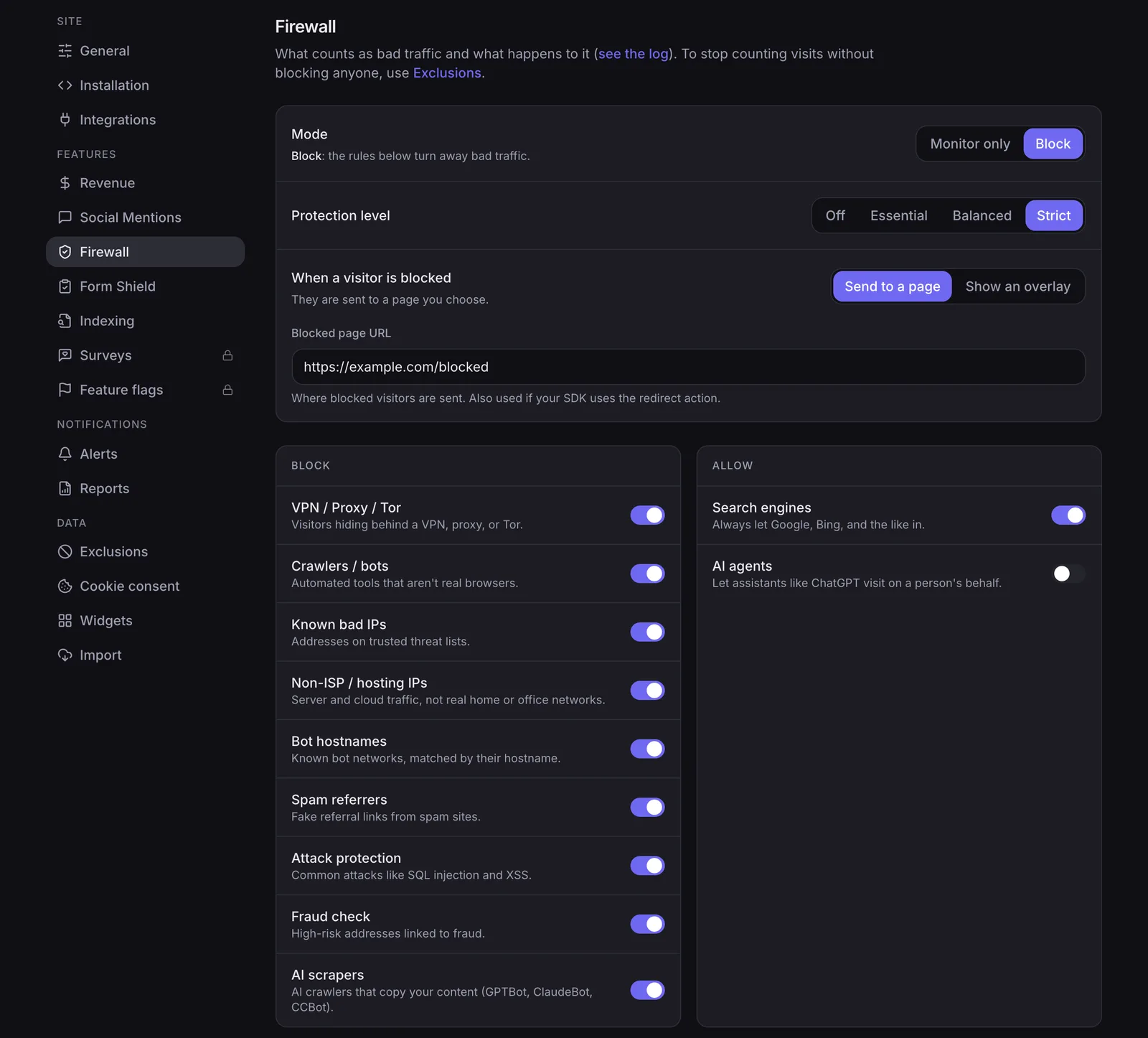
NoirTrack is the better fit for site owners who care about traffic quality, revenue attribution, and simple deployment. PostHog is the stronger pick for product teams that want a wider analytics suite. NoirTrack blocks bots before they reach your numbers, while PostHog classifies bot and AI traffic at query time in web analytics. This section gives you a comparison table that covers audience, analytics focus, bot handling, revenue tracking, and starting price.
NoirTrack vs PostHog at a glance
| NoirTrack | PostHog | |
|---|---|---|
| Best for | Marketing sites, content sites, SaaS homepages | Product teams that want product analytics and experimentation in one place |
| Bot handling | Firewall blocks bots, scrapers, datacenter proxies, VPNs, and AI scrapers before they count | Classifies bot and AI traffic at query time in web analytics; it does not block it |
| Revenue attribution | Included on every plan, with Stripe, Paddle, Polar, Lemon Squeezy, Dodo Payments, and Creem | Not listed in the pricing facts provided here |
| Open source | No | Yes |
| Starting price | $9 per month, checked 2026-10-06 | Usage-based pricing with a free monthly allowance; product analytics starts at $0.00005 per event, checked 2026-10-06 |
NoirTrack also bundles site-focused tools around that core: web analytics, revenue tracking, bot protection, session replay, surveys, feature flags, and an AI analyst. PostHog is a broader platform with product analytics, web analytics, session replay, feature flags, experiments, and surveys. NoirTrack is not open source and does not offer self-hosting. PostHog is open source.
A short example shows the practical split. If a marketing page gets 10,000 visits and 2,000 of them are bots, NoirTrack filters those visits before they enter your reports. PostHog can label or exclude those visits in web analytics, but the traffic still reaches the query layer.
The practical takeaway
Choose NoirTrack if you run a marketing site, content site, or SaaS homepage and want clean visitor numbers plus sales attribution.
Choose PostHog if your team wants one platform for product analytics and experimentation and is comfortable with more setup and more concepts.
How do NoirTrack and PostHog compare on features and price?
Checked on 2026-10-06, NoirTrack starts at $9 per month on Starter, while PostHog uses usage-based pricing with monthly free allowances per product. This is a feature and entry-price comparison, not a full cost forecast, because PostHog bills by usage and those allowances reset every month. If you want a quick read on how NoirTrack handles traffic quality and revenue, the table below shows the gap fast.
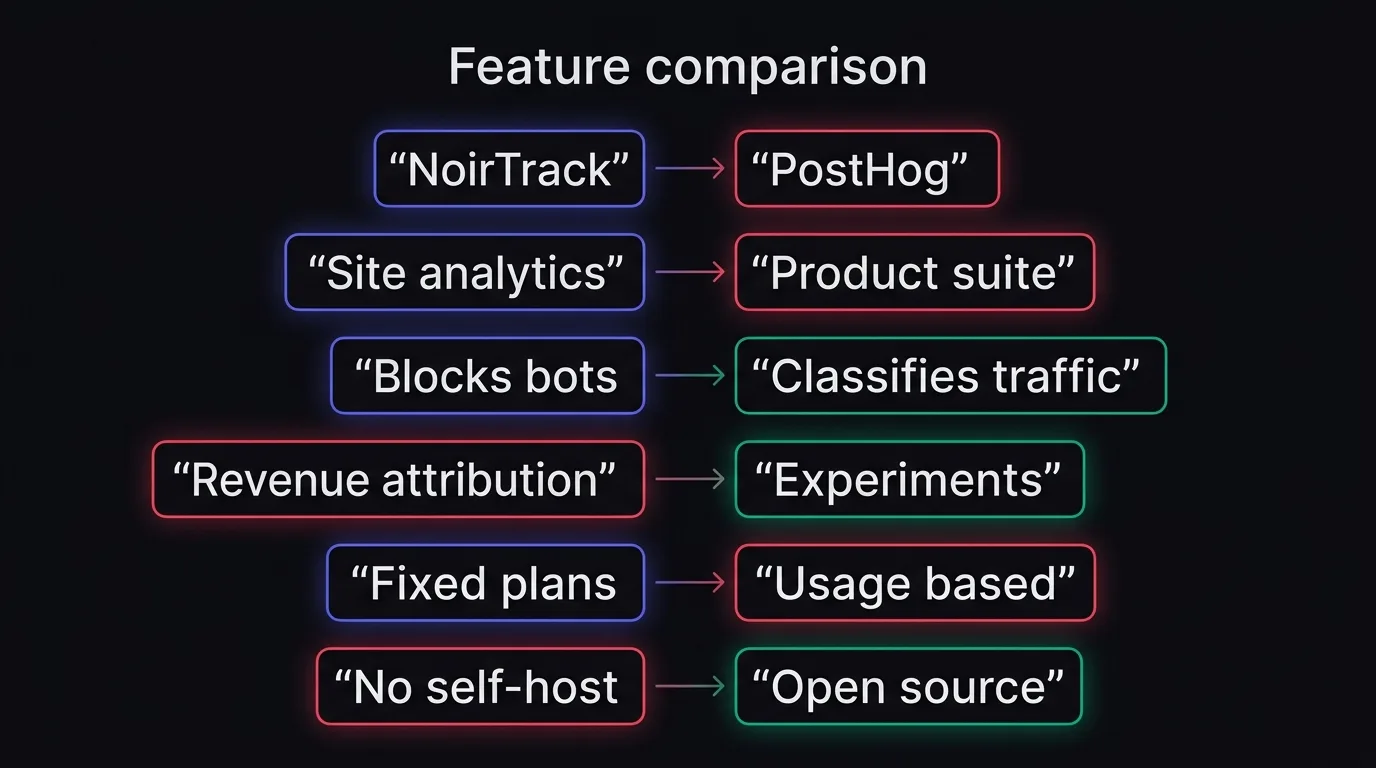
Comparison table
| Area | NoirTrack | PostHog |
|---|---|---|
| Starting price | $9/month on Starter | Usage-based pricing with monthly free allowances |
| Free trial or free allowance | 14-day free trial on Pro | Monthly free allowances per product, including 1,000,000 analytics events and 5,000 session replays |
| Bot handling | Built-in firewall that blocks bots, scrapers, datacenter proxies, VPNs, and AI scrapers | Web analytics classifies bot and AI traffic at query time so you can measure or exclude it |
| Revenue attribution | Revenue attribution on every plan | Not listed on the pricing page |
| Privacy mode | Cookie mode or cookieless mode | Not listed on the pricing page |
| Open source | No | Yes |
| Best fit | Website analytics with revenue tracking and bot blocking | Broader product analytics suite for engineering and product teams |
What the pricing means in practice
NoirTrack uses fixed monthly plans, so budgeting is simple. Starter costs $9 and includes 500,000 events, 10 sites, 3 team members, and 2 years of data. Pro costs $19 with 2,000,000 events, 25 sites, 10 team members, and 3 years of data. Business costs $49 with 5,000,000 events, 50 sites, 25 team members, and 5 years of data. If your site gets 420,000 events in a month, Starter still fits with room left.
PostHog can stay cheap early because the free allowances cover a lot of first usage. The bill then depends on how much you use and which products you turn on, not on one simple monthly plan. That works well if you want one platform for analytics, replays, flags, experiments, and surveys. It is harder if you want a clean budget for website analytics alone.
For teams that want website analytics with a known monthly bill, NoirTrack is easier to plan around. For teams that want a broader product suite and open source, PostHog is the closer match.
Why NoirTrack is stronger for traffic quality and revenue
NoirTrack is built for the buyer problem where traffic quality and money matter together. It blocks bots, scrapers, datacenter proxies, VPNs, and AI scrapers before they reach your numbers, and it ties sales back to the visit that brought them, so you can trust the channel data behind paid campaigns, newsletters, partner traffic, and any site where bad traffic can make conversion rate and CAC look better or worse than they are.
Revenue attribution across every plan
NoirTrack attributes sales from Stripe, Paddle, Polar, Lemon Squeezy, Dodo Payments, and Creem on every plan. Open Site → Settings → Revenue to connect the processor, then use the revenue and transactions views to see source, campaign, and sale together. That matters when the decision is about channels that produce money, because pageviews alone do not show which visits paid.
A simple example: if a newsletter sends 800 visits and 12 sales, you can read those sales against the source instead of guessing from traffic spikes.
Bot blocking before the numbers
NoirTrack ships with Monitor mode first, then Block mode. That lets a team watch traffic before enforcing anything.
The user-facing effect is cleaner data from the start. Visitors and pageviews exclude bots, so the dashboard is already less noisy before you segment by source, campaign, or country. The firewall docs say it stops bots, scrapers, datacenter proxies, VPNs, and AI scrapers, which is the part that matters when you need your analytics to reflect real people instead of automated traffic.
If you only need to compare NoirTrack vs PostHog for website analytics, the difference here is practical: NoirTrack treats bot traffic and revenue as first-class data, while PostHog focuses on product analytics and classifies bot and AI traffic at query time rather than blocking it.
How privacy and cookieless tracking differ
The compliance question most buyers ask is simple: do you need a cookie banner, and how much identity do you need for reporting? NoirTrack gives you two modes. Cookie mode uses one first-party noir_vid cookie for exact returning visitors, while cookieless mode uses a daily-rotating hash and stores nothing on the device, so analytics usually do not need a consent banner. NoirTrack also includes a built-in consent banner for cookie mode. PostHog's pricing page here does not establish the same cookie modes, so the clean comparison is about reporting depth versus privacy setup, not a one-to-one feature match. See the cookieless setup details and the quick install steps.
A cookieless setup looks like this:
<script defer src="https://noirtrack.com/t.min.js" data-site="YOUR_SITE_KEY" data-cookieless></script>
When NoirTrack is the easier privacy choice
Cookieless mode is the fit for founders who want website analytics without adding a consent banner just for tracking. If you need exact returning-visitor tracking, cookie mode is the option to pick, since it uses the first-party cookie and the built-in banner when your region or policy calls for consent.
For a simple site, the choice is usually direct: turn on data-cookieless and ship. If you later decide that exact returning visitors matter more than a banner-free setup, switch to cookie mode and enable the banner in the dashboard.
What not to assume
Do not assume bot classification is the same as bot blocking. PostHog web analytics can classify bot and AI traffic at query time, which helps you measure or exclude it, but the traffic still reaches your system first. NoirTrack's firewall blocks bots, scrapers, datacenter proxies, VPNs, and AI scrapers before they reach your numbers.
Do not assume more privacy features than the docs and pricing pages state. NoirTrack's checked docs cover cookie mode, cookieless mode, and the built-in consent banner. The checked PostHog pricing page covers web analytics, usage-based pricing, and bot and AI classification at query time, but it does not show the same cookie-mode split or a banner flow in the facts used here.
How to choose between NoirTrack and PostHog
Choose the tool that matches the job you need done, the team that will run it, and how much of your data you need to trust at collection time. NoirTrack fits site analytics when you care about revenue and bot protection. PostHog fits product analytics and experimentation when your team wants one place for analytics, session replay, feature flags, surveys, and experiments.
-
Pick NoirTrack for cleaner site traffic. NoirTrack blocks bots before they reach your numbers, so visitors and pageviews exclude bot traffic instead of sorting it out later. If you want a simple setup and a bill you can plan around, that matters more than a long feature list. For example, a content site on Starter pays $9 per month for 500,000 events and 10 sites, so a team can budget without watching event usage every day.
-
Pick NoirTrack when revenue is the metric that matters. NoirTrack ties sales to the visit that brought them on every plan through Stripe, Paddle, Polar, Lemon Squeezy, Dodo Payments, and Creem. That makes it a better fit for a solo founder or small team that wants to see which posts, campaigns, or pages bring paying customers, not just visits. If you want to read more about that flow, see how revenue tracking works.
-
Pick PostHog when your workflow starts with product questions. PostHog gives product analytics, web analytics, session replay, feature flags, experiments, and surveys in one platform, so it suits teams that run experiments and ship features from the same stack. It is also open source, which matters if your team already uses it or wants that control. Its pricing page starts with usage-based pricing and a free monthly allowance, then charges product analytics at $0.00005 per event after that allowance.
-
Pick PostHog when you want query-time traffic handling. PostHog classifies bot and AI traffic at query time, which helps you measure or exclude it after collection. That works for analysis. It does not block traffic before it reaches your app, so it solves a different problem than a firewall. NoirTrack's firewall blocks bots, scrapers, datacenter proxies, VPNs, and AI scrapers before they affect your analytics.
-
Pick the tool your team will actually use. If marketing needs a site dashboard, revenue numbers, and cleaner traffic, NoirTrack is the easier fit. If product and engineering need experiments, flags, and replay in the same place, PostHog is the better fit.
The best choice can change by job. A marketing site and a product app do not need the same stack.
What should you do next?
If NoirTrack looks like the better fit, install it on one site, verify the data flow, then decide whether to keep cookie mode or switch to cookieless mode.
Fastest setup path
- Add the site. Open Quickstart and paste the script into your
<head>. - Use the right install path.
- Connect revenue. Follow revenue tracking so sales map back to the visit that brought them.
What to check after install
Open the dashboard and revenue views, then confirm visitors, sources, and sales line up. If bot noise is already visible, turn on the firewall in Monitor mode first, then switch to Block mode once the logs look right.
Start the Pro trial, paste the snippet, and watch the first clean visitor and revenue source appear.
Questions, answered.
NoirTrack is website analytics with revenue attribution and a bot blocking firewall, while PostHog is a broader product analytics suite with replay, flags, experiments, and surveys. NoirTrack is built for people who want traffic numbers they can trust and sales tied back to visits. PostHog fits teams that want one platform for product analytics and user research tools.
NoirTrack starts at $9 per month on Starter, with Pro at $19 and Business at $49. PostHog uses usage based pricing with monthly free allowances that reset and do not roll over. That makes NoirTrack easier to budget for a site with steady traffic, while PostHog can fit teams that want to start from free allowances and pay as use grows.
The checked facts do not cover historical migration or import docs.
NoirTrack is the clearer pick if you want cookieless analytics with a daily rotating hash and no consent banner for analytics, or cookie mode with a built in banner. NoirTrack also gives you a first party cookie mode when you want exact returning visitors. The checked PostHog facts do not show the same setup, so NoirTrack is the more direct fit for this use case.
No, PostHog does not block bots like NoirTrack. The checked facts say PostHog classifies bot and AI traffic at query time in web analytics, so you can measure or exclude it after collection. NoirTrack blocks bots, scrapers, datacenter proxies, VPNs and AI scrapers before they affect the numbers, which keeps those visits out of visitor and pageview counts.
Try NoirTrack
See which traffic actually pays.
Analytics with revenue attribution and a built-in bot firewall. One script tag, live in two minutes.
Free 14-day trial, no credit card
Written by NoirTrack team
The privacy-first Google Analytics alternative with a built-in bot firewall and revenue attribution. See which traffic makes you money, no cookie banner.


