NoirTrack vs Simple Analytics in 2026: which to pick
Compare NoirTrack and Simple Analytics on price, privacy, bot protection, and revenue attribution so you can choose the better fit for your site.

NoirTrack team·Follow

Pick NoirTrack if you want privacy-first analytics plus revenue attribution, bot blocking, and built-in firewall controls. Pick Simple Analytics if you mainly want lightweight, cookie-free website stats with a free plan and a simpler setup. This comparison matters most for site owners who care about which traffic pays; it matters less if you only need basic pageview reporting.
NoirTrack vs Simple Analytics is a choice between a revenue-and-protection stack and a simple website analytics tool. The buyer question is whether you need to track traffic that turns into revenue without giving up privacy. NoirTrack gives you revenue attribution, bot handling, and firewall controls in one place. Simple Analytics keeps the setup lighter and includes a free plan.
The deciding factors are price, bot handling, revenue attribution, and whether you need cookie-free tracking or blocking. By the end, you will know which tool fits your traffic, your checkout flow, and the amount of setup you want to live with.
Which is better: NoirTrack or Simple Analytics?
NoirTrack fits teams that want analytics, revenue attribution, and bot blocking in one place. Simple Analytics fits teams that want a simpler analytics product with a free tier. The main trade-off is direct: NoirTrack includes a firewall and payment-provider revenue attribution on every plan, while Simple Analytics does not list those features. If you need to know which traffic pays and keep bots out before they hit your numbers, NoirTrack is the better match. If you only need website metrics, Simple Analytics can be enough.
| Tool | Best fit | Starting price | Standout point |
|---|---|---|---|
| NoirTrack | Teams that need traffic, revenue, and protection together | $9/month | Firewall and revenue attribution on every plan |
| Simple Analytics | Teams that want basic hosted analytics and a free tier | Free | Simple website metrics with no cookies |
Who should choose each tool?
NoirTrack is the stronger pick for founders, marketers, and developers who need to know which traffic pays, not just which pages get views. A store that gets 1,000 visits and 12 sales can use NoirTrack to tie those sales back to the visit that brought them in. That makes the dashboard useful for spending decisions, not just reporting.
Simple Analytics is the better fit for people who want a cookie-free hosted analytics tool with a free plan and straightforward website metrics. It suits teams that want a clean read on visits and pages without adding revenue tracking or bot blocking to the setup.
What is the real difference?
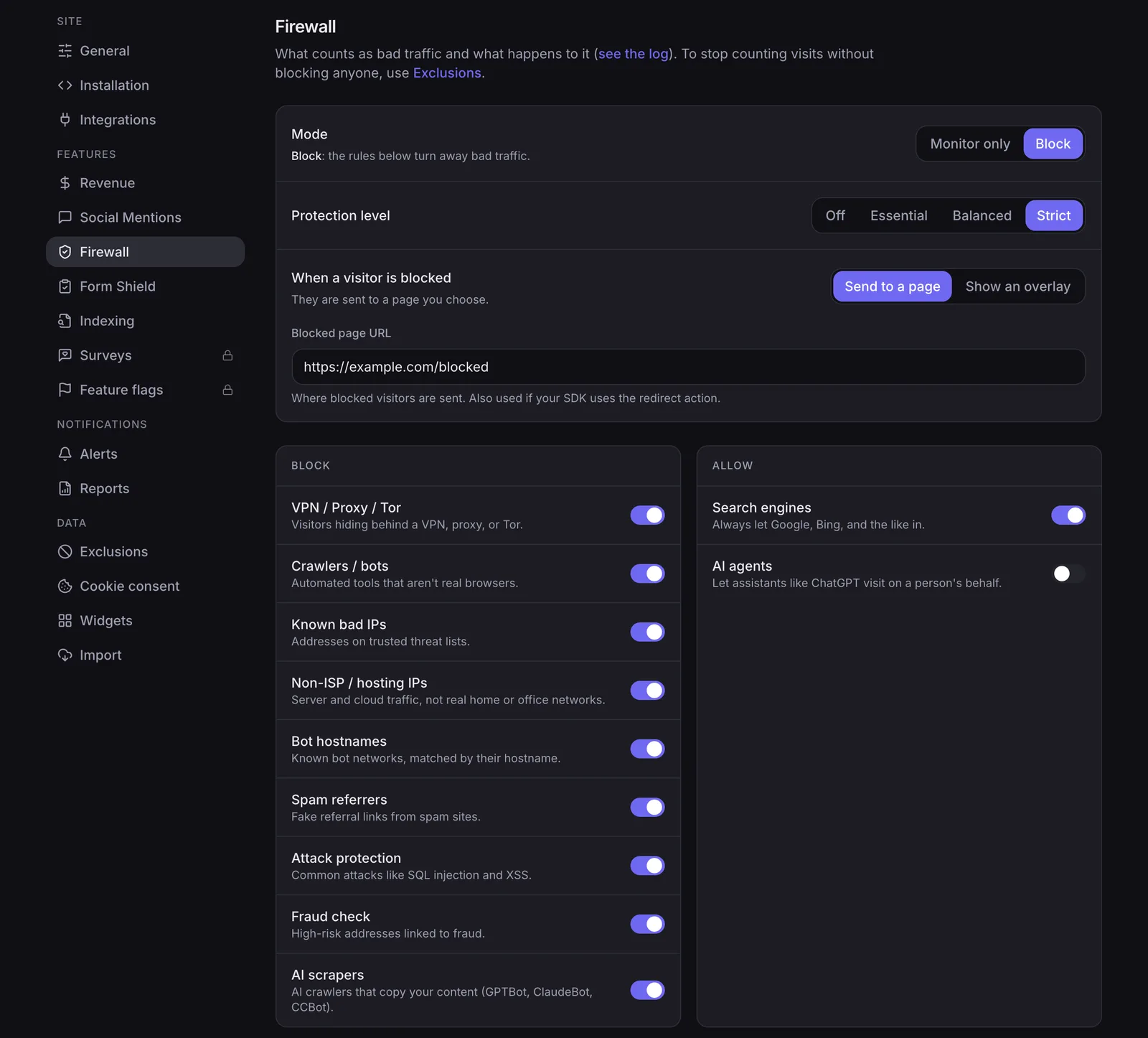
The real difference is that NoirTrack combines analytics with firewall protection and revenue attribution, while Simple Analytics stays focused on analytics. NoirTrack blocks bots, scrapers, datacenter proxies, VPNs, and AI scrapers before they reach your numbers, and it ties sales back to the visit that brought them in. Simple Analytics does not list those features.
If the buyer only needs basic reporting, Simple Analytics may be enough. If the buyer needs bot blocking or payment attribution, NoirTrack is the better match.
NoirTrack's tracking snippet is <script defer src="https://noirtrack.com/t.min.js" data-site="YOUR_SITE_KEY"></script>, and revenue attribution is on every plan. Its firewall blocks bots, scrapers, datacenter proxies, VPNs and AI scrapers.
NoirTrack vs Simple Analytics comparison table
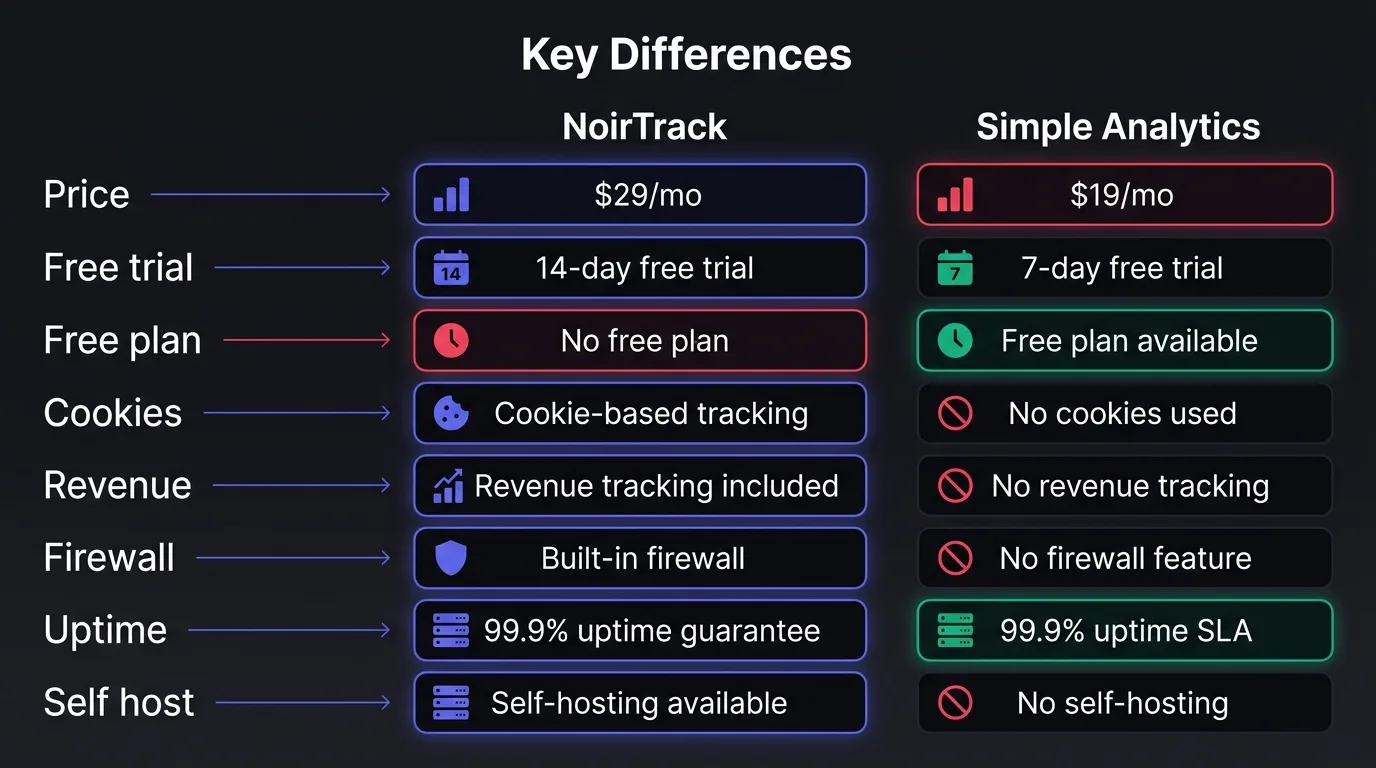
NoirTrack vs Simple Analytics splits on money tracking and traffic control. NoirTrack starts at $9 per month, includes a 14-day trial on Pro, and tracks revenue on every plan. Simple Analytics starts with a free plan and a self-serve plan from $20 per month, and its pricing page does not list revenue attribution, bot blocking, or uptime monitoring. If you want the details behind NoirTrack's revenue and firewall, see revenue tracking and bot blocking.
| Comparison row | NoirTrack | Simple Analytics |
|---|---|---|
| Price and trial | Starter from $9 monthly, 14-day free trial on Pro, no free plan | Free plan available, self-serve from $20 monthly |
| Privacy and cookie handling | Cookieless mode available | No cookies, no consent banner needed |
| Revenue attribution | On every plan | Not listed |
| Bot protection and spam control | Firewall blocks bots before they reach the numbers | Not listed |
| Status of open source and self-hosting | Not open source, no self-hosting | Not open source, no self-hosting |
| Uptime monitoring | Heartbeat uptime on every plan | Not listed |
Comparison rows to include
Price and trial matter if you want to test before you pay. A site that just needs a low entry point can start with the free plan on Simple Analytics, while a site that needs revenue on day one starts with NoirTrack's $9 Starter plan.
Privacy and cookie handling are close on the surface, but the setup differs. NoirTrack can run cookieless with data-cookieless, and Simple Analytics says it uses no cookies.
Revenue, bot protection, and uptime are the clearest gaps. NoirTrack ties each sale back to the visit, blocks bots before they count, and checks heartbeat uptime on every plan.
What NoirTrack and Simple Analytics cost in 2026
Prices were checked on 2026-10-06. NoirTrack starts at $9 per month, while Simple Analytics pricing starts with a free plan and then moves to $20 per month. NoirTrack's Starter plan includes 500,000 events, 10 sites, 3 team members, and 2 years of data. Pro adds the 14-day free trial and includes 2,000,000 events, 25 sites, 10 team members, and 3 years of data. Simple Analytics' free plan requires a badge, and its self-serve plan includes unlimited sites and unlimited history. Its pricing page does not list revenue attribution or firewall features.
NoirTrack pricing details
Starter costs $9 per month, Pro costs $19, and Business costs $49. There is no free plan, but Pro includes a 14-day free trial.
Revenue attribution and firewall protection are part of the product on every plan, so you do not buy them as add-ons. That matters if you track paid traffic and want bots blocked before they reach the numbers.
A small site can start with Starter and still cover a real workload. For example, if one newsletter send brings 120,000 visits and you run three sites, Starter stays within its 500,000 event limit.
NoirTrack also includes revenue attribution and bot firewall controls in the product itself.
Simple Analytics pricing details
Simple Analytics has a free plan with 5 websites, 1 user, 30 days of history, and a badge. Its self-serve plan starts at $20 per month and includes unlimited sites and unlimited history.
The company is EU-based and cookie-free, which is useful if your main requirement is lightweight website analytics. Its pricing page does not list payment attribution or a bot firewall, so teams that need money tracking or traffic blocking need to look elsewhere.
For a solo site with a public badge, the free plan can cover basic reporting. For a team that needs longer history and no badge, the paid plan removes both limits and keeps the setup simple.
Where NoirTrack is stronger and where Simple Analytics wins
NoirTrack vs Simple Analytics comes down to what you need the tool to do after it counts a visit. NoirTrack fits sites where traffic quality, revenue, and bot control matter. Simple Analytics fits sites where the buyer wants a plain analytics setup with no-cookie tracking and a lower-friction start.
NoirTrack adds a firewall, revenue attribution across Stripe, Paddle, Polar, Lemon Squeezy, Dodo Payments, and Creem, plus AI analytics, Google Search Console integration, heartbeat uptime, and SSL monitoring. It also has cookieless mode, so you can run analytics without storing anything on the device. A practical setup looks like this:
<script defer src="https://noirtrack.com/t.min.js" data-site="YOUR_SITE_KEY" data-cookieless data-block></script>
That one line gives you cookieless tracking and bot blocking on the same site.
Simple Analytics wins when the brief is just analytics. It offers a free plan, no cookies by default, and no consent banner needed. That makes it a clean choice for teams that want a free plan and a simple setup.
NoirTrack is stronger for revenue and protection
NoirTrack blocks bots, scrapers, datacenter proxies, VPNs, and AI scrapers before they reach your numbers. That matters when you want blocked traffic excluded from visitors and pageviews.
NoirTrack also tracks revenue on every plan and ties each sale back to the visit that brought it. If you sell a $49 plan and two traffic sources each send 100 visits, you can see which source actually drove the sale instead of guessing from pageviews alone.
Heartbeat uptime and SSL monitoring are included on every plan too. That makes NoirTrack a better fit when you want one place to watch traffic, sales, and site health. More detail lives in the revenue attribution docs and the firewall docs.
Simple Analytics is stronger for simplicity
Simple Analytics is easier to start with because it has a free plan and a straight self-serve path. That helps small sites, personal projects, and teams that only need pageviews and referrers.
Its no-cookie default also keeps setup light. You do not need to think through consent banners for analytics, which removes one step for sites that want a simple install and nothing else.
If you do not need a firewall, form protection, or payment attribution, Simple Analytics keeps the stack smaller and the decision easier.
How to choose between NoirTrack and Simple Analytics
Pick NoirTrack if you sell online, want to block bot traffic before it reaches your numbers, or need analytics and revenue in one account. Pick Simple Analytics if you want a lightweight hosted tool with basic privacy-first stats and a free plan to start. NoirTrack supports cookieless mode and cookie mode with a built-in consent banner, while Simple Analytics is cookie-free and does not need a banner. The usual mistakes are buying for pageviews only, or assuming privacy-first analytics also gives you revenue attribution and bot blocking.
Choose NoirTrack when you need more than pageviews
NoirTrack fits sites that need to connect traffic to money. It ties sales back to visits from Stripe, Paddle, Polar, Lemon Squeezy, Dodo Payments, or Creem, and its firewall blocks bots, scrapers, datacenter proxies, VPNs, and AI scrapers before they pollute your reports. It also keeps uptime monitoring and Google Search Console in the same account, so you do not bounce between tools.
A simple example: if a campaign brings 1,000 visits and 12 orders, NoirTrack can show which source brought the orders, not just the clicks. That matters when one channel looks busy but does not pay.
- You sell online. You want source-level revenue, not only visit counts.
- You fight bad traffic. You want blocked requests kept out of analytics.
- You want fewer tools. You want revenue, uptime, and Search Console in one place.
Cookieless mode uses a daily-rotating hash and does not need a consent banner for analytics. Cookie mode uses one first-party noir_vid cookie for exact returning visitors, and the built-in consent banner is available for cookie mode.
Choose Simple Analytics when the brief is minimal
Simple Analytics fits a team that wants hosted analytics with a small setup and a free tier. It keeps things narrow: no cookies, no banner, and a pricing page that starts with a free plan for 5 websites. That makes it a clean pick when you only need pageviews, sources, and a quick read on traffic.
Use it when you do not need blocked traffic, sales attribution, or form protection. If the job is "show me what pages people read," Simple Analytics does that well. If the job is "show me what traffic makes money," NoirTrack is the better fit.
- You want a free start. The free plan covers 5 websites.
- You want simple hosting. You do not want to run anything yourself.
- You only need stats. You do not need revenue, bot blocking, or form tools.
What to do next after you choose
If you want more than pageviews, start with the Quickstart and the introduction so you can go from script tag to first visitor fast. If revenue or bot blocking decides the choice, keep revenue attribution, the firewall, and GDPR & cookieless open while you set it up.
First steps for NoirTrack
- Install the snippet. Add the script from Quickstart and confirm a visit appears in the dashboard.
- Check money and protection. Connect revenue settings, then decide whether cookieless mode or the firewall fits your site.
First steps for Simple Analytics
- Create the account. Add the script and make sure pageviews arrive.
If you are still undecided, run NoirTrack's Pro trial and Simple Analytics' free plan on the same site for the same traffic window, then install the one that matches your needs and verify the first data flow before you migrate everything.
Questions, answered.
NoirTrack combines analytics with revenue attribution, bot blocking, and uptime monitoring. Simple Analytics is a simpler privacy first analytics tool with a free plan. NoirTrack also includes an AI analytics assistant, Google Search Console integration, and tracking that ties each sale to the visit that brought it. Simple Analytics focuses on clean, cookie free website analytics and keeps the product narrower.
NoirTrack starts at $9 per month, and Pro includes a 14 day free trial. Simple Analytics has a free plan and a self serve plan that starts at $20 per month. NoirTrack's Starter plan includes 500,000 events, 10 sites, and 3 team members. Simple Analytics' free plan covers 5 websites with 30 days of history, while the paid plan adds unlimited sites and unlimited history.
Simple Analytics is cookie free by default and does not need a consent banner. NoirTrack offers cookieless mode and also has cookie mode with a built in consent banner. That gives you a choice between a fully cookie free setup and exact returning visitor tracking with a first party cookie. If you want the simplest EU consent story, Simple Analytics is easier. If you want the option to use cookies for exact return visits, NoirTrack gives you that control.
NoirTrack includes revenue attribution on every plan and connects to Stripe, Paddle, Polar, Lemon Squeezy, Dodo Payments, and Creem. Simple Analytics does not list payment provider revenue attribution. NoirTrack ties each sale to the visit that brought it, which helps you see which traffic pays. If you need that link between visits and sales, NoirTrack fits better. If you only want basic privacy first traffic stats, Simple Analytics stays simpler.
The most common mistake is comparing them only on pageviews and price, then finding out later that one tool doesn't list bot blocking or revenue attribution. That leaves you with clean looking traffic numbers but no way to separate real visits from bot noise or connect revenue to the campaigns that drove it. A better comparison checks bot blocking, revenue attribution, uptime monitoring, and privacy setup before price alone.
Try NoirTrack
See which traffic actually pays.
Analytics with revenue attribution and a built-in bot firewall. One script tag, live in two minutes.
Free 14-day trial, no credit card
Written by NoirTrack team
The privacy-first Google Analytics alternative with a built-in bot firewall and revenue attribution. See which traffic makes you money, no cookie banner.


