NoirTrack vs Umami Compared (2026): which wins?
Compare NoirTrack and Umami on pricing, privacy, revenue tracking, bot blocking, and self-hosting so you can pick the right analytics tool.

NoirTrack team·Follow

Pick NoirTrack if you want revenue attribution tied to payment providers plus a built-in firewall that blocks bots before they hit your numbers. Pick Umami if you want open-source analytics, free self-hosting, and a free hobby tier with funnels, user retention, user journeys, and revenue tracking on every plan, plus session replays on Business. The best choice depends on whether you value blocking and attribution more than self-hosting and openness.
NoirTrack vs Umami compares two privacy-friendly analytics tools built for site owners who want cleaner data than they get from older analytics stacks. NoirTrack is built for tracking which traffic pays and for stopping bots before they pollute reporting. Umami is built for open-source analytics, self-hosting, and a free hobby tier, with funnels, user retention, user journeys, and revenue tracking on every plan.
Both tools fit privacy-first teams, but they optimize for different jobs. After reading this post, you will know which one fits your site, your budget, and the kind of traffic data you actually need.
Which should you pick: NoirTrack or Umami?
Pick NoirTrack if you want revenue attribution plus firewall protection, and pick Umami if you want open-source analytics and self-hosting. NoirTrack is built around paid traffic quality, while Umami is built around lightweight website analytics and product-style reporting. Both can track revenue, but NoirTrack also ties each sale back to the visit that brought it and blocks bad traffic before it reaches the numbers.
Best fit by buyer type
Founders selling through Stripe, Paddle, Polar, Lemon Squeezy, Dodo Payments, or Creem usually get more value from NoirTrack. A checkout that brings in 40 paid customers a month is easier to read when each order is tied back to the source, campaign, and visit that started it. If bot traffic also skews your reports, NoirTrack keeps those visits out before they count.
Teams that want open source, free self-hosting, or a hobby plan with no cost will usually prefer Umami. Umami's Hobby plan starts at free, and its source code is public, so developers who want to run their own stack get a clear path.
Where the tools differ most
NoirTrack includes a firewall, cookieless mode, and revenue attribution on every plan. The firewall can block bots, scrapers, datacenter proxies, VPNs, and AI scrapers, and cookieless mode uses a daily-rotating hash instead of a device cookie. A site can also start in Monitor mode, then switch to Block when the team is ready, as described in the firewall docs.
Umami includes funnels, user retention, and revenue tracking on every plan, but its pricing page does not list a bot-blocking firewall or direct payment-provider integrations. That makes it a better fit when you care more about product reporting and self-hosting than about blocking traffic before it lands in your data.
A simple example shows the split. If you run a paid newsletter and 12 signups arrive from one campaign, NoirTrack can tie those 12 sales back to the source and block repeat scraper hits from the same range. Umami can report the revenue, funnels, and retention around the signup path, which is enough when you do not need traffic filtering at the edge.
NoirTrack vs Umami features and starting price
NoirTrack starts at $9 with revenue attribution, a built-in firewall, and cookieless tracking. Umami starts with a free Hobby plan, then moves to $20 Pro and $200 Business, with open source code and free self-hosting on every plan. The table below uses only what each pricing page lists, so you can compare the starting point without guessing.
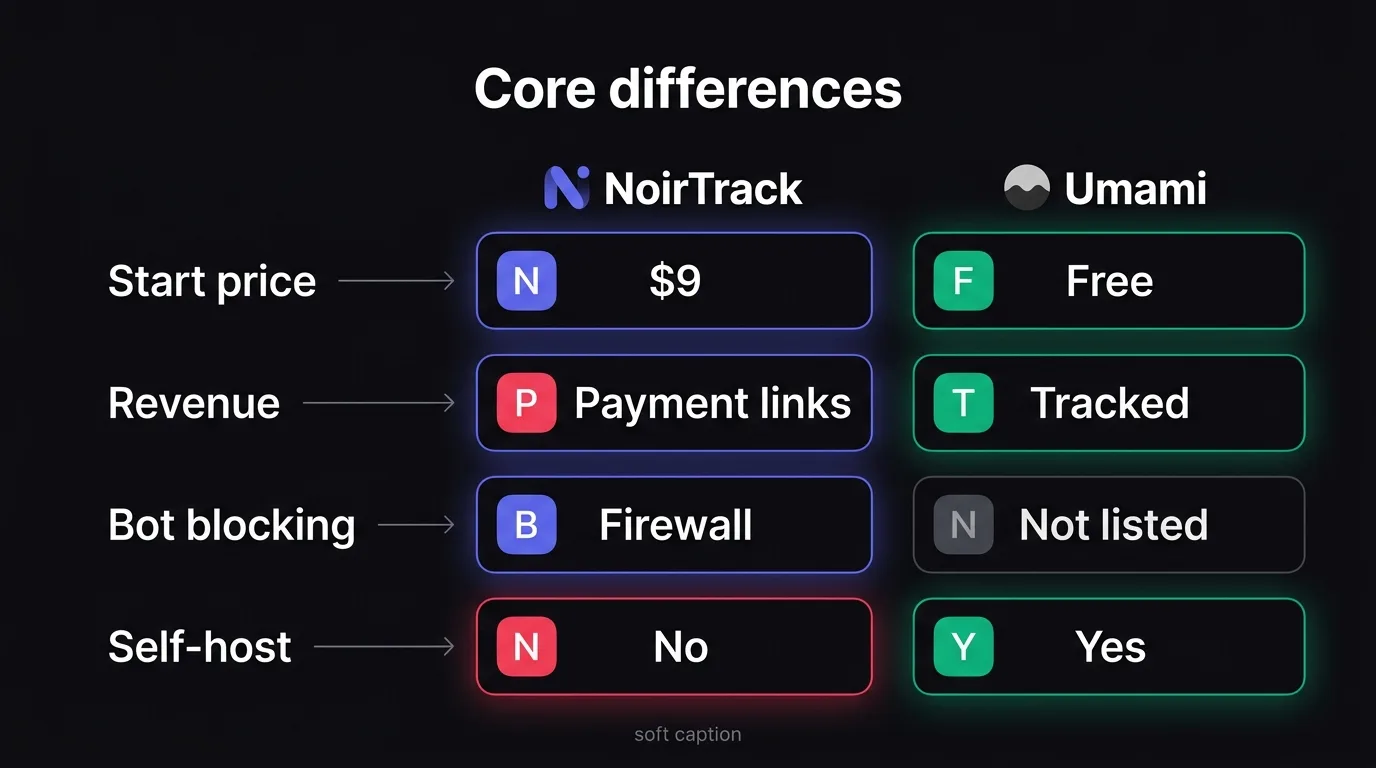
Comparison table
| feature | NoirTrack | Umami |
|---|---|---|
| starting price | Starter $9 | Hobby free |
| free trial or free plan | 14-day free trial on Pro | Free Hobby plan |
| revenue attribution | On every plan | On every plan |
| bot blocking | Built-in firewall that blocks bots, scrapers, datacenter proxies, VPNs and AI scrapers | Not listed on pricing page |
| self-hosting | Not available | Free to self-host |
| privacy mode | Cookie mode and cookieless mode | Not listed on pricing page |
| notable extras | Heartbeat uptime monitoring, Google Search Console integration, AI analytics assistant | Open source, API access, funnels, user retention, user journeys, heatmaps, session replays |
NoirTrack prices were checked on 2026-10-06. Umami prices were checked on 2026-10-06.
What to highlight in the table
NoirTrack's Starter plan is $9, and Pro includes a 14-day free trial. If you want clean numbers from the first visit, the firewall matters because it blocks bad traffic before it lands in your reports. If you want to read the privacy setup in more detail, see the cookieless mode docs and the firewall docs.
Revenue attribution is on every NoirTrack plan, so a sale from Stripe, Paddle, Polar, Lemon Squeezy, Dodo Payments, or Creem can be tied back to the visit that brought it. Umami also lists revenue tracking on every plan, but its pricing page does not list payment provider connections, so keep that distinction clear.
Umami's main price story is simpler: Hobby is free, Pro is $20, and Business is $200. It also lists open source and free self-hosting, which is the key line for teams that want to run their own stack. NoirTrack does not offer self-hosting.
A quick scenario makes the difference obvious. If a checkout lands from ?utm_source=x, NoirTrack can match the sale to that visit and keep bot noise out of the count at the same time. If your buyer wants to run analytics on their own server, Umami is the one to look at.
How pricing and plans compare in 2026
NoirTrack vs Umami comes down to how soon you need paid analytics, attribution, and protection. NoirTrack starts on paid plans and includes a 14-day Pro trial, while Umami starts with a free Hobby plan and moves to a paid path from $20 per month. For a small personal site, Umami's free tier can cover the basics. For a team that wants revenue attribution and bot blocking earlier, NoirTrack's $9 Starter plan is the lower paid entry. NoirTrack is hosted, and Umami Cloud adds managed hosting with free self-hosting available.
| Tool | Starting path | Best fit |
|---|---|---|
| NoirTrack | 14-day Pro trial, then $9 Starter | Teams that want revenue and cleaner traffic sooner |
| Umami | Free Hobby plan, then $20 Pro | Small sites that can stay on a free tier longer |
A simple example makes the split clear. If you run a landing page that gets 40,000 events a month and you need to tie Stripe sales back to traffic, NoirTrack starts at $9 per month and includes that attribution on every plan. If you run a personal blog and only need page and event counts, Umami's free Hobby plan may be enough until you outgrow its 100K event limit.
NoirTrack pricing
Starter is $9 per month, Pro is $19 per month, and Business is $49 per month. The paid ladder is short, and the lower entry point is meant for sites that need attribution and bot protection before they scale. Every plan includes revenue attribution, heartbeat uptime, SSL monitoring, and Google Search Console integration. If you want to see how revenue tracking works, the setup is described in the revenue attribution docs.
NoirTrack's plans also scale by site count, team size, event volume, and data retention. Starter includes 500,000 events, 10 sites, 3 team members, and 2 years of data.
Umami pricing
Hobby is free, Pro is $20 per month, and Business is $200 per month. The free plan covers up to 100K events per month, 1 website, and 6 months of retention, which is enough for many small personal sites. Pro adds 1 million included events, 20 websites, 10 team members, 2 years of retention, and API access.
Funnels, user retention, user journeys, and revenue tracking are on every plan. Umami's bigger pricing difference is that the free plan stays available, and the open source code plus free self-hosting make it the better fit when you want to run your own instance.
Where NoirTrack is stronger than Umami
NoirTrack vs Umami comes down to traffic quality and sales attribution. NoirTrack changes the data at the source by checking traffic before it counts, so bots, scrapers, datacenter proxies, VPNs, and AI scrapers never mix into visitors and pageviews. It also ties sales back to the visit, source, and campaign that brought the buyer, so revenue reports show which channels pay and which ones only add noise.
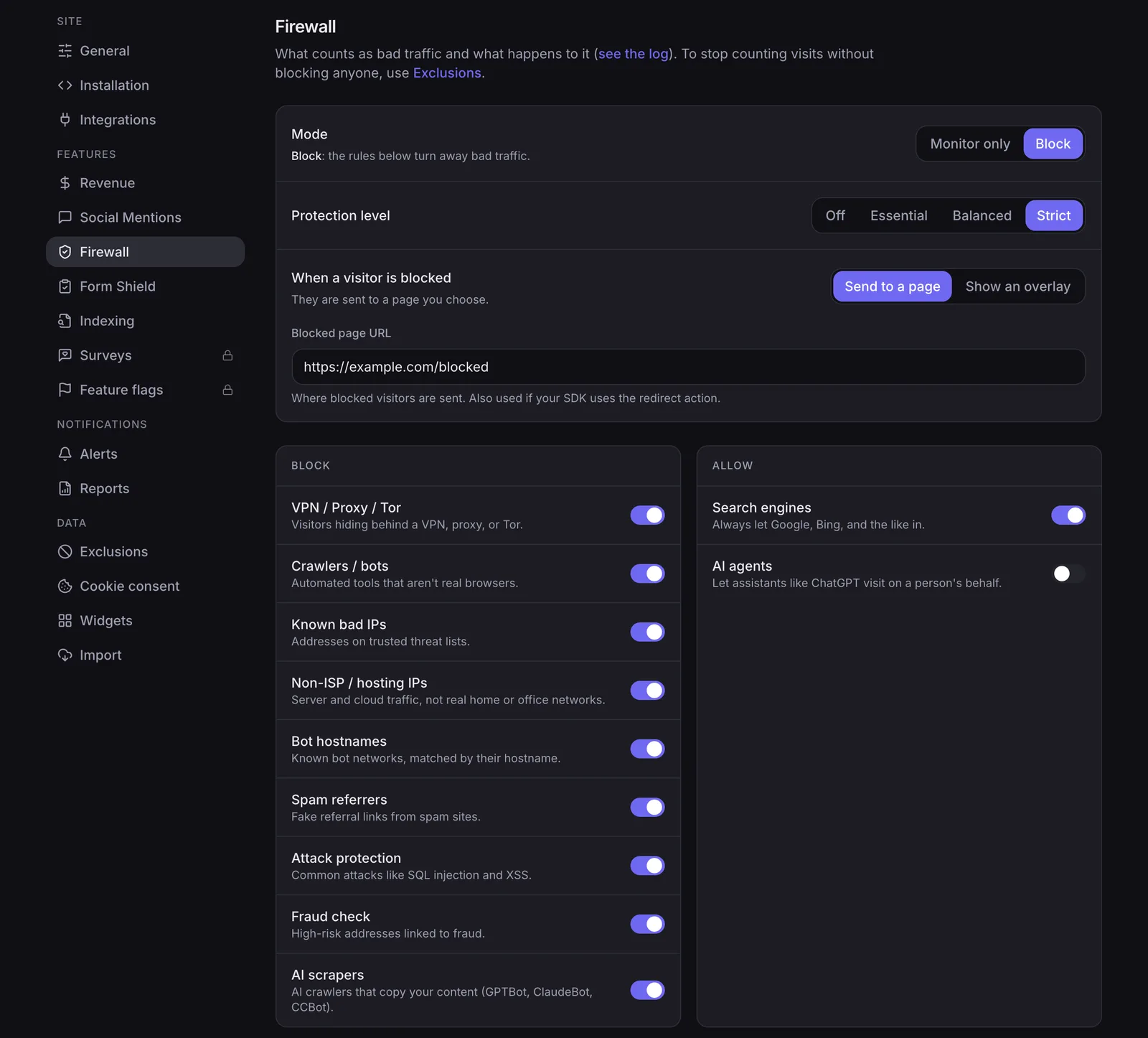
Bot protection and cleaner numbers
NoirTrack starts with Monitor mode, then lets you switch to Block mode after you see what it would stop. That matters because you can review the threat pattern first instead of blocking real users on day one. The firewall excludes blocked traffic from visitors and pageviews.
The tracking snippet uses the data-site attribute:
<script defer src="https://noirtrack.com/t.min.js" data-site="YOUR_SITE_KEY"></script>
If a campaign pulls 1,000 visits and 120 are bots, NoirTrack counts the 880 real visits instead of burying them inside the total. That makes source reports and conversion rates easier to trust because the denominator is not inflated by junk traffic. Read more in how the firewall works.
Revenue attribution from real payments
NoirTrack connects revenue directly to Stripe, Paddle, Polar, Lemon Squeezy, Dodo Payments, and Creem, then matches each sale back to the visit that brought it. Revenue attribution is on every plan, and each sale ties back to the visit that brought it. That gives you source-level sales reporting, not just event totals.
NoirTrack tags the visitor, then ties the payment back to the visit that brought it. See the full flow in revenue attribution.
Umami lists revenue tracking on every plan, but its pricing page does not list direct payment-provider integrations like Stripe. For founders who want the analytics to reflect paid orders without extra wiring, NoirTrack gives you the shorter path from visit to sale.
Where Umami is stronger than NoirTrack
Umami wins for teams that want open source, self-hosting, and a free entry point. Its Hobby plan costs $0, so a team can test the tool without committing to a paid subscription, and it keeps funnels, user retention, user journeys, and revenue tracking on every plan. That makes it a cleaner fit for product teams that care more about product analysis than about blocking bad traffic. NoirTrack vs Umami comes down to this tradeoff: one is built around traffic quality and paid visits, the other gives you product analytics depth with an open codebase.
Open source and self-hosting
Umami is open source and free to self-host. A team can run it on its own infrastructure, inspect the code, and keep data under its own control.
NoirTrack is not open source and does not offer self-hosting. It is a hosted product, so teams that need to run analytics on their own servers will find Umami the better fit.
A simple example is a startup that wants to try analytics on a staging app before launch. It can start on Umami Hobby, point one site at it, and move on without paying first.
Product analytics depth
Umami includes funnels, user retention, user journeys, and revenue tracking on every plan. That matters when a team wants to follow a signup path, compare repeat visits, or tie revenue to product behavior without upgrading just to get the basics.
The Hobby plan gives teams a free way to test those reports, while Pro and Business add more scale. For product managers and founders who spend most of their time on conversion paths, feature usage, and retention curves, that package is more useful than a tool centered on bot blocking.
NoirTrack still covers revenue attribution, goals, and funnels, plus bot protection and cleaner numbers. Umami is the stronger pick when the team's main job is analysis, not traffic filtering.
How to choose the right tool for your site
Pick NoirTrack for paid acquisition, sales attribution, and traffic you do not trust. Pick Umami for open-source code, free self-hosting, and basic website analytics with funnels and journeys.
Choose NoirTrack if you need
Use NoirTrack if you want revenue attribution tied to each sale and a built-in firewall with Monitor mode before Block mode. It also has cookieless mode, so you can run analytics without a tracking cookie. See how revenue tracking works and how the firewall works.
Choose Umami if you need
Use Umami if you want a free starting point, open-source code, and self-hosting. It also gives you funnels, retention, and user journeys without moving to a bigger product analytics stack. If you are deciding today, install both on one test page and compare a real signup path from the last 7 days.
Questions, answered.
NoirTrack is built around revenue attribution and bot blocking, while Umami is open source and free to self host, and it includes funnels, user retention, user journeys and revenue tracking. NoirTrack ties sales back to the visit that brought them and blocks bots, scrapers, datacenter proxies, VPNs and AI scrapers before they reach the numbers. Umami focuses on funnels, user journeys, retention and revenue tracking, with self hosting as a major draw.
NoirTrack starts at $9 per month, and the Pro plan includes a 14 day free trial. Umami has a free Hobby plan, and its paid plans start at $20 per month. NoirTrack also publishes Starter, Pro and Business tiers, while Umami scales from Hobby to Pro and Business.
NoirTrack gives you both cookie mode and cookieless mode, and cookie mode includes a built in consent banner. Cookieless mode uses a daily rotating hash and does not need a consent banner for analytics. Umami is cookieless and free to self host, which appeals to privacy focused teams that want more control over their data and deployment.
Umami lists revenue tracking on every plan, and that covers the basic need to connect analytics with sales. NoirTrack goes further by tying each sale back to the visit that brought it, and it lists direct payment provider attribution for Stripe, Paddle, Polar, Lemon Squeezy, Dodo Payments and Creem. Teams that want clearer visit level attribution usually care about that extra link.
The common mistake is comparing pageview tracking only and ignoring bot filtering, self hosting and revenue attribution. Those differences usually matter more than the dashboard layout because they change what data you trust, where it runs and whether sales can be tied back to visits. Umami makes sense for teams that want open source and self hosting. NoirTrack fits teams that want bot blocking and revenue attribution first.
Try NoirTrack
See which traffic actually pays.
Analytics with revenue attribution and a built-in bot firewall. One script tag, live in two minutes.
Free 14-day trial, no credit card
Written by NoirTrack team
The privacy-first Google Analytics alternative with a built-in bot firewall and revenue attribution. See which traffic makes you money, no cookie banner.


