How to Track Checkout Conversions Without Cookies or Google Analytics in 2026
See how to measure checkout conversions, revenue, and source attribution without cookies or Google Analytics, with a practical setup flow.

NoirTrack team·Follow

You can track checkout conversions without cookies by tying each sale back to the visitor, source, and campaign that started the journey. NoirTrack does this with revenue attribution on every plan and a cookieless mode for analytics, so you can track checkout conversions without cookies or Google Analytics without relying on Google Analytics. This does not replace tools built for ad optimization or deep Google Ads workflows.
If your checkout is the part of the funnel that pays the bills, that is the number you need to trust first. Cookies and Google Analytics are not required to measure purchases, revenue, or which source drove the sale. The real job is linking the checkout back to the original visit while keeping your analytics usable under privacy rules.
After reading this, you will know how to connect sales to the visit that started them and read the numbers with less noise from cookies, consent gaps, and bot traffic.
How do you track checkout conversions without cookies?
Track checkout conversions without cookies or Google Analytics by sending a purchase event from your payment provider or backend, then matching that sale back to the visit that started the session. NoirTrack links the sale to the source and campaign that brought the buyer in, so revenue shows up next to the traffic that paid for it. If you want a privacy-first setup, turn on cookieless mode for visits and keep revenue attribution separate from cookie-based page tracking.
What NoirTrack records for a sale
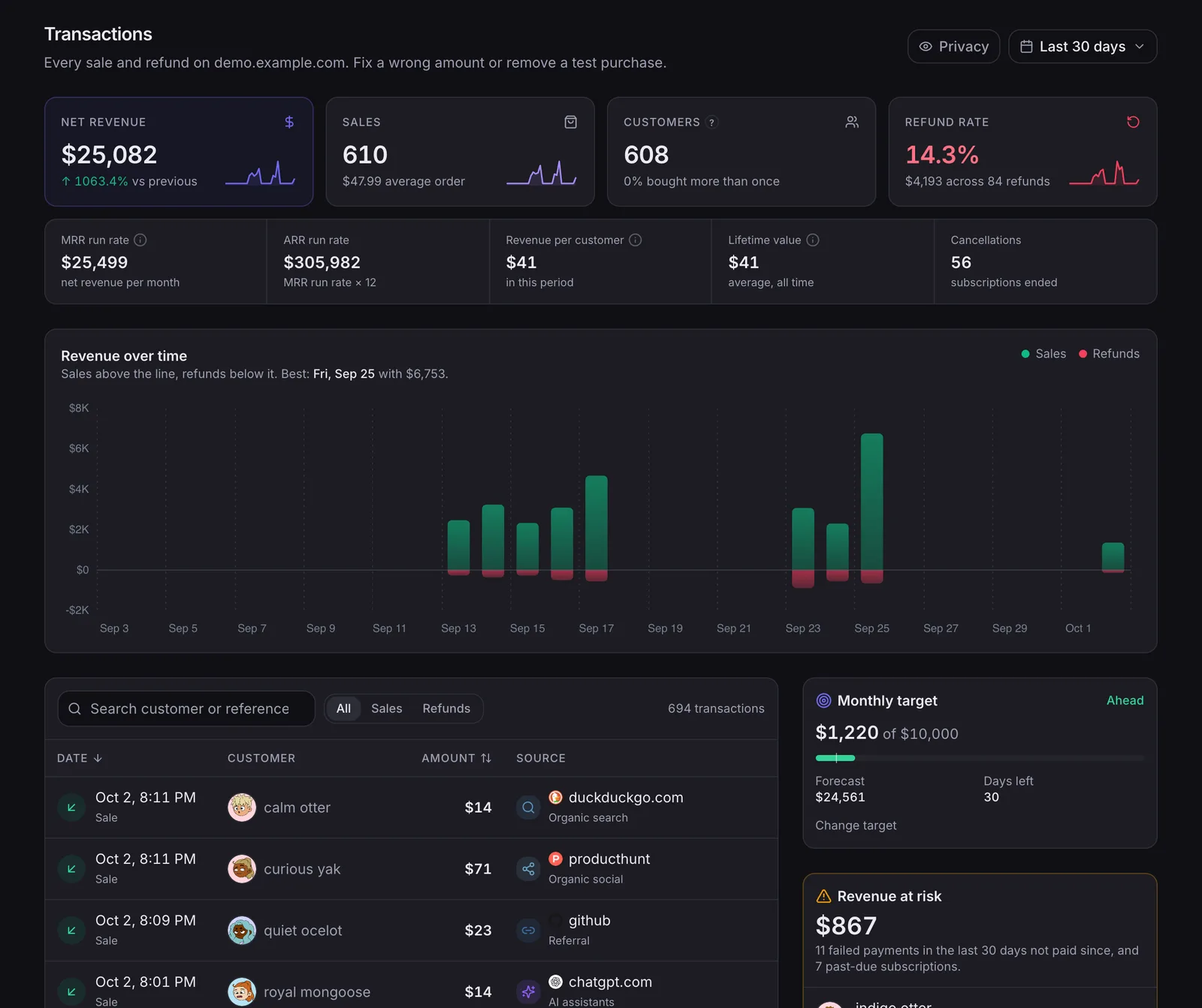
NoirTrack attributes sales from Stripe, Paddle, Polar, Lemon Squeezy, Dodo Payments, and Creem on every plan. That means a sale does not sit only in a payment dashboard. NoirTrack ties it to the visit, source, and campaign that led there, so you can read revenue by channel in the same place you read traffic.
A simple flow looks like this:
- Connect your processor. Open Site → Settings → Revenue and connect the one processor your site uses.
- Let the sale sync. NoirTrack matches each sale to the visitor who made it, first by
visitor_idpassed at checkout, then by the success page, then by email. - Read the result in revenue reports. NoirTrack shows revenue by source, campaign, and page once sales are flowing.
A short scenario makes this concrete. If a buyer lands from utm_source=x&utm_medium=social&utm_campaign=launch, starts a trial, and then pays $49, that sale appears under that campaign instead of as an isolated payment record.
For the traffic side, tag links with campaign parameters so NoirTrack can group visits by source and campaign before the sale lands. If you also want a goal before revenue is available, Goals can record the earlier step.
When this method is the right fit
This approach fits SaaS, digital products, and subscriptions where the checkout provider can send a sale record back to analytics. It also fits sites where visitors block cookies, because cookieless mode removes the device cookie while still letting NoirTrack count visits and match revenue when the sale arrives.
It is a good choice when you care about site-level attribution, such as which campaign drove paid users. It is a poor fit when you only want ad platform reporting and do not need to see which pages or sources turned into revenue.
NoirTrack's cookieless mode uses a daily-rotating hash instead of a device cookie.
What should the setup flow look like?
Set up analytics first, connect your payment provider second, and test one real purchase before you rely on the numbers. That order gives you pageviews, then sale matching, then a source check on the revenue view. If you want to track checkout conversions without cookies or Google Analytics, cookieless mode keeps the setup simple on the tracking side while revenue still ties back to the visit.
Use UTM tags on every campaign link so paid posts, newsletters, and ads land in the same campaign report. NoirTrack reads those parameters automatically, and the sale keeps the campaign that brought the buyer in. If you already have a checkout, this is the fastest path from traffic to money.
-
Install the snippet and confirm pageviews. Add the tracking snippet to your site, then load a few pages and check that visits appear. For cookieless mode, add
data-cookielessto the script tag. -
Connect your payment provider. Open Site → Settings → Revenue and connect the processor you charge through, such as Stripe, Paddle, Polar, Lemon Squeezy, Dodo Payments, or Creem. NoirTrack matches each sale back to the visitor who brought it in.
-
Tag campaign links with UTMs. Use
utm_source,utm_medium, andutm_campaignon links from newsletters, ads, and social posts. A link like?utm_source=newsletter&utm_medium=email&utm_campaign=jan_launchkeeps the source attached when the buyer reaches checkout. See the campaign parameter guide for the exact fields. -
Test one purchase end to end. Place a real or test order, then open the source and revenue views. You want to see the visit, the campaign, and the sale line up on the same buyer journey. If the payment layer is not connected yet, add a goal for checkout completion so you can still read conversion rate by source while you finish revenue sync.
A practical 4-step setup
The practical setup is install, connect, tag, then verify. That sequence catches the most common breakage early, especially missing UTMs and a payment provider that is not linked to the site.
Where goals help before revenue sync
Goals give you a conversion rate before the sale data arrives. A checkout-start goal on 1,000 visits and 40 completions tells you the funnel is working at 4 percent, even if the payment webhook is still pending.
Once revenue sync is live, the same flow shows both completion rate and paid revenue for the same source.
Cookies vs cookieless tracking: what changes?
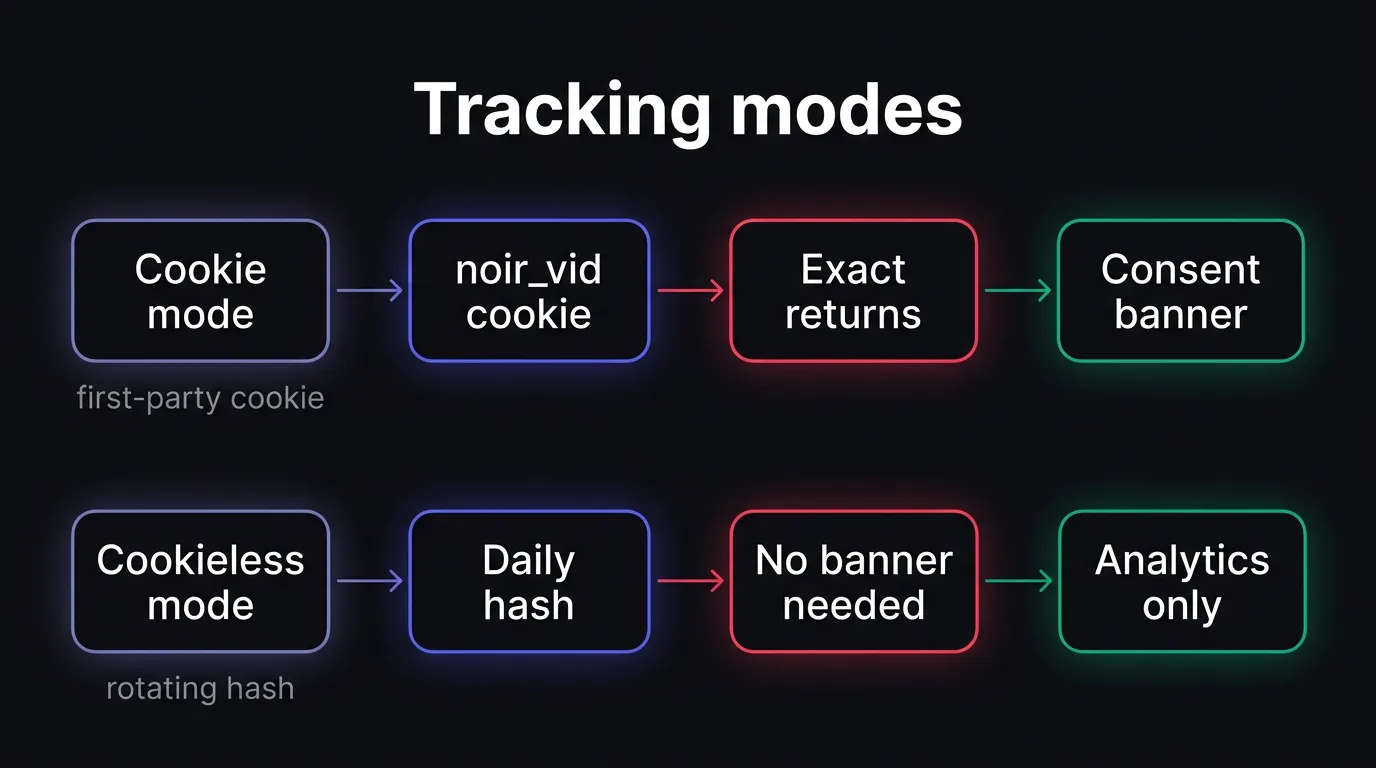
Cookie mode stores one first-party noir_vid cookie so NoirTrack can recognise the same visitor on later visits. Cookieless mode uses a daily-rotating hash instead, so it tracks analytics without a device cookie or a consent banner for measurement. In both modes, the sale still has to match the visit that brought it, which is what drives revenue attribution. If you want the setup details for sales matching, see /docs/revenue-attribution.
Which mode to choose
Choose cookie mode when you already run consent and want exact returning-visitor recognition across days. Choose cookieless mode when you want privacy-first analytics and prefer not to ask for analytics consent in the browser. The revenue part stays the same in both cases. You still connect your payment provider once, then NoirTrack matches each sale back to the visit.
A simple example: if a checkout completes through Stripe and the success page carries the visitor match, NoirTrack can tie a $49 sale back to the source and campaign that started the session. The visitor ID method is the most accurate, but the matching logic does not change when you switch tracking modes.
- Use cookie mode if your site already shows a consent banner and you want the same visitor recognised on Tuesday that came back on Friday.
- Use cookieless mode if you want to measure traffic without storing anything on the device and without a banner for analytics.
- Keep the revenue setup the same in either mode, because the checkout link to the visit is separate from visitor identification.
How this compares with Google Analytics 4
| Tool | Cookie use | Consent banner need in the EU | Revenue attribution | Bot blocking |
|---|---|---|---|---|
| NoirTrack | Cookie mode uses noir_vid; cookieless mode stores nothing on the device |
Needed in cookie mode, usually not needed in cookieless mode | Built in for supported payment providers | Built in |
| GA4 | Uses cookies to identify visitors | Generally needed, unless consent mode modelling fills gaps | Requires custom setup for Stripe-style sales tracking | Not built in |
GA4 is free for standard properties and fits teams already deep in Google Ads, BigQuery, explorations, and audiences. GA4 also brings a steeper learning curve for small teams, and its standard properties keep user and event data for 2 or 14 months. NoirTrack is the better fit when you care more about revenue attribution, bot blocking, and a privacy-first setup than about the Google marketing stack.
If your main question is how to track checkout conversions without cookies or Google Analytics, the cookieless mode is the cleaner path when you want fewer browser prompts and the same sales matching flow.
How do you keep checkout numbers clean?
Keep checkout numbers clean by removing test traffic, blocking bad traffic before it reaches your reports, and checking every sale that shows up without a source. If you want to track checkout conversions without cookies or Google Analytics, the reporting still depends on the same three checks: who should not count, which visits were blocked, and which purchases can be tied back to a visit.
A clean setup starts with exclusions. If you use the built-in firewall, put it in Monitor mode first, then switch to Block mode after you confirm it is catching the right traffic. NoirTrack says the firewall blocks bots, scrapers, datacenter proxies, VPNs, and AI scrapers, so the dashboard only sees traffic you actually want to measure.
Sales with no source need a review too. NoirTrack links each sale back to the visit, source, and campaign that led to it, and it can still count a sale even when the source is unknown. When that happens, check the payment provider match, the checkout handoff, and whether the visit had tracking parameters in the first place. A sale that lands as Direct or Unknown often means the visit trail never reached the payment event.
Common data problems to catch early
A duplicate sale usually means the same purchase arrived twice, often from a retrying webhook or a browser event plus a server event for the same order.
A blocked real customer means the firewall rules are too strict for that traffic pattern. Check whether a VPN, corporate proxy, or privacy tool is being treated like a bot before you trust the numbers.
A source of Direct or Unknown usually means the visit was not captured with enough context. If you tag campaigns, keep the link consistent with your source tags, such as utm_source=newsletter&utm_medium=email&utm_campaign=launch, so the sale can be matched back to the right visit through campaign tracking parameters.
Why this matters for checkout reporting
Small checkout volumes can swing hard when one bad visit or one duplicate event slips through. If you have 20 sales in a month, one fake test checkout changes revenue by 5 percent.
When bots are excluded before they reach the numbers, conversion rate and revenue by source become easier to read. That matters most when a single newsletter or ad campaign drives most of your orders, because one bad event can make a strong channel look weak or a weak channel look profitable.
For attribution details, see how revenue gets tied back to the visit.
What is the easiest next step if you already have a checkout?
Pick the payment provider you already use, then connect it to your analytics so sales are tied to visits automatically. If you want to see how revenue matching works, start there. Tag your highest-value links with UTMs before the next campaign goes live, using the campaign parameter guide. If you want track checkout conversions without cookies or Google Analytics, start with revenue attribution first and add cookieless tracking after.
A simple rollout order
- Install NoirTrack. Verify that visits appear.
- Connect payments. Run a test sale and check that it shows a source.
- Add goals. Use them if you want a clearer path to purchase.
- Review by campaign. Check source, campaign, and revenue in the dashboard.
When to stop here and choose another tool
Choose Google Analytics if your team needs Google Ads workflows or BigQuery export. Choose another stack if you need open-source self-hosting. Choose NoirTrack if you want revenue attribution and bot protection in one system.
Questions, answered.
Checkout conversion tracking without cookies means a sale or purchase event is tied back to the visit and source that started the journey, instead of relying on a browser cookie to recognise the user. That lets you connect revenue to a campaign, referrer, or ad click even when you are not using a visitor cookie for identification.
The basic setup takes two steps: connect your payment provider, then let NoirTrack match each sale to the visitor who made it. If you also want campaign attribution, add UTM tags to your links so the source data comes through with the visit. NoirTrack supports revenue attribution with Stripe, Paddle, Polar, Lemon Squeezy, Dodo Payments, and Creem on every plan.
Google Analytics 4 is free for standard properties and works well with Google Ads and BigQuery, but it uses cookies to identify visitors and leans toward a broader marketing stack than direct revenue attribution. GA4 also does not include payment provider revenue attribution, bot blocking, form spam protection, or uptime monitoring out of the box.
Yes, cookieless tracking still works with revenue attribution. Cookieless analytics changes how visitors are identified, but the sale can still be tied back to the visit that brought it. NoirTrack does this with a cookieless mode that uses a daily rotating hash and does not need a consent banner for analytics.
The most common mistake is sending sale data without source data, which makes transactions show up as direct or unknown and breaks campaign reporting. Add the visit source before the payment completes, then test a real purchase end to end. Without that source link, revenue tracking shows the sale but not the channel that caused it.
Try NoirTrack
See which traffic actually pays.
Analytics with revenue attribution and a built-in bot firewall. One script tag, live in two minutes.
Free 14-day trial, no credit card
Written by NoirTrack team
The privacy-first Google Analytics alternative with a built-in bot firewall and revenue attribution. See which traffic makes you money, no cookie banner.


