How to Track Which Ads Bring Paying Customers
Learn how to connect ad clicks to real purchases, read revenue by campaign, and cut spend on ads that only drive empty traffic.

NoirTrack team·Follow

Track the ad click with UTM tags, then connect each sale to that visitor so you can read revenue by campaign, source, and platform. To track which ads bring paying customers means linking every ad click to a completed sale, then using that match to judge which campaigns earned money. In practice, that means the winning ads are the ones that bring paid conversions, not just clicks, and you can see it in one dashboard. This does not help if your checkout or payment data never reaches analytics.
Clicks are cheap to count, but paying customers are what matter. The fix is to tag every ad, match the visit to a sale, and compare revenue against spend instead of relying on platform-reported conversions alone. That gives you a cleaner view of which source paid back its cost and which one only looked good inside the ad platform.
This post shows the exact setup, the reports to read, and the mistakes that make ad attribution look better or worse than it is. By the end, you will know how to tell which ads brought paying customers and which ones did not.
What should you track to know if an ad paid off?
To know whether an ad paid off, track spend, revenue, and the conversion tied to the original click. That gives you a simple test: did this campaign bring back more money than it cost, or did it only bring visits and signups. Use tagged links on every ad and connect the sale to the visit that started it, so you can compare campaigns by money instead of by attention. NoirTrack reads UTM tags from links and links sales back to the visit, source, and campaign when you set up campaign tracking tags and revenue attribution.
Use a single source of truth for each click
Every paid click should land on one tagged URL, even if the ad platform also reports clicks. If one campaign appears as google, google ads, and gads, your report splits the same traffic into three buckets and the revenue numbers stop lining up.
Keep the naming stable across platforms and campaigns. Use the same utm_source and utm_medium every time for the same channel, then vary utm_campaign and utm_content for the specific ad or creative. A clean ad link can look like this:
https://yoursite.com/pricing?utm_source=google&utm_medium=cpc&utm_campaign=trial-offer&utm_content=text-ad-1
That one link tells you where the visitor came from and which ad drove the click, without forcing you to guess later.
Measure revenue, not just conversions
A signup shows interest. Revenue shows payment. If a campaign gets 40 signups but 2 customers, it looks busy and still may not pay for itself.
Attach the purchase or subscription event to the original visitor, then compare campaigns by revenue collected from those visitors. NoirTrack does that matching after you connect your payment flow, so you can see which traffic source led to the sale. If you also run subscriptions, include refunds in the same view so a campaign with early sales does not hide churn a month later.
A simple example helps. If Campaign A spends $200 and brings in $560 in revenue, it paid back. If Campaign B spends $200 and brings in $120, it did not. The conversion count alone would not show that difference.
How do you tag ads so revenue can be attributed correctly?
Use one tracking template for every ad, email, and paid placement, then keep the same naming rules across every channel. That makes each click readable later, even after you copy an ad, pause it, or reuse it in a new campaign. NoirTrack reads UTM parameters automatically and groups visits by source and campaign, so you can connect a click to revenue when you pair it with revenue tracking.
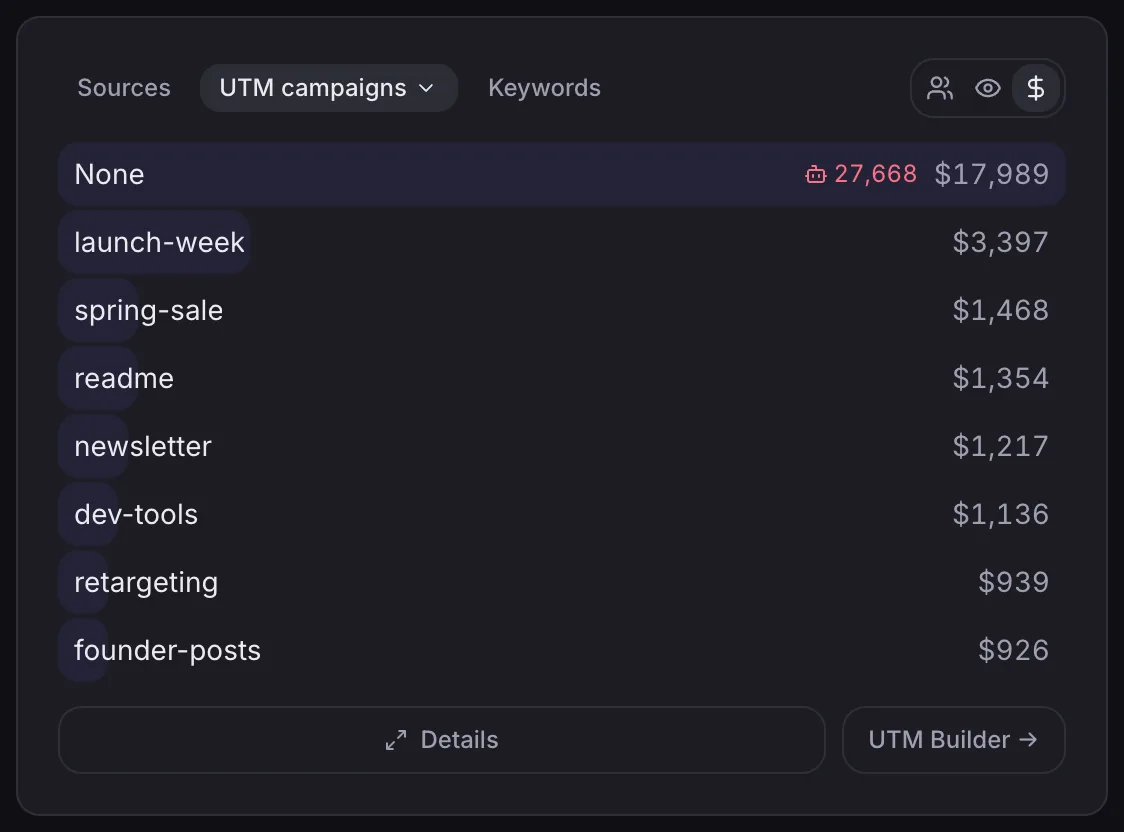
Numbered setup for clean campaign data
-
Pick one campaign name per offer. If you are selling a free trial and a paid plan, give each its own
utm_campaignvalue. A single offer should keep one name from launch to close so the data rolls up cleanly. -
Set source and medium to match the platform. Use
utm_sourcefor where the link lives andutm_mediumfor the channel type. For example, an X ad can useutm_source=x&utm_medium=paid_social, while a search ad might useutm_source=google&utm_medium=cpc. -
Add content or term only when you need extra detail. Use
utm_contentfor creative variants andutm_termfor paid search keywords. If you only need to know which campaign sold, leave them out. -
Test the link before you spend. Paste the tagged URL into your browser and check that the landing page still loads with the parameters intact. A tagged post on X can look like this:
https://yoursite.com/?utm_source=x&utm_medium=social&utm_campaign=launch
What to avoid in UTM naming
Keep case and spelling consistent. Black Friday and black-friday are different values in case-sensitive reports, and that splits one campaign into two rows. Use lowercase and no spaces.
Do not reuse one campaign name for different products. If two offers share the same utm_campaign, their results blend together and you cannot tell which ad paid for which sale.
Do not let different people invent their own naming style. One team member writing paid_social while another writes Paid Social creates cleanup work later and breaks clean comparisons.
NoirTrack's Campaigns and UTM view uses these parameters to group visits by source, medium, campaign, content, and term, so consistent tags make the revenue report readable from day one.
How do you see which ads bring paying customers in NoirTrack?
Connect revenue tracking once, then open the Sources panel to see which ad traffic brings in money and use Transactions to check the sales behind it. NoirTrack reads UTM tags on tagged links, and it also matches ad click IDs and revenue so you can see whether a campaign brought visits or paid customers. That is the part that helps you track which ads bring paying customers without guessing from clicks alone.
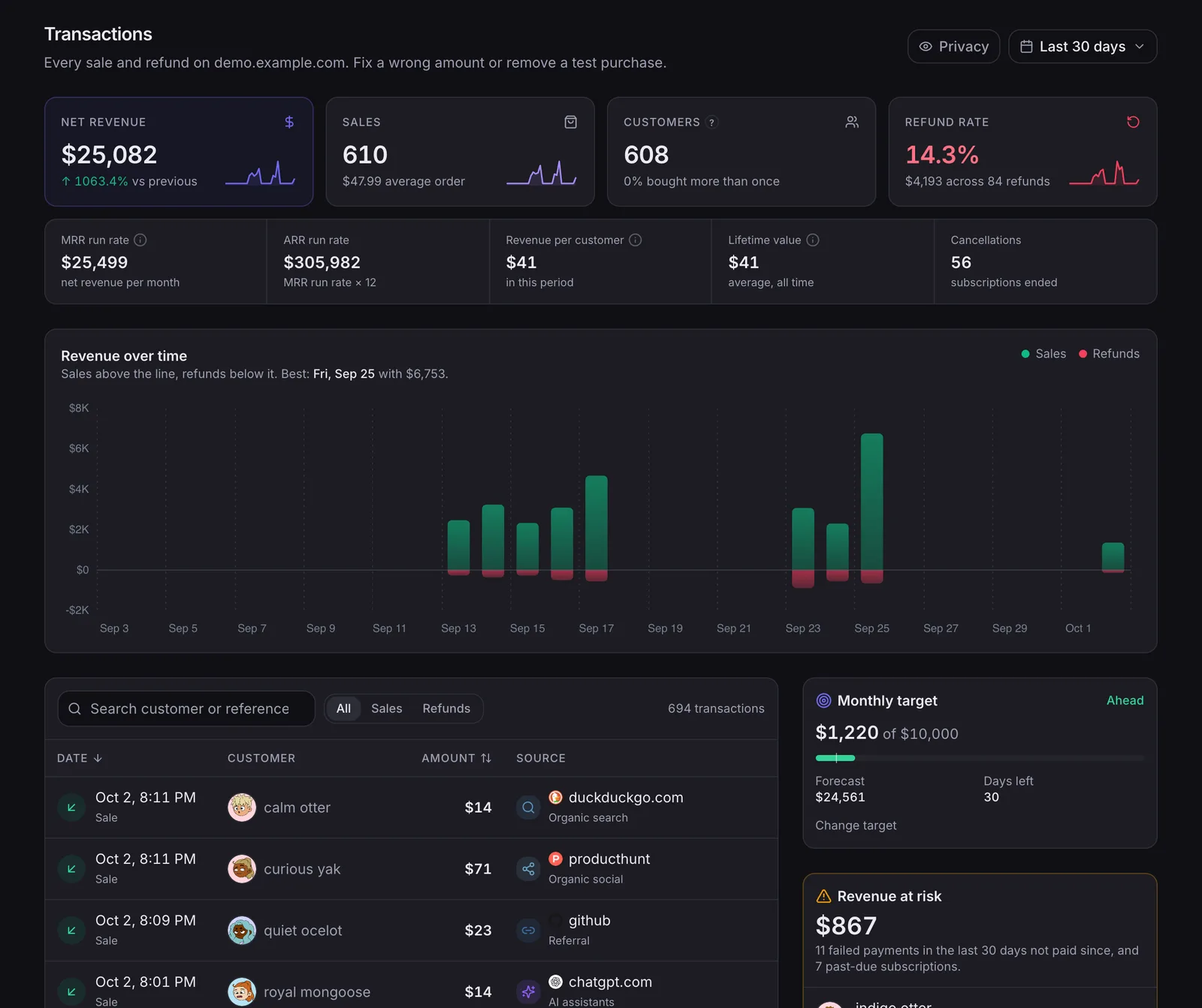
Read the Sources panel first
The Sources panel shows revenue by source and campaign, so start there and ignore visit count until you know which source paid back. A campaign with 40 visits and $600 in revenue beats one with 400 visits and $0 in revenue, even if the second looks busy.
- Open Sources and switch to the campaign view.
- Sort by revenue and scan for the sources with the highest money total.
- Compare campaigns from the same source so a cheap but weak ad does not hide inside a broader channel.
- Pick the one campaign that brings fewer visits but more sales, then keep that pattern for the next test.
A simple tagged ad link looks like this:
https://yoursite.com/?utm_source=x&utm_medium=social&utm_campaign=launch
That link groups every click under one source and campaign, so the dashboard can show which post or ad sent the buyer.
Use Transactions when you need proof
Transactions lists each sale with its source, which gives you the audit trail behind the revenue number. Open a sale that looks odd and check whether the visitor journey was captured before checkout, since that decides whether NoirTrack can connect the payment to the earlier visit.
If a sale shows as Direct, look for one of three paths: the visitor landed without tags, the checkout happened before the visit was saved, or the buyer returned later through a route that lost the original source. If a sale shows as UTM-tagged, you can trace it back to the exact campaign values in the URL. If it matches another source, follow that source label back to the first recorded visit and compare it with the ad platform data you already have.
For the full tracking rules, see how revenue attribution works and Campaigns and UTM tags.
How do you compare ad spend against revenue?
Compare ad spend against revenue by putting both numbers in the same report and using that report to judge each platform. NoirTrack's Revenue → Ad spend page shows spend, revenue, ROAS, and CAC side by side, so you can see whether a platform brought paying customers or just brought visits. If you want the setup behind those numbers, see /docs/ad-spend and /docs/revenue-attribution.
Use the platform view for budget decisions
Start at the platform level when you decide where next month's budget goes. If one platform earns a 4x ROAS and another sits below 1x, the budget choice is obvious before you look at any campaign detail. That is the fastest way to track which ads bring paying customers.
- Open the platform view. Go to Revenue → Ad spend and pick the month you want to review.
- Read ROAS and CAC together. ROAS tells you how much revenue came back for each dollar spent. CAC tells you how much you paid for each customer.
- Drill into a weak platform. If a platform looks fine overall but one campaign drags it down, check that campaign before you cut the whole channel.
A low CAC can still hide small orders. A channel that costs $20 to win a customer looks cheap until that customer only spends $18. ROAS catches that problem because it ties spend to revenue, not just signups or checkout starts.
| What you see | What it means |
|---|---|
| High spend, low revenue | The platform is buying traffic that does not pay back |
| Low spend, high revenue | The platform is small but efficient |
| Low CAC, low ROAS | Customers are cheap, but each one buys too little |
| High CAC, high ROAS | The channel costs more, but the orders justify it |
Compare what ads platforms claim with what you collected
Ad platforms often count view-throughs, modeled conversions, or duplicate touches. Your ad report may say a campaign drove 40 conversions while your own sales records show 27 paid orders. Treat the sales records tied to the visitor journey as the source of truth, then use the platform number as a second opinion.
A simple check keeps the decision clean. If Platform A reports $8,000 in revenue and NoirTrack shows $5,200, ask which sales actually matched a visitor from that platform and which ones came from a later touch or a model. That gap is the number that matters when you decide whether to keep funding the campaign.
What should you do next after you find the winning ads?
Move budget toward campaigns that bring revenue and cut the ones that only send clicks. Set one review day each week and watch spend, revenue, ROAS, and CAC together in Revenue → Ad spend. If a campaign has traffic but no sales after a fair test window, pause it and move the money.
Build a weekly decision routine
Review the same campaigns every week, on the same day. Keep the test window long enough to get a real sales signal, then scale only when the same source keeps paying. Use ad spend, CAC, and ROAS for the budget call, not platform clicks.
Make attribution part of launch
Tag every new ad before it goes live with clean tracking parameters. Check that the first sales appear with a source before you raise spend. Keep the naming template in your team notes so the next campaign stays comparable.
Questions, answered.
Ad attribution for paying customers is the process of linking an ad click to a later purchase so you can see which source, campaign, or creative produced revenue. It connects the first visit to the sale record, so you can compare ads by actual income instead of clicks or form fills. That gives you a clean view of which messages and channels brought people who paid.
Tracking ad revenue usually takes tagged links plus one revenue connection to your payment data. After that setup, the dashboard can show revenue by source and platform automatically. Most of the work happens once, then each new sale is matched to the original campaign without manual reporting.
Google Ads conversion tracking helps the ad network optimize inside its own system, while your own revenue attribution shows the sale records you actually collected across channels and campaigns. That matters when you run more than one platform or want to compare paid traffic with other sources. The two can work together, but they answer different questions.
The most common mistake is measuring clicks or form fills instead of revenue, or using inconsistent UTM names so campaigns cannot be compared cleanly. Clicks can look good while sales stay flat, and messy naming makes reports split the same campaign into several versions. Clean revenue tracking needs one naming pattern and one purchase outcome.
Some ads show conversions but no real customers because the event tracked is too early in the funnel, or because the purchase is not connected back to the original visitor source. A lead form, trial signup, or button click can count as a conversion even when no money changes hands. Connecting the sale itself to the source shows which ads brought paying customers.
Try NoirTrack
See which traffic actually pays.
Analytics with revenue attribution and a built-in bot firewall. One script tag, live in two minutes.
Free 14-day trial, no credit card
Written by NoirTrack team
The privacy-first Google Analytics alternative with a built-in bot firewall and revenue attribution. See which traffic makes you money, no cookie banner.


