How to Track Which Facebook Posts Bring Paying Customers
Learn how to tag Facebook post links, connect them to revenue, and see which posts drive real customers instead of vanity clicks.

NoirTrack team·Follow

Tag every Facebook link with unique UTM parameters, then connect those visits to goals and revenue so you can rank posts by money made, not just clicks. Tracking which Facebook posts bring paying customers means matching each post's link to the visits, signups, purchases, and revenue it creates. With that setup, you can compare posts, campaigns, and even individual creatives in one dashboard. It does not help if you never send a trackable link or if the purchase happens in a channel you cannot tie back to the visit.
Facebook reach is cheap to measure and expensive to misread. A post with 500 likes can still send zero buyers.
The fix is simple: give each post its own tracked link, then connect those visits to signups, purchases, and revenue. Once the data is in place, you can stop guessing which post worked and start seeing which ones actually paid. After this post, you will know how to set up the links and read the results without mixing up clicks with cash.
How do you track Facebook posts to revenue?
To track which Facebook posts bring paying customers, give each post its own tagged link, send that traffic through to checkout, and read revenue by source and campaign. NoirTrack reads UTM parameters on the link, groups visits by those values, and matches sales back to the visit that led to them, so you can rank posts by money instead of likes or clicks. See how campaign tags work and how revenue gets matched to a visitor.
What should each Facebook link include?
Each Facebook link should carry enough UTM detail to keep one post separate from another. Use utm_source, utm_medium, utm_campaign, and utm_content on the same URL, then keep the pattern stable across every place you share that post.
- Set
utm_source=facebookandutm_medium=social. - Use one
utm_campaignfor the launch or offer. - Use
utm_contentto identify the post version, such astext-post,image-post, orreel-caption. - Use the same link format in the post, the comments, a story, and a pinned reply if they all point to the same offer.
A simple example looks like this:
https://yoursite.com/pricing?utm_source=facebook&utm_medium=social&utm_campaign=spring-launch&utm_content=text-post
That link keeps one Facebook post from getting mixed into another campaign. If you change the campaign name or spelling halfway through, you split the report into two rows and make the comparison harder.
Why clicks are not enough
Clicks only tell you that someone was curious enough to open the page. Revenue tells you whether that visit turned into money, which is the metric that matters when you are deciding what to post again.
A post can bring 400 visits and zero sales. Another can bring 40 visits and three purchases. The second post wins because it paid back the attention it earned.
This is why raw traffic can mislead you. A post that gets shared widely may pull in free traffic from people who browse and leave, while a smaller post may attract buyers who are already close to purchase.
When you read revenue by post, you can compare each one on the same scale:
- Visits show reach.
- Revenue shows which post converted.
- Revenue per visit shows which post pulled its weight.
That makes the decision simple. Keep the post that produced sales, not the one that only filled the top of the chart.
How do you tag Facebook posts with UTM parameters?
Tag each Facebook post with its own tracked URL so NoirTrack can group the visit by source, medium, campaign, and content instead of guessing from the referrer. Keep the landing page the same and change only the UTM values, then you can compare one post against another and see which one led to sales in campaign tracking and revenue attribution.
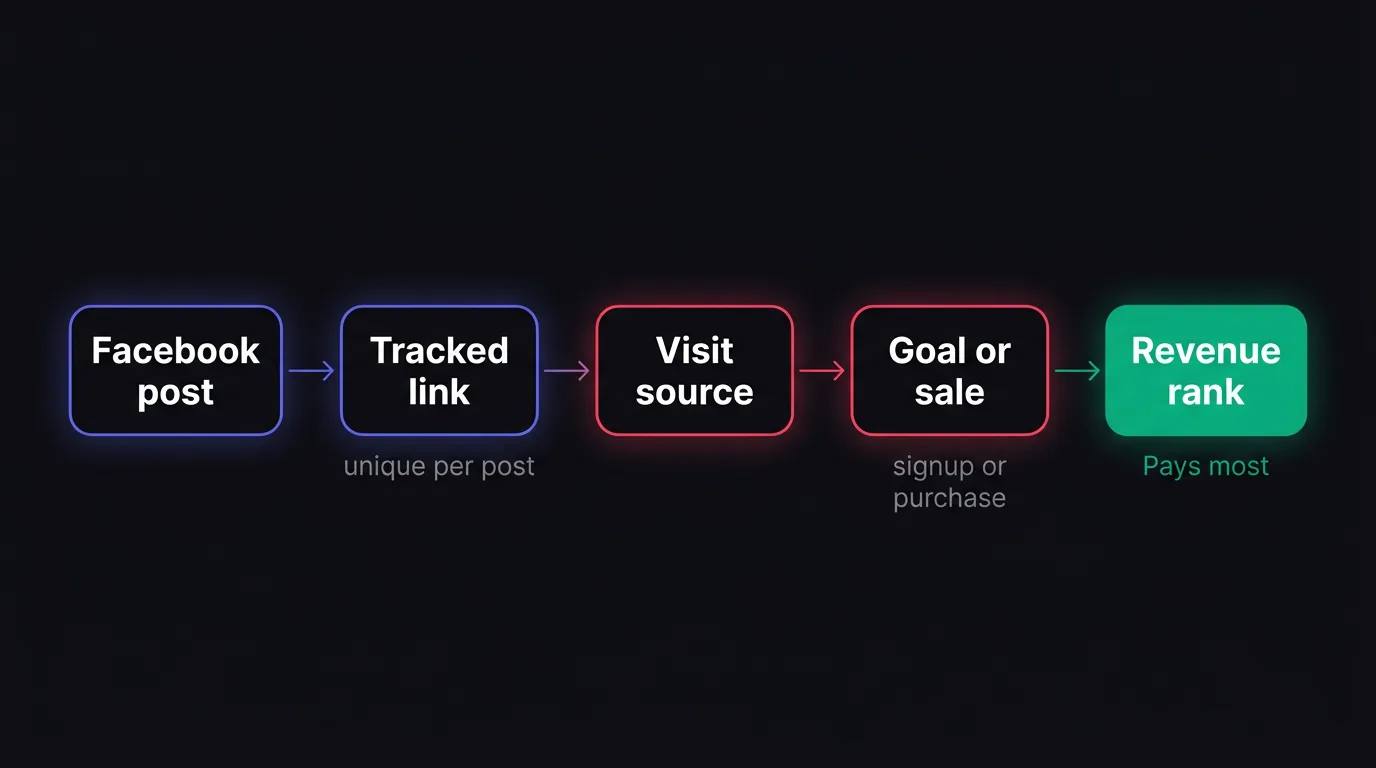
-
Start with the base URL
Use the same landing page for every post. If one post points to/pricingand another points to/pricing, the only thing that should change is the tracking data. -
Set the source and medium
Useutm_source=facebookandutm_medium=social. That keeps Facebook traffic grouped together without mixing it with email, ads, or direct visits. -
Add campaign and content labels
Useutm_campaignfor the offer or theme, such asspring-launch, andutm_contentfor the specific post, such ashook-aorcase-study-post. That gives each post a clear label when you look at revenue later. -
Publish the full tagged URL
Shorten the link if you want, but keep the parameters intact. If the parameters disappear before you share the post, NoirTrack can only guess where the visit came from.
A simple pattern keeps this clean. Use source for the platform, medium for the channel, campaign for the offer, and content for the post. For Facebook, that usually looks like utm_source=facebook&utm_medium=social&utm_campaign=launch&utm_content=post-1.
Example:
https://yoursite.com/pricing?utm_source=facebook&utm_medium=social&utm_campaign=launch&utm_content=post-1
Pick one naming pattern and keep it. If one month uses fb and the next uses facebook, your dashboard splits the same channel into two rows and the comparison gets messy.
A simple naming pattern to use
Use source for the platform, medium for the channel, campaign for the offer, and content for the specific post. That gives you one stable structure for every link, so a February launch and an April retargeting post still sit in the same reporting shape.
Use lowercase with no spaces. spring-launch and Spring Launch count as different values, so consistency matters more than style.
How this compares with untaged links
Untaged links usually fall into Direct or Unknown, which hides the post that made the sale. That means you can see traffic, but not which Facebook post earned it.
| Link type | What you see | What you miss |
|---|---|---|
| Untagged | Visits grouped as Direct or Unknown | The exact post that drove the sale |
| Tagged | Visits grouped by source, medium, campaign, and content | Nothing important for post-level comparison |
Tagged links let you compare post by post instead of treating Facebook as one bucket. That matters when one post is a soft intro and another pushes hard for a purchase.
How do you see which Facebook posts make money in NoirTrack?
NoirTrack shows which Facebook posts make money by matching revenue back to the source and campaign that brought the visitor in. After you connect your payment provider once, the dashboard can rank traffic by revenue instead of stopping at pageviews, and the revenue attribution setup ties each sale to a visitor, source, and campaign. For Facebook posts, tagged links work best because NoirTrack reads the UTM values automatically and groups visits by campaign, so you can compare posts side by side instead of guessing from clicks alone. A link like https://yoursite.com/?utm_source=facebook&utm_medium=social&utm_campaign=launch-post gives you a clean campaign name to filter on later.
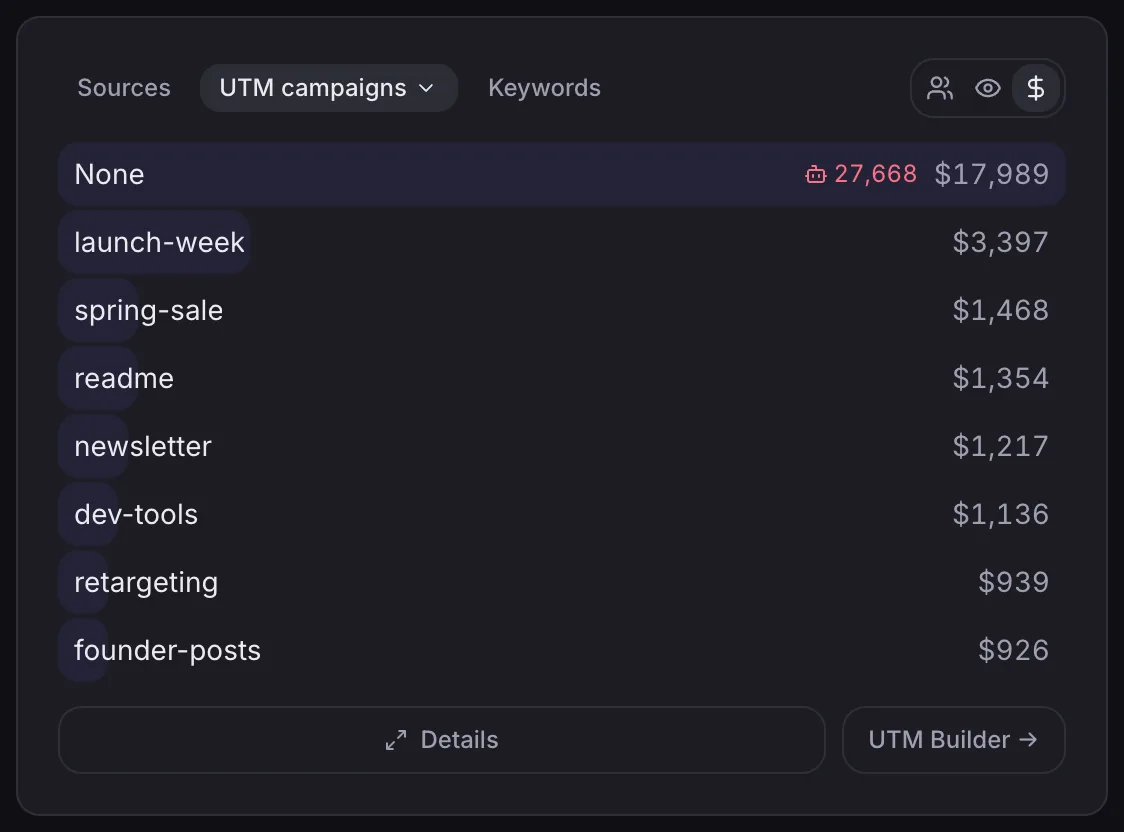
Where to look first
Open the Sources panel first. It gives you a revenue view by channel, so Facebook traffic sits next to every other source you send to the site. From there, switch to the UTM campaigns view when you want to compare individual Facebook posts, because that view breaks the source down by utm_source, utm_medium, utm_campaign, utm_content, and utm_term. If one post brought 120 visits and another brought 18, the revenue column shows which one paid back instead of which one got more attention.
Use the Transactions page when you need to verify a single sale. That view shows the exact purchase with its source attached, which helps when a post looks stronger than expected or when you want to check a specific customer path.
What NoirTrack adds beyond traffic counts
NoirTrack ties visits to verified revenue, so a post with fewer clicks can still outrank a busier post if it brings more paying customers. That matters when the same Facebook page mix includes both organic posts and paid promotion, because raw traffic counts do not tell you which visitors actually bought.
NoirTrack also blocks bots before they reach the numbers, so post comparisons stay cleaner. That keeps a spam burst from making one Facebook post look bigger than it is. When you filter to one campaign and read its revenue, you are looking at traffic that passed the same measurement rules across every post. That gives you a practical way to track which Facebook posts bring paying customers without adding a second spreadsheet on top of the dashboard.
What if one Facebook post drives signups before sales?
Track the signup as a goal, then connect that goal to the later purchase so you can see the full path from post to customer. That matters when a Facebook post starts a lead, free trial, demo request, or waitlist entry first, and the payment comes days or weeks later. Use goals for the first step and revenue attribution for the sale.
How goals help with delayed revenue
A Facebook post can look weak if you only check direct purchases. A post that brings 18 signups and 3 paid accounts still has value, because those 3 customers started with the signup.
- Track the signup event. Fire a goal when someone completes the form, starts a trial, or books a demo. A simple example is
noir('signup')or a button withdata-noir-goal="signup". - Read the conversion rate by post. Once the goal is in place, you can compare posts by signups instead of clicks alone. A post with 500 visits and 25 signups is doing more work than one with 700 visits and 4 signups.
- Match the later purchase. When the same visitor pays later, NoirTrack ties that sale back to the original visit and campaign, so the post still gets credit for the path it started.
That view helps when the buying cycle is longer than one session. A demo request from a Facebook post may become revenue three days later, and a free trial may convert after the user gets your first onboarding email. The goal gives you a measurable step before the payment appears.
When goals are better than purchases
Use goals when the first action you care about is not the sale itself. That includes B2B demos, applications, trials, lead magnets, and waitlists. Use purchase attribution when the post should map straight to cash and the sale happens fast enough to measure inside the same decision window.
| Situation | Best metric |
|---|---|
| Free trial starts before the paid plan | Goal first, then revenue |
| Demo request before a contract closes | Goal first, then revenue |
| Direct checkout with same-session payment | Revenue |
Many teams need both views on the same post. A post that produces 30 signups and 2 purchases may still be the best one, because the signups fill the top of the funnel and the sales finish it later.
What can break Facebook post attribution?
Facebook post attribution breaks when the click path stops carrying the source, when a sale gets counted twice, or when non-buyers distort the visitor mix. If you want to track which Facebook posts bring paying customers, the same link that brought the visit has to survive redirects, the checkout has to match the buyer back to that visit, and noisy traffic has to stay out of the numbers.
Common mistakes to avoid
- Use one generic link for every post. A shared homepage link hides which post did the work. Tag each post separately so the campaign data stays tied to that specific share.
- Strip parameters during redirects or link shorteners. If a redirect removes
utm_source, NoirTrack falls back to unattributed traffic instead of the post you shared. A safe tagged link looks like this:
https://yoursite.com/?utm_source=facebook&utm_medium=social&utm_campaign=spring-sale
- Compare clicks from one post with revenue from another. A post with 200 clicks and a post with 40 clicks are not comparable if one uses UTMs and the other does not, or if one sends buyers through a different checkout path. Use the same tracking setup for both, then compare the revenue column in the dashboard or a filtered view of that campaign.
What to check when numbers look wrong
- Confirm the link still carries UTMs after it loads. Open the final URL in your browser and check that the query string is still there after any redirect chain. If the parameters disappear, the visit cannot stay tied to the post.
- Check that purchases match the same visitor path. NoirTrack links sales back to the visit that led to them, through the checkout visitor id, the success page, or the buyer email, depending on how you set up revenue tracking. If the sale lands in
Direct / Unknown, the path broke somewhere between click and purchase. See /docs/revenue-attribution for the matching order. - Review bot traffic and exclusions before you trust the ranking. If your own team, uptime monitors, or obvious bots are landing on the post URL, they can inflate visits without adding revenue. Filter the report to the campaign, then check whether the traffic looks like real visitors or a pile of repeat hits. Filters and exclusions are covered in /docs/filters.
What is the fastest way to start measuring Facebook posts?
Start with one tracked link for your next post, then connect the purchase or signup path so NoirTrack can tie the click to revenue or a goal. If you want the link setup, see /docs/tracking-parameters; if you want the money side, see /docs/revenue-attribution.
A practical rollout order
- Pick your highest-frequency post type. Use the post you already publish most often, because one pattern gives you a clean comparison set.
- Tag new promos before publish. Add the same source and campaign labels every time, so each post rolls up the same way.
- Check revenue each week. Sort by money, keep the posts that pay, and drop the ones that only bring clicks.
How to make it sustainable
Save one link template for launches, offers, and evergreen posts. Make revenue the default score for every Facebook post, so you track which Facebook posts bring paying customers without rebuilding the setup each time.
Questions, answered.
Tag each Facebook post link with a unique UTM string, then connect those visits to purchases or other goals so you can rank posts by revenue. Use a different source, medium, or campaign value for each post, then keep the rest of the link the same. When your analytics and payment data use the same naming, you can see which post brought the customer, not just the click.
The setup takes a small amount of work: create tracked links, connect your payment provider, and keep the naming consistent. After that, each new post only needs a new URL. The main time sink is the first pass, where you decide on one naming pattern and use it the same way every time.
Click tracking shows interest, but revenue tracking shows which post created customers. A post can get plenty of clicks and still bring no sales. Revenue tracking answers the question that matters for spend and effort: which post paid back.
Using one generic link for every post or losing the UTM parameters before the landing page loads is the most common mistake. That merges every post into one bucket and hides which message worked. Each post needs its own tagged link, and the tags need to survive the full trip to the landing page.
Try NoirTrack
See which traffic actually pays.
Analytics with revenue attribution and a built-in bot firewall. One script tag, live in two minutes.
Free 14-day trial, no credit card
Written by NoirTrack team
The privacy-first Google Analytics alternative with a built-in bot firewall and revenue attribution. See which traffic makes you money, no cookie banner.


