How to Track Which Landing Pages Bring Paying Customers
Learn how to connect landing page visits to purchases, attribute revenue to each page, and spot the pages that actually turn traffic into customers.

NoirTrack team·Follow

Track which landing pages bring paying customers by pairing pageviews with goal completions or revenue, then compare each page's conversion rate and attributed sales. This means linking a landing page to the purchase, signup, or revenue event that follows it. The useful rule is simple: a page matters when you can tie its visits to purchases, not just clicks or sessions. This approach is not enough for offline sales or journeys that switch domains without cross-domain tracking.
Most landing page reports stop at traffic, but traffic alone does not tell you which page sells.
The real answer is to connect each landing page to the purchase, signup, or revenue event that came after it. Once you do that, you can rank pages by conversion rate, revenue, and visitor quality instead of raw visits.
After reading this, you will be able to tell which landing pages bring paying customers and which ones only bring visits.
What should you measure on a landing page?
Measure the first visit, the main conversion event, and the revenue tied to that page. Pageviews tell you whether the page gets traffic. The conversion event tells you whether that traffic does useful work for the business, such as a purchase, trial, or booked call. Revenue tells you whether the page brings in money, which is the number that matters when two pages convert at different rates.
A page with fewer visits can still win if each visitor is worth more. For example, 200 visits and 10 purchases at $80 each produces $800, while 1,000 visits and 15 purchases at $20 each produces $300. The second page gets more clicks. The first page gets more money.
Keep one metric for the page itself across the whole site. If one report uses signups and another uses purchases, the comparison breaks. The clean setup is to pair every page view with one business goal from Goals, then connect that goal to revenue so the same page can be judged by both conversion rate and money.
Which numbers matter most?
Track visits, conversions, conversion rate, and revenue tied to the page. Visits show reach. Conversions show action. Conversion rate shows how well the page turns visitors into buyers or leads. Revenue shows whether those conversions are worth the traffic cost.
If you sell subscriptions, watch first purchase and recurring revenue from the traffic that started on the page. A page that brings in many trial signups but weak paid conversions is a different asset from a page that brings in fewer trials but stronger paid accounts. Use the same goal name and revenue view so the numbers stay aligned.
What counts as a landing page?
Any page that is the first page in a visit counts as a landing page, including a blog post, sales page, or ad destination. A page becomes useful to review when you can tie it to a source, campaign, or goal, because traffic without context only shows volume.
A page that starts a visit from an ad, a newsletter, or a shared link can all sit in the same review set, but each one needs a clear label. If a page is the first step in the visit, it belongs in the landing page set. If it only appears later in the session, it does not tell you where the visit began.
How do you connect landing pages to revenue?
Connect the entry link to the sale, then keep the visit attached to the customer when they buy later. You do that by tagging every incoming link with campaign parameters, defining the action you want to count, and connecting your payment provider so NoirTrack can match the sale back to the visit that started on the landing page. When the customer moves through a longer path, the original landing page should keep the credit. That is the signal you need when you want to track which landing pages bring paying customers.
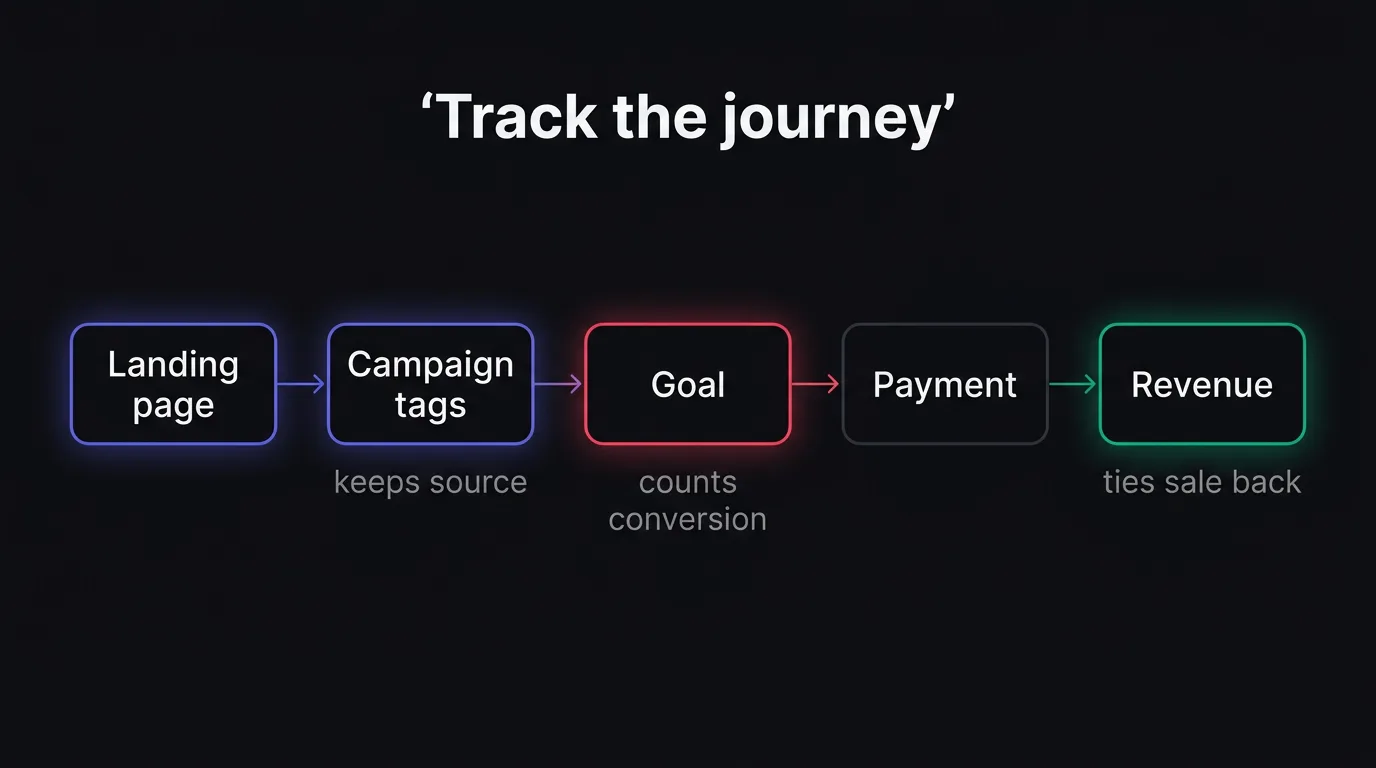
Use campaign tags on every entry link
Add UTM parameters to every link that can bring someone to a landing page. That includes ads, newsletters, social posts, and partner placements. NoirTrack reads those parameters automatically and groups visits by source and campaign, so you can compare pages by where the traffic came from instead of by guesswork. The same page can produce different revenue on X, in email, and through a partner post, and you want to see that split.
A tagged link looks like this:
https://yoursite.com/pricing?utm_source=newsletter&utm_medium=email&utm_campaign=spring_launch
Keep utm_source and utm_medium stable. Change utm_campaign when the promotion changes, and use utm_content when you need to distinguish two versions of the same link. If you want a deeper cut, you can filter the dashboard by campaign and read the revenue attached to each one. See /docs/tracking-parameters for the full parameter list.
Connect goals and revenue
Define the outcome you care about first. A purchase, trial start, or signup can all count as goals, and goals turn raw activity into conversion rates you can read by source, campaign, and revenue. That gives you one view for the lead and the sale, which matters when a page starts with a signup and finishes with a payment days later.
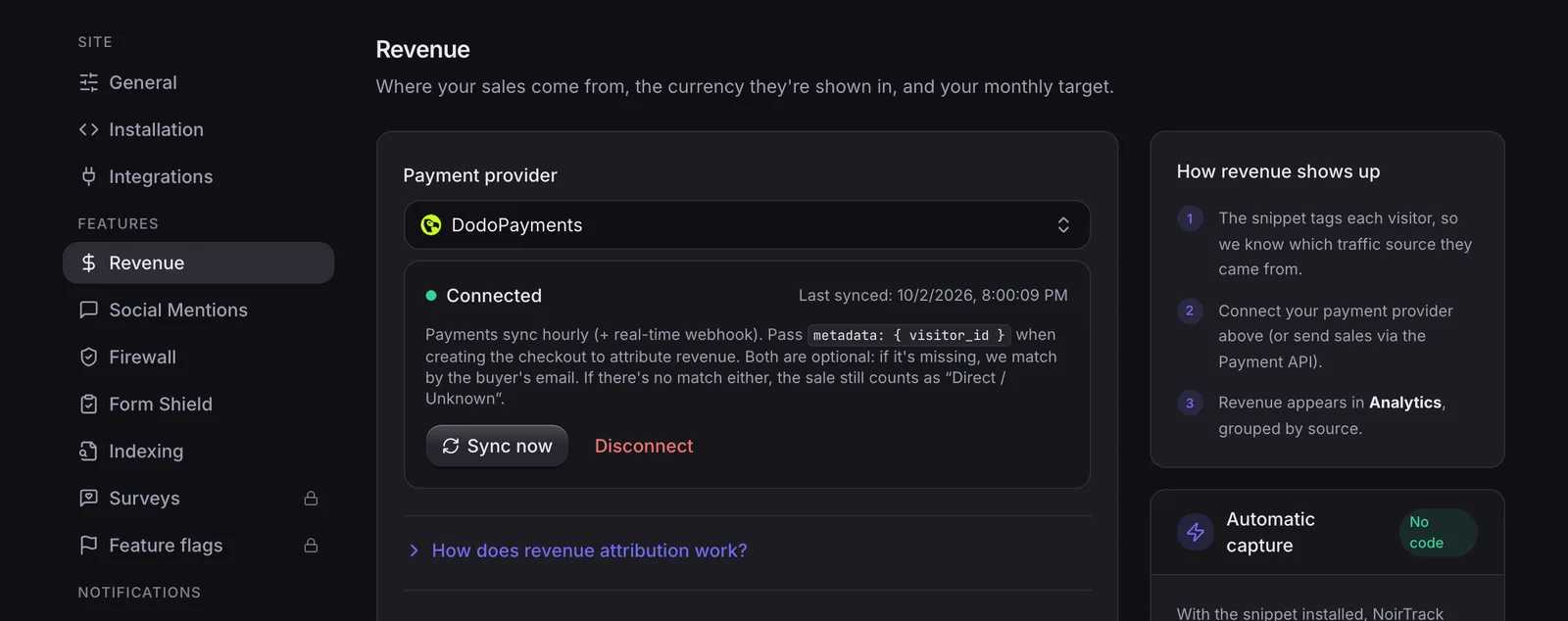
Then connect your payment provider in Site → Settings → Revenue. NoirTrack matches sales back to the visitor in the order described in /docs/revenue-attribution: checkout visitor ID first, then a success page visit, then email match. Once that connection is live, you can see which landing pages generate customers, not just leads.
If you sell through Stripe, Paddle, Polar, Lemon Squeezy, Dodo Payments, or Creem, connect the provider directly. If you send sales from your backend, pass the amount, currency, and visitor ID there instead. The key point is simple: one tagged entry link, one goal, one revenue source, all tied to the same visit.
How can NoirTrack show which pages make money?
NoirTrack shows which pages make money by tying visits, goals, and payments to the same visitor. The Goals view tells you which landing pages convert on the outcome you chose, and the Revenue Attribution report shows which visits turned into paid orders. Put those together and you can compare pages by sales, not by traffic alone. Campaign tags from /docs/tracking-parameters help NoirTrack group each entry link, so a page like /pricing or /summer-offer can be read in the same source and campaign context as the click that brought it in.
What the goals view tells you
The Goals view shows completions and conversion rate for one outcome across the pages you care about. That gives you a clean comparison when every landing page feeds the same goal, such as a signup, checkout start, or purchase.
A simple setup looks like this: you tag the link, set the goal, then read the rate. For example, if two pages each get 200 visits and one gets 18 goal completions while the other gets 8, the first page converts at 9 percent and the second at 4 percent. The number is small, but the gap is clear.
Use the goals panel when you need a quick read on page performance. It shows what happened after the visit without making you piece together pageviews and sales by hand. If you need the goal setup itself, use /docs/goals as the reference.
What the revenue view adds
The Revenue Attribution report adds the payment side. NoirTrack connects a payment provider once, then matches each sale back to the visit that led to it. That lets you see the source and campaign behind a transaction instead of guessing which page helped close it.
The transactions view shows each sale with its source, and the Sources panel can rank campaigns by revenue. That matters when a page gets a lot of clicks but only a few buyers. A page with 1,000 visits and $120 in sales is a different page from one with 140 visits and $480 in sales.
Use the revenue settings in /docs/revenue-attribution when you want to compare pages by money earned, not just conversions. If a page sends buyers through several campaigns, the revenue view shows which ones paid and which ones only filled the top of the funnel.
How do you compare landing pages fairly?
Compare landing pages with the same time range, the same conversion event, and the same traffic source mix when you can. A page with more visits is not better by default. Revenue per visitor and conversion rate tell you whether the page attracts buyers or just fills the top of the funnel.
A fair comparison starts with the same window. Use 7 days against 7 days or 30 days against 30 days, not a holiday week against a quiet one. Use the same goal too, such as a purchase or a signup, so one page is not judged on clicks while another is judged on sales. If one page gets most of its visits from paid search and another gets most of its visits from email, compare them with care because the source mix changes intent.
A simple worked example shows why volume can mislead. Page A gets 1,000 visits, converts at 2%, and brings in $200. Page B gets 400 visits, converts at 3%, and brings in $300. Page B wins because it earns $0.75 per visit versus $0.20 for Page A.
Use the same filter logic every time. You can read more about filters and segments in /docs/filters, and about how sales get tied back to visits in /docs/revenue-attribution.
Use one view for each page
- Filter to one page or campaign. Click the page path or campaign value in the dashboard, or add the filter you want, then keep the view limited to that single slice. NoirTrack updates conversion rate and revenue for that slice at once.
- Read the same numbers for each page. Compare the conversion rate and revenue side by side, with the same date range and goal. If the page drives a purchase goal, keep the purchase view. If it drives a signup goal, keep the signup view.
- Save the slice if you will check it again. Save the filter as a segment so you can reopen the same page view later without rebuilding it.
Look for value, not volume
A page can lose on conversion rate and still win on money. That happens when the page sends fewer visitors who buy higher-priced plans, larger orders, or better-fit customers.
Look at revenue next to conversion rate before you decide to keep, rewrite, or cut a page. If one landing page brings 50 buyers at $10 each and another brings 20 buyers at $40 each, the second page earns $800 and the first earns $500.
That is the split you want when you track which landing pages bring paying customers. The page with fewer clicks can still be the better one if it turns those clicks into more cash.
What is the best way to set this up in practice?
The best setup is to install tracking first, then define the outcomes you care about, then connect payments, and then tag every important entry link so you can track which landing pages bring paying customers. That order gives you a clean path from pageview to goal to sale, and it keeps source data attached to the first visit instead of forcing you to guess later.
If you skip the tags, you still see traffic. You just lose the link between the page that started the visit and the revenue that followed. That is why campaign parameters matter on ads, email links, partner links, and any other link you control. NoirTrack reads those parameters automatically and groups visits by source and campaign, so the dashboard can show which entry pages and campaigns actually pay. See /docs/tracking-parameters and /docs/revenue-attribution.
A simple setup order
-
Install the script. Add the tracking snippet to the site so pageviews and visitor IDs start flowing.
<script defer src="https://noirtrack.com/t.min.js" data-site="YOUR_SITE_KEY"></script> -
Add goals. Create the signup, checkout, or purchase goals that mark progress on the page. If a page goal fits better, use a URL goal for the page you want to watch, such as
/pricing. -
Connect revenue. Link your payment provider in Site → Settings → Revenue so sales can match back to the visitor who made them.
-
Tag entry links. Use UTM parameters on every link you control, then check the sources and campaigns view beside the landing page report. A tagged link like
?utm_source=newsletter&utm_medium=email&utm_campaign=launchkeeps one email send separate from every other source.
When this setup needs extra care
Cross-domain checkout needs extra care because the buyer starts on one host and finishes on another. If the payment flow moves to a different domain, make sure the visitor ID carries through the handoff so the sale can match the original visit.
Single-page apps need extra care for the same reason. If the URL changes without a full reload, the analytics script still needs a pageview signal for each route change, or one landing page can swallow several distinct visits.
After those two cases are handled, the dashboard can separate a real entry page from a later step in the flow, which is the only way the revenue view stays tied to the first page the buyer saw.
What should you do next if one page wins?
Keep the winner and test one change at a time. Use the same goal and revenue view from your goals and revenue tracking setup, then compare revenue per visitor after each test. If the new version earns less, roll it back.
Turn the winner into a template
Reuse the structure, not just the copy. Keep the same section order, offer shape, and CTA placement so each variant keeps the same measurement and you can track which landing pages bring paying customers without mixing in a new setup.
Use the loser to find friction
If a page gets visits but no purchases, check the message, offer, and traffic source together. A mismatch here usually means the page speaks to the wrong intent, or the source sends people who never meant to buy. If spend is sending low-value traffic, cut that source and point it at the page that already converts.
Questions, answered.
The best way to track which landing pages bring paying customers is to measure visits, goals, and attributed revenue on the same page, then rank each landing page by conversion rate and sales, not traffic alone. That shows which pages bring buyers, not just clicks. A page with fewer visits can still win if it turns a larger share of those visits into revenue.
Landing page revenue tracking usually needs an analytics install, one or more goals, campaign tags on links, and a payment connection so sales can be tied back to the visit. That setup gives you the path from first click to purchase. If you skip the payment connection, you can still see visits and goals, but you lose the clean link between a landing page and booked revenue.
Landing page attribution ties visits to purchases, while basic page analytics only shows visits and engagement. Basic analytics can tell you who came, how long they stayed, and which pages they viewed. Attribution shows which landing page helped create revenue, so you can compare pages by sales instead of by pageviews alone.
The most common mistake when comparing landing pages is judging them by raw traffic or last click sales only. Raw traffic favors pages that get more visits, even if they convert poorly. Last click sales hide pages that start the journey but do not get the final click, so you miss the pages that influence buyers earlier.
A landing page can still be good if it brings higher value customers or more recurring revenue. Conversion rate alone does not tell you how much money the page brings in per visitor. A page that converts less often can still beat a higher converting page if each customer spends more or keeps paying longer.
Try NoirTrack
See which traffic actually pays.
Analytics with revenue attribution and a built-in bot firewall. One script tag, live in two minutes.
Free 14-day trial, no credit card
Written by NoirTrack team
The privacy-first Google Analytics alternative with a built-in bot firewall and revenue attribution. See which traffic makes you money, no cookie banner.


