How to Track Which Referrals Drive Paying Customers
Learn how to tag referral links, connect visits to revenue, and see which sources actually turn into customers instead of just traffic.

NoirTrack team·Follow

Track the source of each visit with clean referral and UTM tags, then connect those visits to goals or payments so you can rank sources by revenue. Referral attribution means matching a visit to the signup, purchase, or repeat payment it led to. In practice, one tagged link and one reliable revenue connection is enough to see which referrals pay off. This does not work well when links are untagged, redirects strip parameters, or sales happen in a different system you never sync.
Most referral reports stop at clicks, which makes it easy to overvalue traffic that never buys. The better question is which referrers created signups, purchases, and repeat revenue.
This post shows the simplest way to tag referrals, read revenue by source, and avoid the setup mistakes that hide the winners. After reading, you will be able to spot the referrers that bring paying customers instead of empty traffic.
What counts as a referral that pays?
A referral counts as paid when you can follow one click from a source like a newsletter, partner post, community link, or influencer mention through to a signup, purchase, or recurring customer. Raw referrers only send visits. Paid referrals are the ones that keep their source through the journey and end in money, which is where referral attribution matters.
Referral traffic is not revenue
A referrer can send plenty of people and still produce no buyers. That happens when the audience wants something else, the landing page answers a different question, or the click came from curiosity rather than intent. Sessions alone do not show that difference.
Track the chain as visits, goals, and revenue. Visits tell you that the link was seen. Goals show that a visitor did the step before money. Revenue shows that the visit turned into cash or subscription value. If you stop at sessions, bot traffic and casual clicks can look like wins.
A simple example makes this clear. A Reddit post can drive 500 visits, 12 signups, and 2 paid accounts. The 500 visits are traffic. The 12 signups are the useful middle step. The 2 paid accounts are the only part that proves the referral paid.
The buyer path you need
A referral becomes measurable when the click keeps its source into the visit and then into the payment record. NoirTrack reads UTM parameters automatically, so a tagged link like this stays grouped by source and campaign:
https://yoursite.com/?utm_source=newsletter&utm_medium=email&utm_campaign=launch
That lets you compare one newsletter send against another, or a partner post against an influencer mention, using the same source rules across every channel. Keep the naming stable so each channel competes on the same terms.
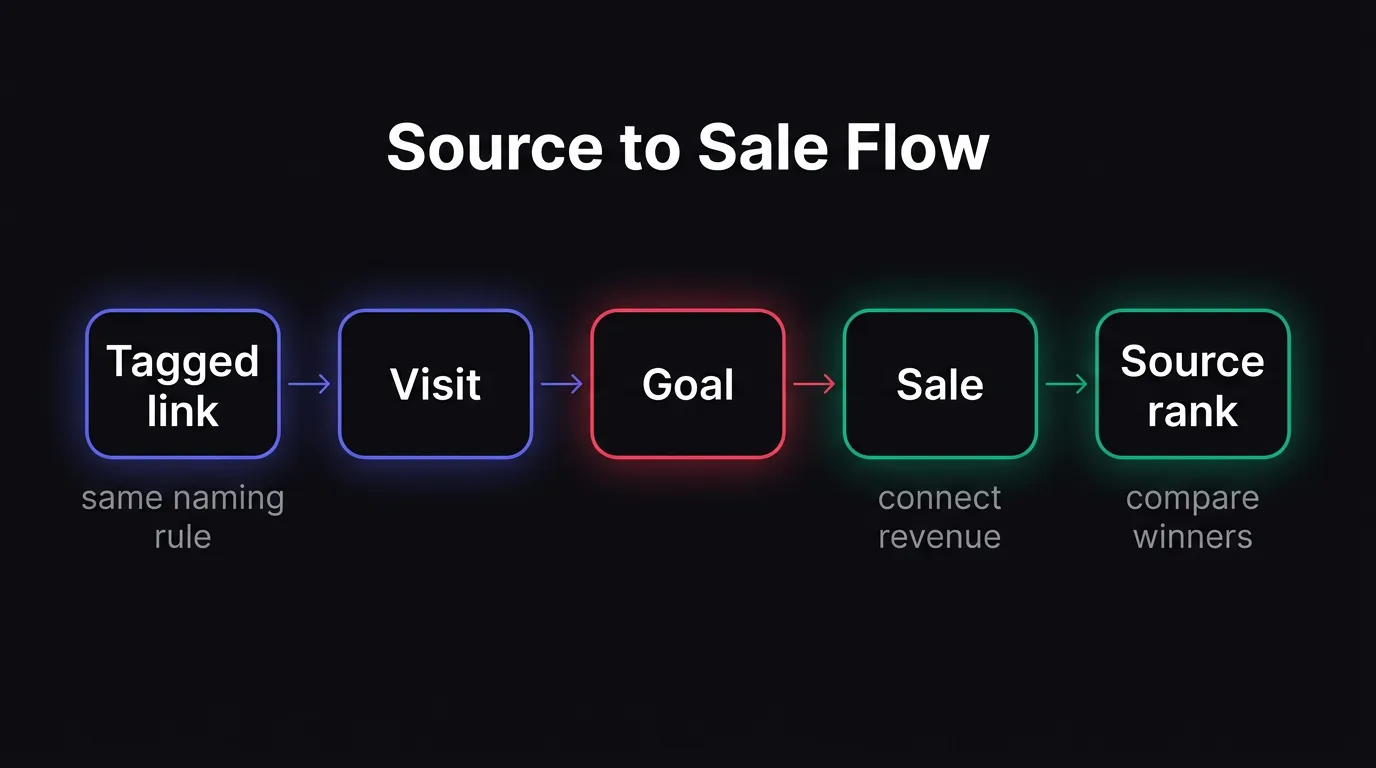
The path is simple: tag the link, record the visit, fire the goal, then match the payment. NoirTrack can group visits by source and campaign from the tag, and pair that with revenue tracking so you can see which source brought the sale. If you want the step before money, use Goals to mark the signup or checkout step.
If any link in that chain breaks, the sale can fall back to Direct or Unknown. That makes the source look weaker than it is, so the first job is to keep the source attached from click to payment.
How do you tag referrals so revenue is traceable?
Tag every shareable link with UTM parameters before you publish it, then keep the same values for the same source, medium, and campaign. NoirTrack reads those parameters automatically in its Campaigns and UTM view, so one partner link, one newsletter issue, or one post can be grouped the same way across visits and sales. That is the base layer for referral attribution.
A clean system matters because small naming differences split one winner into several rows. newsletter, Newsletter, and news-letter look close to you, but they become separate buckets in reporting. Keep the source and medium stable, and vary the campaign only when the promotion itself changes. A link like this keeps the data readable:
https://yoursite.com/?utm_source=partnerA&utm_medium=referral&utm_campaign=launch-week
Use one naming system
Pick one format before you send any links. Use lowercase, no spaces, and the same word for the same thing every time. If a partner sends traffic through five posts, give all five links the same utm_source and utm_medium, then change only utm_campaign when the offer or post changes.
- Choose the source label. Use one label for each partner, newsletter, or channel.
- Keep the medium stable. Use one medium for referral traffic, email, or social, and do not mix them inside the same bucket.
- Name the campaign with the promotion. Use the issue name, post name, or launch name so you can read the result later.
- Check for duplicates before publishing. Two similar labels can make one strong referral look weak.
Compare tagged links in a table
Use a simple table with source, visits, goals, revenue, and notes. Visits show reach, goals show buyer intent, and revenue shows which link paid.
| Source | Visits | Goals | Revenue | Notes |
|---|---|---|---|---|
| partner-a | 140 | 9 | $620 | Best converting guest post |
| newsletter | 480 | 6 | $410 | High traffic, lower buyer rate |
| 90 | 2 | $180 | Good niche thread |
A weekly review keeps weak referrals from running for a month without anyone noticing. The goal is not the row with the most visits. The best row is the one that brings fewer visits but more customers.
Pair the table with revenue tracking so you can rank links by money instead of guessing from clicks.
How do you connect referrals to paying customers in NoirTrack?
Connect revenue once, then NoirTrack matches each sale back to the visitor's source, campaign, and path so you can see which referrals pay. That is the core of referral attribution, and it works after you connect a payment provider or send sales from your backend.
Use a tagged link on the way in, then a revenue source on the way out. NoirTrack reads UTM parameters automatically, groups visits by source and campaign, and pairs that visit data with sales from the revenue setup. A link like https://yoursite.com/?utm_source=x&utm_medium=social&utm_campaign=launch keeps one post separate from another, so a sale from the launch post can land in the same source row as the visit that started it.
If you sell on Stripe, Paddle, Polar, Lemon Squeezy, Dodo Payments, or Creem, connect the provider in Site → Settings → Revenue. If your checkout lives elsewhere, send the sale from your backend with the Payment API or noir.revenue({ amount, currency, visitorId }). For a $49 subscription, that means the visitor who clicked the referral link can later show up with the payment that followed, instead of disappearing into a total revenue number.
Revenue attribution does the heavy lifting
NoirTrack ties sales to source after you connect a payment provider or send sales from your backend. That gives you revenue by source, campaign, and page, not just visit counts.
For subscriptions, you can also watch recurring revenue, churn, and customer value over time. That matters when a referral brings five signups on day one but only two keep paying after the first month.
Goals show the step before money
A referral may not buy right away, so add a goal for the step that proves intent. NoirTrack supports event goals and page goals, which lets you track signups, demo requests, add-to-cart clicks, or a thank-you page.
Create the goal in Docs → Goals or send it from code with noir('signup') when the action happens. Then compare conversion rates by source and campaign. A referral that sends 200 visits and 18 signups gives you a 9 percent signup rate, which is enough to rank it above a source that sends 300 visits and 6 signups, even before the purchases land.
Use the Sources panel and Transactions page to confirm which channels earn money after the goal data shows which ones earn attention.
Where do you read the winners in the dashboard?
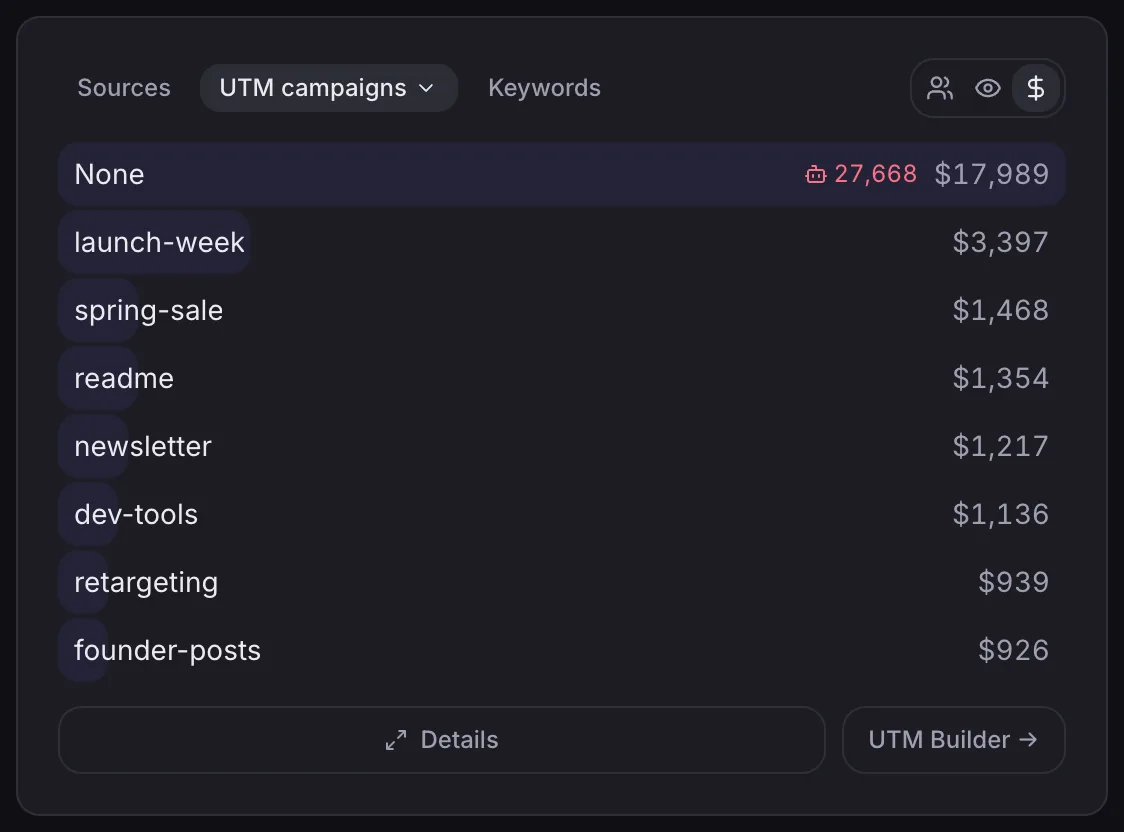
Read the winners in the Sources view first, then open Transactions when you need to confirm the sales behind the total. Sources shows which referral channels brought revenue, and Transactions shows the individual orders behind that number. That gives you a fast ranking and a way to check the numbers before you decide where to send more traffic.
Read source revenue first
Start with the source ranking because it answers the main question fastest. Open the Sources view and sort by revenue, then look for the channels with fewer visits but stronger order value. A source that sends 20 visits and 3 purchases can beat one that sends 500 visits and no sales.
Then drill into Transactions when a source looks promising or surprising. Transactions shows each sale, so you can confirm which source, campaign, or link brought that customer in. That is the clearest way to verify revenue attribution on individual orders.
A simple example makes the pattern obvious. If utm_source=partner-a brings 12 visits, 2 purchases, and $240 in revenue, while utm_source=forum-post brings 90 visits and $90 in revenue, the partner post is the better referral even with less traffic. The source ranking shows that quickly, and Transactions lets you inspect the two purchases behind it.
When you need to trace a tagged referral, keep the link naming consistent. NoirTrack reads UTM parameters automatically and groups visits by source and campaign, so a link like this stays easy to find later:
https://yoursite.com/?utm_source=x&utm_medium=social&utm_campaign=launch
Filter before you compare
A single campaign filter keeps one referral separate from the rest of your traffic. Click the campaign value in the Sources panel or set a filter directly, then read the full dashboard for that slice. The numbers for revenue and conversion rate update together, so you compare one campaign against another on the same footing. See Filters & segments for the exact controls.
Use filters when you want to compare a partner post against a newsletter send or a social mention. Without a filter, broad traffic can hide a small source that pays well. With a filter, the dashboard shows only that source, which makes small differences visible instead of lost in the total.
That is the simplest way to read referral attribution in practice. Rank by revenue first, then filter before you compare.
What is the best next step to start measuring referrals?
Start with one channel, one campaign name, and one revenue source, then track the next 10 links you publish with a single rule from /docs/tracking-parameters and one goal or payment stream from /docs/revenue-attribution. This gives you a clean first pass at referral attribution without guessing which clicks paid.
A simple weekly process
- Choose one referral source to test.
- Tag every link with the same campaign rule.
- Check goals and revenue after traffic arrives.
- Keep only the sources that lead to buyers.
When to expand the setup
Add another source only after the first source reads cleanly and you can explain the numbers in one minute. If your sales stack is custom, send sales from the backend so the match stays exact. Once that works, use /docs/filters to watch the channels that matter most.
Questions, answered.
Referral attribution in analytics links a visit or sale back to the source that sent it. That lets you measure which referrals turn into customers and revenue, not just clicks. A blog link, partner mention, directory listing, or affiliate placement can all count as referral sources. The key is keeping the source attached long enough to connect the visit to the purchase or signup.
Tracking referral revenue usually takes one tagging rule for links and one revenue connection to start. The main work is keeping names consistent and making sure your sales source sends data reliably. If one partner is tagged as partner a in one place and Partner A in another, reports split the same source into separate rows. Clean naming and stable revenue syncs do most of the work.
Referral tracking ties visits to goals or purchases, while generic traffic reports show visits alone. That lets you compare sources by conversion and revenue instead of by volume only. A source with 200 visits and 0 sales looks strong in a traffic report and weak in a referral report. A source with 20 visits and 5 customers shows the opposite pattern.
The most common mistake when tracking referrals is using untagged or inconsistent links. That splits one source into many rows or drops the visit into Direct or Unknown. Redirects can hide the original source, and missing revenue syncs can break the link between a visit and a sale. Both problems make the same referral look smaller than it is.
Cookies are not always required to see which referrals pay. You need a reliable way to keep the source attached to the visitor and the sale, but the exact method depends on your setup and privacy requirements. Some setups use link tags, stored identifiers, or server side order data instead of browser cookies. The goal stays the same: keep the original source connected to the purchase.
Try NoirTrack
See which traffic actually pays.
Analytics with revenue attribution and a built-in bot firewall. One script tag, live in two minutes.
Free 14-day trial, no credit card
Written by NoirTrack team
The privacy-first Google Analytics alternative with a built-in bot firewall and revenue attribution. See which traffic makes you money, no cookie banner.


